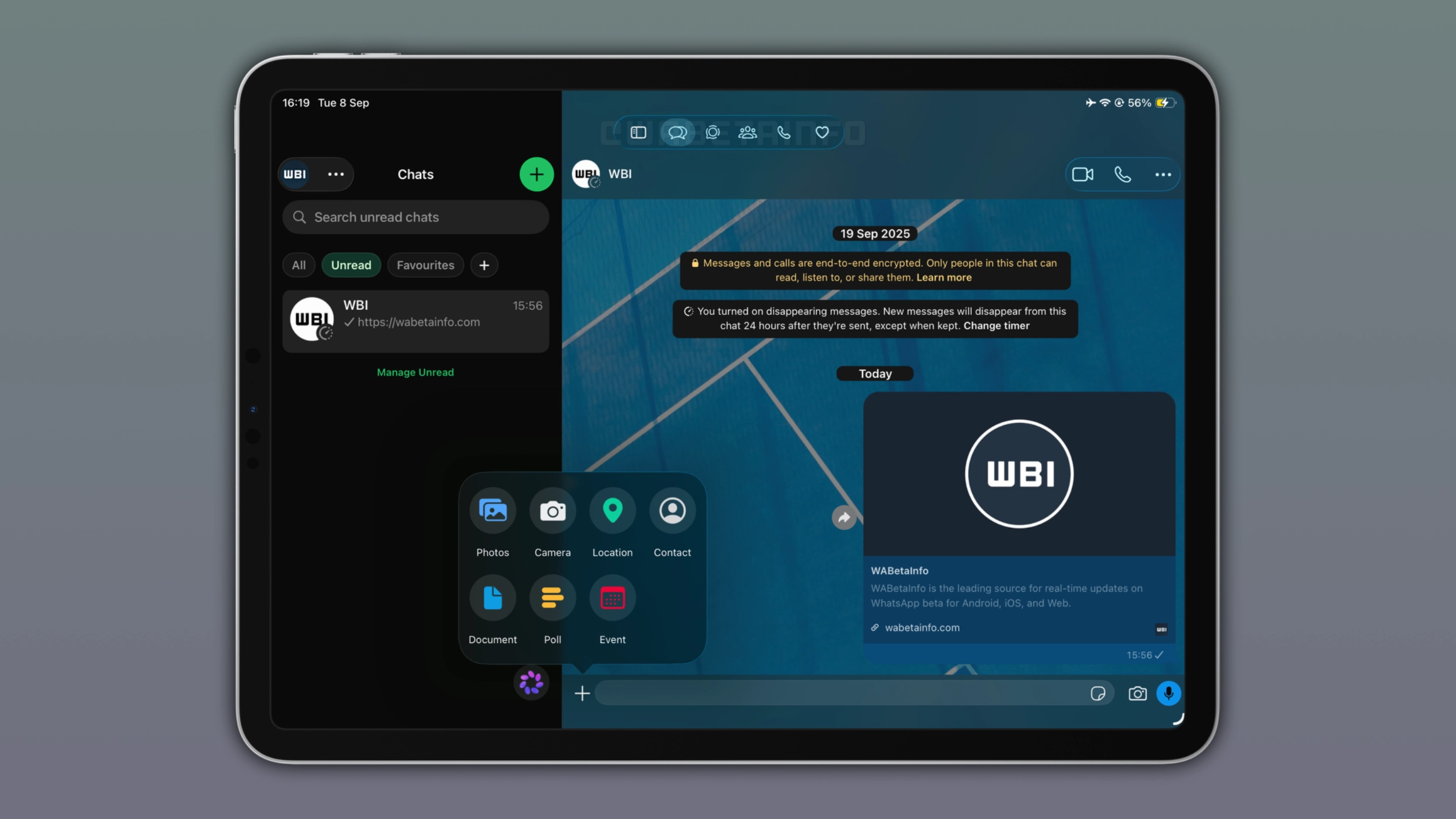
WhatsApp is rolling out a Mac-style sidebar for iPad, making it easier for users to navigate the app. The update replaces the tab bar at the bottom of the screen with a vertical navigation panel on the left. The new layout looks good on a larger screen and, and it is fully compatible with Liquid Glass.
| Key points | Details |
|---|---|
| Feature: | Mac-style navigation sidebar for iPad |
| Feature availability: | Some features may be under development, so they are not available to beta testers. Others may become available to users over time. If you're unable to access a certain feature, you will need to wait for a future update. |
| News shared last week: | WhatsApp launches message menu compatible with Liquid Glass! |
| Previous article: | WhatsApp is rolling out 2x video playback for status updates! |
Weekly WhatsApp beta updates: new features and improvements
This new weekly roundup brings together all the latest updates about WhatsApp beta shared this week. As a result, you can finally catch up on everything you might have missed from our past announcements. You can consider this summary as a way to keep up new features, improvements, and fixes. This week's highlight focuses on the new sidebar on WhatsApp for iPad. See what else we announced this week.
WhatsApp is testing guest calls for people without an account
WhatsApp is testing a feature that lets users without an account join calls through a link. With this feature, the host will be able to create a call link from the Calls tab. Once users share the link with the recipient, they can open the link even if they do not have an account. Before joining the call, the host will have to approve the request manually. Unlike participants with a WhatsApp account, guests cannot join a call automatically. This is not an optional setting, but it is a fixed rule that applies to all participants who join without an account.
WhatsApp is rolling out a redesigned navigation interface for iPad
WhatsApp is bringing the same sidebar from the Mac app to iPad, making it easier for users to navigate the interface on a larger screen. The sidebar allows users to open Chats, Updates, Communities, Calls, and Meta AI. WhatsApp is also introducing a "More" section for more entry points right within the sidebar. This section lets users easily access Locked, Archived, Starred, Status, and Favourites.
How to hide and show the sidebar on WhatsApp for iPad
The sidebar is visible by default when users open WhatsApp on iPad. Users who want to focus on the conversation can hide it by tapping the button at the top right of the sidebar interface. When users hide the sidebar, WhatsApp presents the tab bar at the top of the screen. The sidebar adopts the same Liquid Glass design available on iPhone and Mac. For users on iOS 18 and lower, WhatsApp is rolling out the sidebar without the Liquid Glass effect.
WhatsApp is widely rolling out the full Liquid Glass experience
WhatsApp is finally bringing the full Liquid Glass experience to the chat screen for more iOS users. The update introduces a consistent design to the chat bar, navigation bar, and message menu. In addition, WhatsApp is introducing a new design for message bubbles, as they have more rounded corners now. The update also extends to WhatsApp Business, making both versions of the app consistent with the new design.
What changes with the full Liquid Glass experience
The chat bar floats above the conversation with a translucent, glass-like background that reflects and refracts whatever is behind it. At the top of the chat screen, the navigation bar is now transparent. The bar lets the wallpaper and messages faintly show through, with a subtle fade effect that keeps the content legible. When users tap and hold a message, the reaction tray and the context menu now appear with the same translucent, glass-like background.
WhatsApp is rolling out longer music clips for status updates
WhatsApp is bringing longer music clips to status updates on both Android and iOS. With this feature, users finally have more control over how much of a song they can share in their status updates. WhatsApp is introducing a new picker that lets users choose how long the music plays in their status update, up to a maximum of 30 seconds. After selecting a song from the music catalog, users can see a clip duration picker in the music editor.
WhatsApp ends support for older Android versions today
Starting September 8, 2026, WhatsApp no longer works on devices with Android 5.0 or Android 5.1. The new minimum requirement is Android 6.0 Marshmallow. Users on Android 5.0 or 5.1 can check whether their device supports Android 6.0 or newer. In case the system update is not available, they need to switch to a new device that supports Android 6.0 or a more recent version. The end of support for Android 5.0 and 5.1 applies to both WhatsApp Messenger and WhatsApp Business, since both apps share the same underlying code.
WhatsApp is rolling out media thumbnail previews in the chat list
WhatsApp is bringing media thumbnail previews to the iOS app. The feature shows a small preview of photos, videos, and stickers directly in the chat list. But only when they are the latest message shared in the conversation. The thumbnail appears next to the media label, making it easier for users to identify the message type. Note that WhatsApp does not limit the new thumbnail feature to photos and videos, as the update also introduces the preview for stickers in the chat list.
WhatsApp is testing a new Restricted Chat feature on Android
WhatsApp is working on an upgrade to Advanced Chat Privacy called Restricted Chat. When this option is active, users will be able to access a restricted conversation only on the primary phone. This means that WhatsApp will not sync restricted chats to linked devices, so they cannot appear on WhatsApp Web or other mobile devices. Restricted Chat does not replace protections already offered by Advanced Chat Privacy. It builds on them to add a new layer of control on top.
WhatsApp introduces a new hub to create and manage events
WhatsApp is rolling out a new Events section in the app settings. In this section, WhatsApp shows every event the user has created or been invited to. This makes it easier for users to find everything without opening their chats. Users who want to create a new event can open the hub and tap "Create event", where they can enter a name, a description, and more. The guest doesn't need to have an account to accept the invitation, as WhatsApp generates a link that anyone can open, even those without an account.
WhatsApp is rolling out 2x video playback for status updates
With the WhatsApp beta for iOS 26.36.10.70 update, WhatsApp is introducing a feature that lets users view status updates at double speed. To view a status at double speed, users need to view the update and press and hold the right side of the screen. When they lift their finger, the playback goes back to normal speed. People who use Instagram, TikTok, and YouTube will recognize this new gesture immediately, as these platforms use the same gesture to speed up video playback.
Connect with WABetaInfo
Follow WABetaInfo on X and visit our About page to learn more about what we do. We always appreciate your feedback on posts like this one.