WhatsApp is introducing a cleaner design for the backup screen on Android and iOS. The main backup page shows the most important information, and other settings are available in a separate screen. The new interface makes it easier for users to back up their chat history without any distractions.
| Key Points | Details |
|---|---|
| Feature: | Redesigned chat backup screen |
| Status: | Rolling out |
| Availability info: | This feature is available to some users, and it's rolling out to more people over the coming weeks. |
| Thanks: | Sc, kingcyrious, shw_9876, flakoflow, Muhammad Hammad, Youssef Salem, and Federico Trevisani, for testing and reporting. |
| Previous news: | WhatsApp is testing a new settings design on Android! |
WhatsApp was working on a feature to manage chat backups on Android
In the post about the WhatsApp beta for Android 2.26.24.4 update, we announced that WhatsApp was developing a new section to manage their previous backups. The feature would let users review their existing backups and delete old or duplicate ones. This would make it easier for users to free up storage space. WhatsApp was also working on new shortcuts to manage Google Drive storage from the system settings.
WhatsApp brings a redesigned chat backup screen to Android and iOS
With the latest updates, WhatsApp is redesigning the interface for the chat backup screen on both Android and iOS. The new design separates the main backup screen from other options, making the experience cleaner and more immediate. The main screen focuses on the backup status and the option to start a backup manually. Instead, everything else is available in a secondary screen. WhatsApp is rolling out the new interface gradually to some users on both platforms.
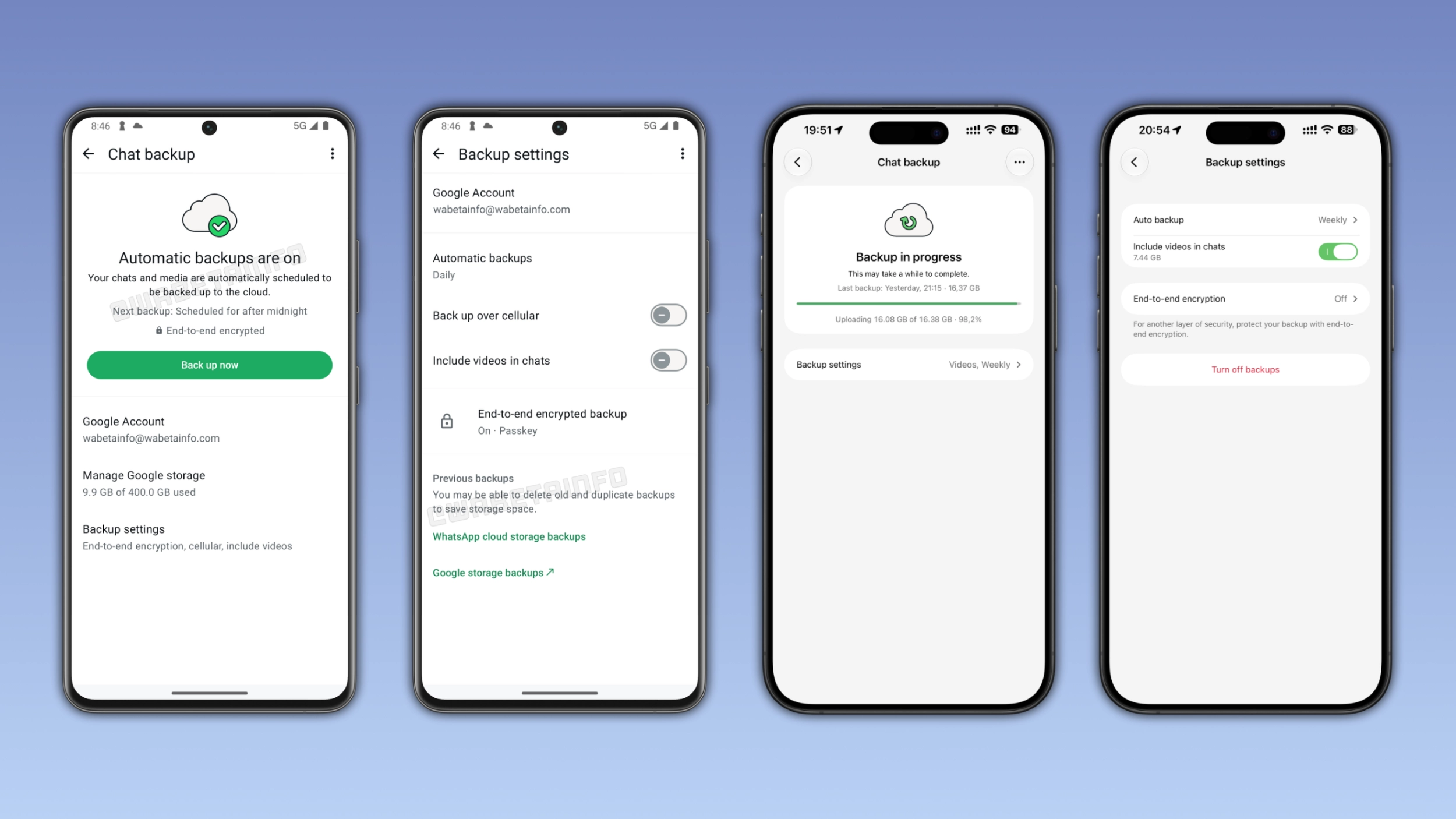
What the new chat backup screen looks like
The main backup screen shows information about the backup status. For example, the screen immediately confirms that automatic backups are active. It shows when the app scheduled the next backup, and it confirms that the backup is end-to-end encrypted. With this redesign, users can still back up their chat history manually. At the bottom of the screen, WhatsApp added an entry point to open the secondary screen where users can manage other options.
WhatsApp keeps backup settings in a secondary page
WhatsApp displays more settings in a separate screen instead of showing everything in the same page. Users on both platforms can see the auto backup frequency, the option to back up videos, and they can enable end-to-end encryption. Android users can see the Google account linked to their backups and some shortcuts to manage them. WhatsApp is also introducing a feature that lets iOS users turn off their backups on iCloud.
How to manage previous backups on Android
The Backup settings screen on Android also includes a new section called "Previous backups". With this feature, users may be able to delete old and duplicate backups to save storage space. To review their previous backups, users can select the shortcut to manage Google storage backups. In the same screen, WhatsApp also mentions the ability to back up the chat history using the WhatsApp cloud storage. This feature is still in a very early testing phase, so we will cover it in a separate post when it becomes available to more users.
Why the new design is easier to use
The previous backup screen showed the backup status and other options in the same screen. Users who wanted to check their backup or start a new one could get distracted by other settings they did not need. The new design shows the backup status and the button to backup the chat history in the main page. Users who want to adjust their settings can open the secondary screen, and they will no longer see them when they open the main backup section.
WhatsApp is rolling out the redesigned backup screen on Android and iOS
The new interface is available to some beta testers on Android and iOS. It is also available to select users on the latest stable version of the app. WhatsApp is rolling it out gradually, so the new design may not be available immediately. If you still see the old design, WhatsApp will update it over the coming weeks. WhatsApp has not announced when it will be available to everyone.
Connect with WABetaInfo
Follow WABetaInfo on X and visit our About page to learn more about what we do. We always appreciate your feedback on posts like this one.