WhatsApp is testing guest calls for people without an account
WhatsApp will extend the call link feature to let people call others even if they do not have an account. Users will be able to join through a secure web link, and they do not need to install the app or create a new account. WhatsApp will let the host approve every guest before they can join the call.
| Key Points | Details |
|---|---|
| Feature: | Guest calls for people without a WhatsApp account |
| Status: | Under development |
| Availability info: | This feature is currently in development and not yet available for testing. |
| Thanks: | Sc, for testing and reporting. |
| Previous news: | WhatsApp launches message menu compatible with Liquid Glass! |
WhatsApp rolled out guest chats for people without an account
In the post about the WhatsApp beta for Android 2.25.22.13 update, we announced guest chats. This feature allows users to invite people without a WhatsApp account into a conversation. The guest receives a link, opens it in their browser, and joins the chat without downloading the app. WhatsApp Web generates a unique identifier for the session. WhatsApp uses this identifier to create the encryption key that makes the conversation end-to-end encrypted. The same technology that protects regular messages on WhatsApp applies to these special chats, even though the guest doesn't have an account.
WhatsApp is developing guest calls on the web
Guest chats open the door to people without a WhatsApp account, but the feature only covered text conversations. WhatsApp already supports call links for users with an account, but they require both sides to have the app installed. WhatsApp is finally working on changing this requirement. In particular, WhatsApp is testing a feature that lets users without an account join calls through a link. This will use the same technology that powers guest chats. With guest calls, the guest opens the link in their browser and enters the call without creating an account.
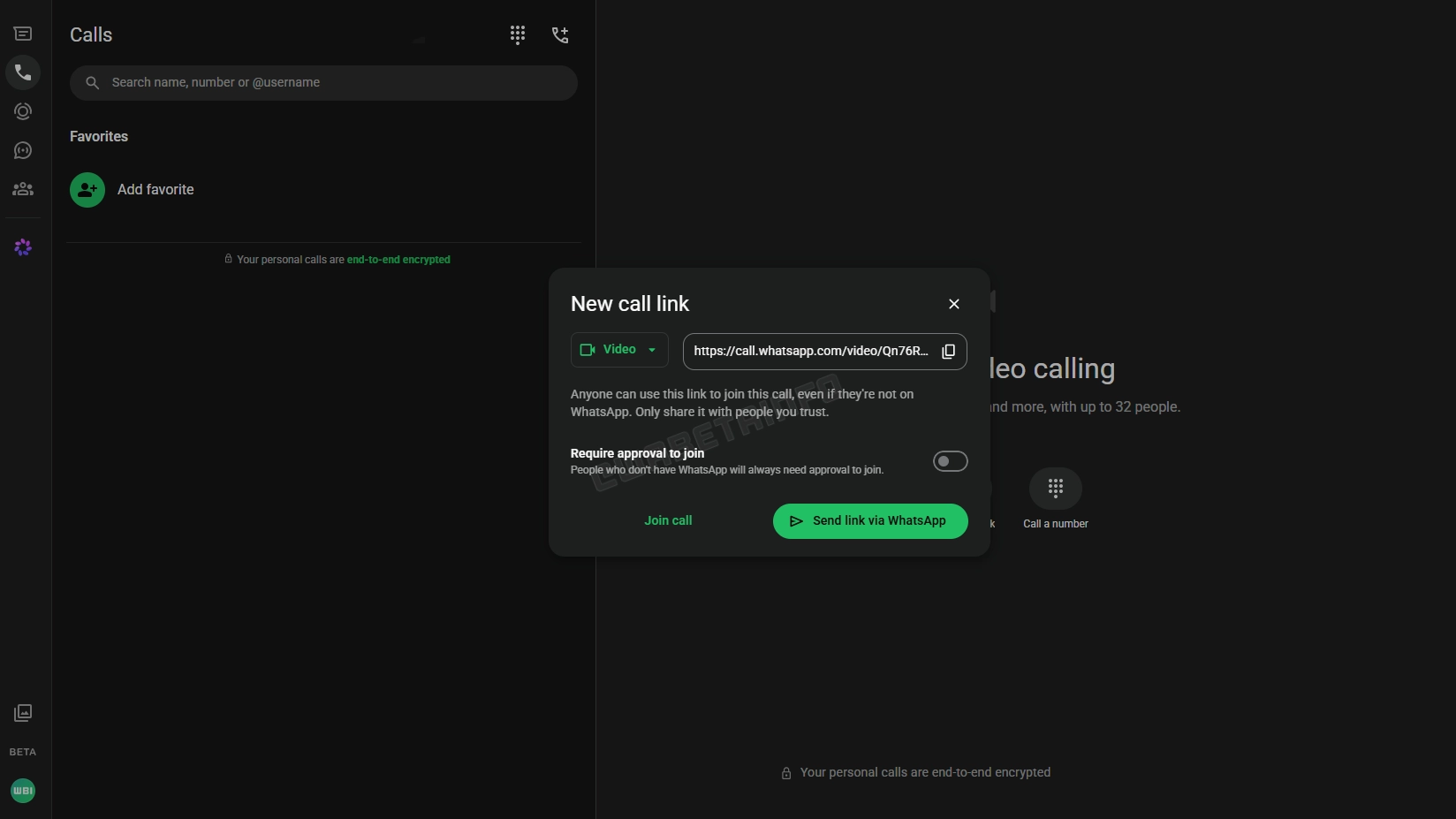
How guest calls work for people without WhatsApp
With this feature, the host will be able to create a call link from the Calls tab. Here, they can choose the call type and copy its link. Once users share the link with the recipient, they can open the link even if they do not have an account. In this case, it will be possible to join the call using a browser. This means that users will be able to continue as a guest rather than downloading the app. The link will present the call interface on WhatsApp Web, where the guest can join the conversation. Before entering the call, the host will have to approve the request manually. Note that this step won't be optional for people without an account.
Guest calls are end-to-end encrypted
For guest calls, WhatsApp will adopt the same security method used for standard calls. When a guest opens the call link in their browser, WhatsApp Web will generate a unique identifier for their session. WhatsApp uses it to create the encryption key that protects the call. This means that the call content is encrypted by default, and WhatsApp cannot access the conversation. As a result, WhatsApp does not need an account to generate the key since the browser session is enough.
Why WhatsApp always requires approval for guest callers
Unlike participants with a WhatsApp account, guests cannot join a call automatically. WhatsApp requires the host to approve every guest request before they can enter. This is not an optional setting, but it is a fixed rule that applies to all participants who join without an account. Since WhatsApp cannot verify the identity of the person who opens it, anyone with the link could try to join. This step will make it easier for the host to decide who can join the call.
How guest calls differ from guest chats
Guest chats and guest calls share the same underlying technology. A guest chat is asynchronous: the guest and the host can read and reply to messages at different times, and the conversation persists for up to 10 days of inactivity. Instead, a guest call is real-time: once the call ends, the conversation is over. Guest calls are also more immediate since users can communicate in real time without waiting for a reply. For users who need to contact someone quickly, a guest call is the most appropriate option.
The host keeps full control throughout the guest call
During a guest call, the host keeps the same level of control they have in any other call. The host can approve or reject incoming join requests from guests at any time during the call. If a guest causes problems, the host can remove them and they will not be able to rejoin. The host can also end the call for all participants whenever they choose. This is very important for guest calls, since the participants may include people the host does not know personally.
WhatsApp is developing guest calls for a future update
WhatsApp is currently working on this feature for a future update. Even if users join the beta program, they won't be able to test this feature since is in under development. We expect WhatsApp to release this feature in the future. At the moment, WhatsApp has not shared an official timeline for the public release.
Connect with WABetaInfo
Follow WABetaInfo on X and visit our About page to learn more about what we do. We always appreciate your feedback on posts like this one.