WhatsApp is testing a new settings design on Android
WhatsApp is finally working on a new look with a redesigned list style for the app settings. The new design groups options into sections with rounded corners, making the interface more modern than before. After the bottom navigation bar, this is another design update WhatsApp is working on for the Android app.
| Key Points | Details |
|---|---|
| Feature: | New settings design |
| Status: | Under development |
| Availability info: | This feature is currently in development and not yet available for beta testing. |
| Previous news: | WhatsApp is testing a new media hub for the iOS app! |
WhatsApp is refining the Android interface
In the post about the WhatsApp beta for Android 2.26.41.6 update, we announced a dynamic bottom navigation bar. When users scroll down, the bar shrinks into a compact pill. WhatsApp will restore its full size when users scroll back up. Note that WhatsApp is still refining the bottom navigation bar since the final version is not ready yet.
WhatsApp is now testing a new design for the settings
WhatsApp is working on a new update that changes how the app displays the settings page. Instead of a flat layout, WhatsApp will group items into sections with rounded corners. With this interface, WhatsApp is adopting the Material Design 3 Expressive segmented list pattern for a more structured appearance. We discovered this with the WhatsApp beta for Android 2.26.43.3 update, available on the Google Play Store. Specifically, WhatsApp is testing a segmented list design for the settings pages. This update will make the app more consistent with Material Design 3.
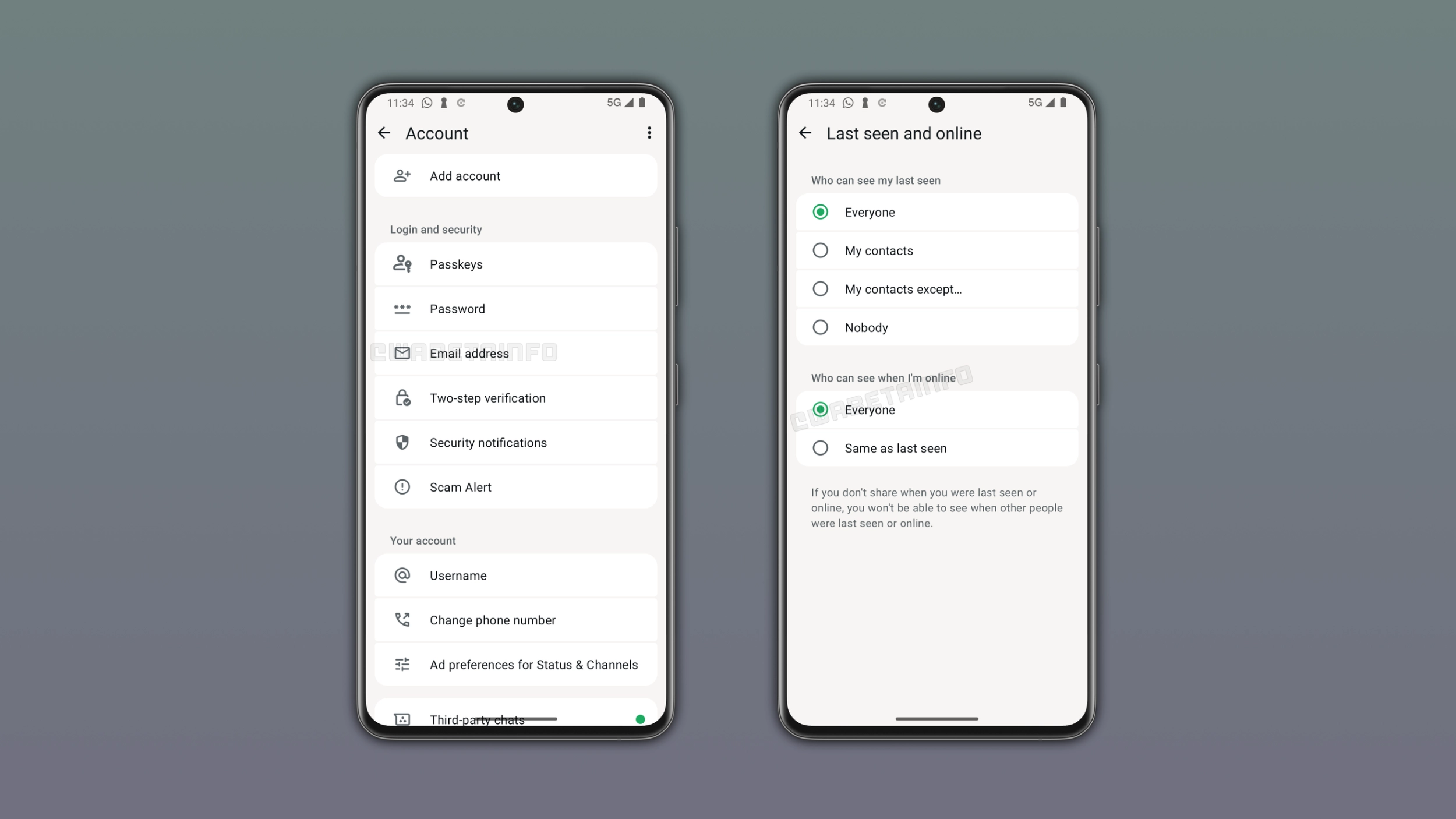
What the new settings design looks like
With the new design, WhatsApp will show settings items within the same section grouped within a rounded container. The first item in a section has more rounded corners at the top, and the last item has more rounded corners at the bottom. Other items have smaller corners on the sides that touch their adjacent options. This gives them a card-like appearance to make it clearer that sections are now separate.
What the Material Design 3 Expressive segmented list style is
The segmented list is a component from the Material Design 3 Expressive. It is Google's design system for Android apps, and it defines how components like lists, buttons, and app bars should look. It introduces dynamically rounded corners to list items, where the curvature changes based on the position of the item within its group. This makes sections look like a pill, making the interface more modern.
How the new style applies to all settings sections
WhatsApp is not limiting the new segmented list style to specific settings. WhatsApp will apply this style to the entire settings interface. This means that every section will adopt the same style. This includes Account settings, Privacy, Notifications, and every other settings page in the app. With this update, WhatsApp will make the application consistent with the new style in every section.
Why this change fits into WhatsApp's broader interface work
WhatsApp is working on bringing a new interface to multiple elements of the app. In the future, WhatsApp will introduce a refreshed bottom navigation bar with a new floating design. WhatsApp is also planning to introduce a new design for the chat bar. By following Material Design 3 Expressive guidelines, WhatsApp will also make the settings look consistent with other apps. Together, these update will make the app interface more modern.
WhatsApp is developing the new settings design for a future Android update
The new settings design is currently under development on Android. Since it's in development, the new interface is not available yet. WhatsApp will release it to the public in a future update. However, WhatsApp has not announced when this update will be available.
Connect with WABetaInfo
Follow WABetaInfo on X and visit our About page to learn more about what we do. We always appreciate your feedback on posts like this one.