WhatsApp is rolling out a redesigned navigation interface for iPad
WhatsApp is bringing the same sidebar from the Mac app to iPad, making it easier for users to navigate the interface on a larger screen. The sidebar is visible by default, but users can hide it at any time to give more space to the conversation. This update is also compatible with the Liquid Glass design language.
| Key Points | Details |
|---|---|
| Feature: | New sidebar design for iPad |
| Status: | Rolling out |
| Compatibility: | WhatsApp beta for iOS 26.36.10.17 is a compatible update. |
| Availability info: | This feature is available to some users, and it is rolling out to more people over the coming weeks. |
| Thanks: | Joy, IgnacioAF, 2gigabitguru, and caesarali, for testing and reporting. |
| Previous news: | WhatsApp is rolling out media thumbnail previews in the chat list! |
WhatsApp introduces the Liquid Glass design on the iPad app
In the post about the WhatsApp beta for iOS 26.25.10.74 update, we announced the Liquid Glass design for the iPad app. The update brings the same translucent, glass-like interface already available on iPhone to the iPad version of the app. This makes the chat bar, buttons, and the message menu compatible with the Liquid Glass style. At the time, the tab structure of the iPad app was similar to the iPhone version, where users can navigate through tabs at the bottom of the screen.
WhatsApp launches a new sidebar for iPad
WhatsApp is now taking the iPad interface one step further. The tab bar at the bottom of the screen is not the most natural way to navigate an app on a large display. But now, WhatsApp is addressing this issue by introducing a new sidebar. The sidebar brings a layout that makes more sense on iPad, since the larger screen does not need to place the tab bar at the bottom of the interface. We discovered this feature with the WhatsApp beta for iOS 26.36.10.17 update, which is available on TestFlight. Specifically, WhatsApp is rolling out a new sidebar for iPad that mirrors the one already available on Mac. This makes it easier for users to switch between different sections on a larger screen.
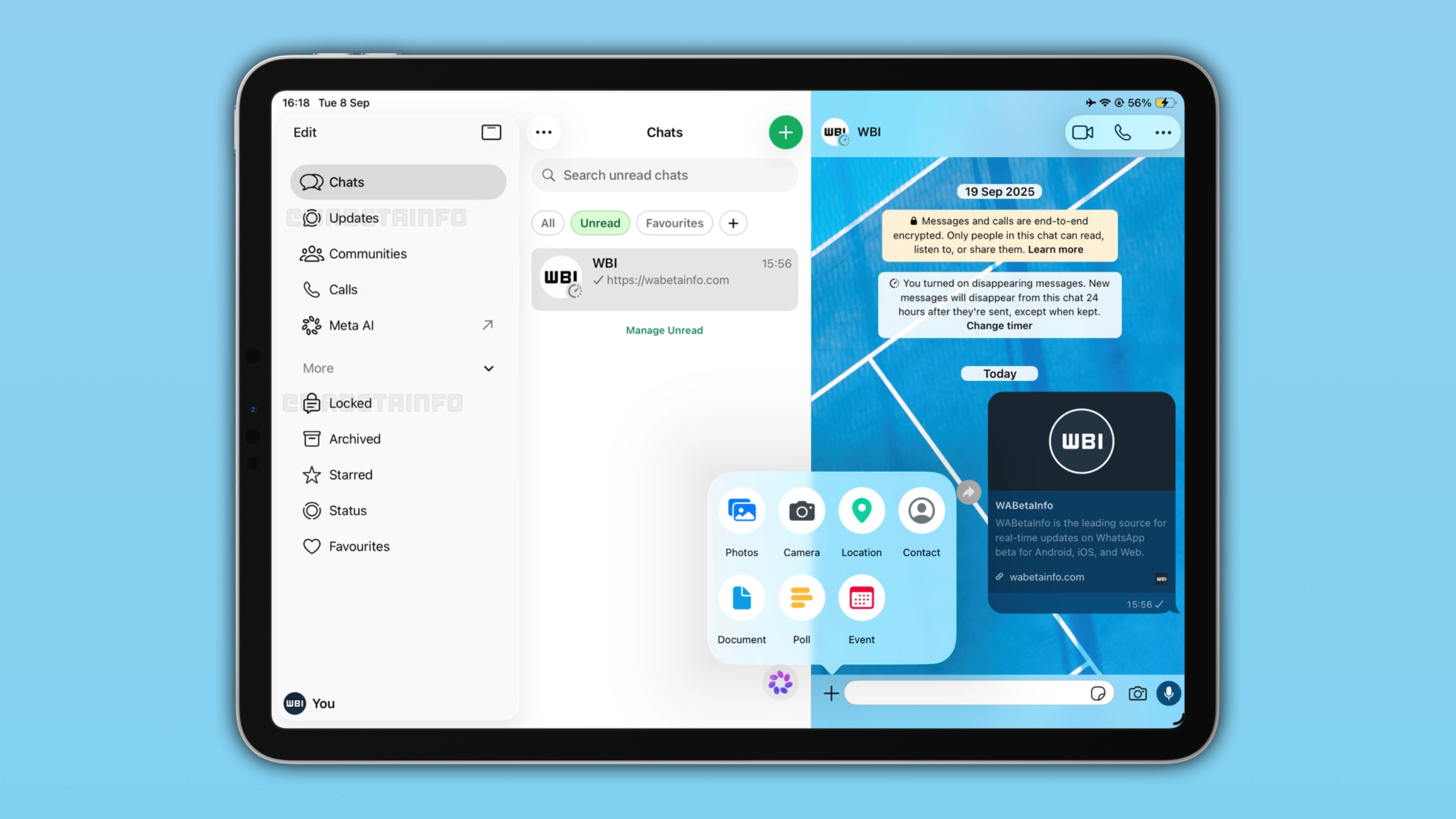
The sidebar looks and works exactly like the Mac version
With the WhatsApp for Mac 26.27.73 update, WhatsApp introduced the same sidebar layout now available on iPad. The sidebar allows users to open Chats, Updates, Communities, Calls, and Meta AI. WhatsApp is also introducing a "More" section for more entry points. With this section, WhatsApp is bringing Locked, Archived, Starred, Status, and Favourites directly to the sidebar. The profile icon at the bottom of the sidebar allows users to quickly access the settings page.
How to hide and show the sidebar on WhatsApp for iPad
The sidebar is visible by default when users open WhatsApp on iPad. Users who want to focus on the conversation can hide it by tapping the button at the top right of the sidebar interface. When users hide the sidebar, WhatsApp presents the tab bar at the top of the screen. It gives users access to the same sections without the sidebar taking up space on the left. Users who want to bring the sidebar back can tap the sidebar button in the top tab bar at any time. This action will restore the sidebar on the left side of the screen.
Why hiding the sidebar is useful
The sidebar takes up a portion of the screen. On iPad, this is rarely a problem since the display is large enough to show the sidebar, the chat list, and the conversation interface. However, some users may prefer a larger conversation interface. When users hide the sidebar, WhatsApp expands the chat list and the conversation toward the center of the screen, making both feel less compressed. Users who prefer to keep focus on the conversation will notice the difference immediately.
The new sidebar is compatible with Liquid Glass
The sidebar adopts the same Liquid Glass design available on iPhone and Mac. The translucent background lets the content (for example, another app or the wallpaper) behind the sidebar show through. This makes the sidebar consistent with the design language introduced on iOS 26. On iPad, the three-column layout and the sidebar introduce a design that feels more modern than the tab bar at the bottom. For users on iOS 18 and lower, WhatsApp is rolling out the sidebar without the Liquid Glass effect.
WhatsApp is rolling out the new sidebar to iPad beta testers
The new sidebar for iPad is available to some beta testers who install the latest update from TestFlight. Some users who install the latest version from the App Store may also notice the same sidebar. WhatsApp is gradually rolling out the new sidebar, so it is still not visible to everyone. If the sidebar is not visible yet, it should become available to more accounts over the coming weeks.
Connect with WABetaInfo
Follow WABetaInfo on X and visit our About page to learn more about what we do. We always appreciate your feedback on posts like this one.