WhatsApp is rolling out media thumbnail previews in the chat list
WhatsApp is introducing a feature that brings media thumbnail previews to the chat list on iOS. The feature allows users to see a small preview of the latest photo, video, or sticker shared in a conversation. The thumbnail appears next to the media label, so users can see what the recipient shared without opening the chat.
| Key Points | Details |
|---|---|
| Feature: | Media thumbnail previews |
| Status: | Rolling out |
| Compatibility: | WhatsApp for iOS 26.34.74 on the App Store is a compatible update. |
| Availability info: | This feature is available to some users on the App Store version. |
| Previous news: | WhatsApp ends support for older Android versions today! |
WhatsApp rolled out media previews in the chat list on Android
In the post about the WhatsApp beta for Android 2.26.32.11 update, we announced media thumbnail previews in the chat list. The feature shows a small preview of photos, videos, and stickers directly in the chat list when they are the latest message shared in the conversation. The thumbnail appears next to the media label, making it easier for users to identify the message type. At the moment, the feature is compatible with photos, videos, and stickers.
WhatsApp is introducing media previews on iOS
While WhatsApp has initially introduced the feature on Android, it also worked on bringing the same functionality to the iOS app. Now, WhatsApp is finally bringing the same thumbnail preview experience to iOS. We discovered the news with the latest WhatsApp for iOS 26.34.74 update, which is available on the App Store. With this update, WhatsApp is rolling out media thumbnail previews in the chat list. The update brings thumbnails for the same message types already supported on the Android app.
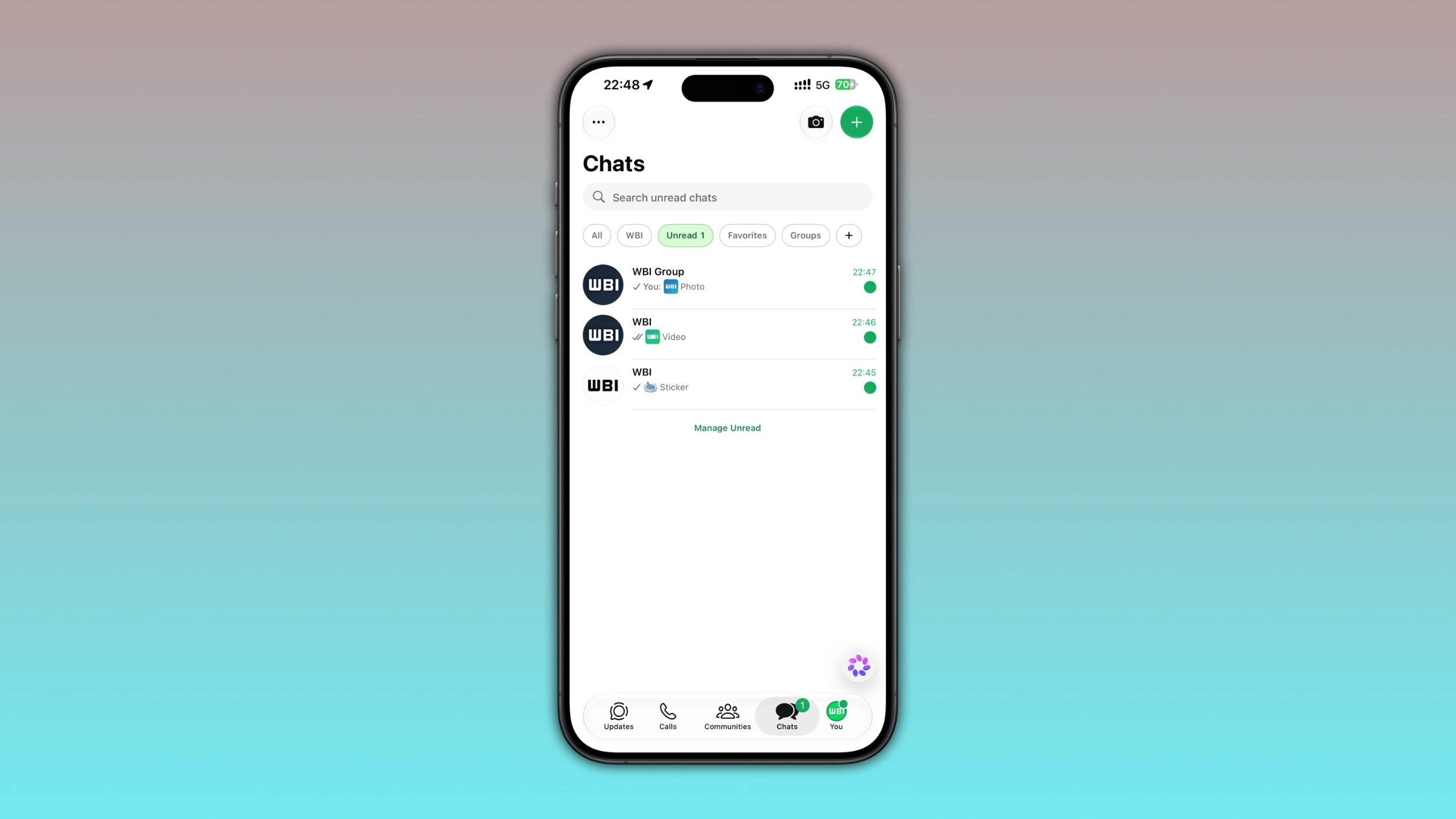
How the chat list currently shows the last message
The chat list shows a text preview of the last message shared in every conversation. For text messages, WhatsApp shows the beginning of the message. Photos show the word "Photo", videos show "Video", and stickers show "Sticker". This works fine for text, but the label doesn't give much information for media. Two conversations can both show "Photo" as the last message, but users cannot see which photo they received directly from the chat list. Although users can tap and hold a chat to see the conversation preview, they may have to do it for multiple conversation.
Photos and videos now show a thumbnail in the chat list
With this update, the chat list shows a small thumbnail of the latest photo or video shared in a conversation. WhatsApp places the thumbnail next to the media label, so the word "Photo" or "Video" is still visible alongside its preview. The thumbnail does not change the layout of the chat list. Users who want to know what a photo or video looks like before opening the chat can now see it directly from the conversation list.
Stickers also get a preview in the chat list
WhatsApp does not limit the new thumbnail feature to photos and videos. The update also introduces the preview for stickers in the chat list. When a sticker is the latest message in a conversation, users can see a small preview next to the "Sticker" label. Users who receive a lot of stickers in different chats will finally know what sticker someone shared without opening the conversation.
Why thumbnails make the chat list more useful
Before this update, media messages all looked the same in the chat list. Users could see just a simple label. With a thumbnail, users can recognize a photo, sticker, or video without opening the chat. This is not a major change, but it helps users when they want to know what someone sent without marking the conversation as read.
WhatsApp is rolling out media thumbnails to some iOS users
This feature is available to some users who install the latest update from the App Store. Note that it is still not available to everyone. This means that some users may not see the thumbnails yet, even after updating the app. In case the preview does not appear, the feature will become available over the coming weeks. However, WhatsApp has not announced when it will be available to everyone.
Connect with WABetaInfo
Follow WABetaInfo on X and visit our About page to learn more about what we do. We always appreciate your feedback on posts like this one.