WhatsApp is testing a new media hub for the iOS app
WhatsApp is developing a feature that will let users see shared media from their chats. WhatsApp will add a new media hub to the app settings, where users can easily see photos, videos, and links without opening their conversations. The hub will only show media the user received, so the feature keeps sent and received messages separate.
| Key Points | Details |
|---|---|
| Feature: | Media hub |
| Status: | Under development |
| Availability info: | This feature is currently in development and not yet available for beta testing. |
| Previous news: | WhatsApp is refining the channel migration tool on Android! |
WhatsApp rolled out the media hub on Mac and Web
Last year, WhatsApp introduced a centralized place where users can see shared media on Mac and Web. The hub displays photos, videos, links, and documents from all conversations in one screen, so users do not need to open their chats individually. Users can search by sender or caption, sort by date or file size, and forward or delete multiple items at once. This makes it easier for users to find a specific photo, video, or link without scrolling through their conversations.
WhatsApp is developing a media hub for the iOS app
WhatsApp is now working on bringing the same feature to the iOS app. With this functionality, WhatsApp will introduce the media hub in the app settings, making it simpler for users to review their photos, videos, and links. We discovered this with the WhatsApp beta for iOS 26.42.10.74 update, which is available on TestFlight. Specifically, WhatsApp is testing a new media hub that displays received media in a new section.
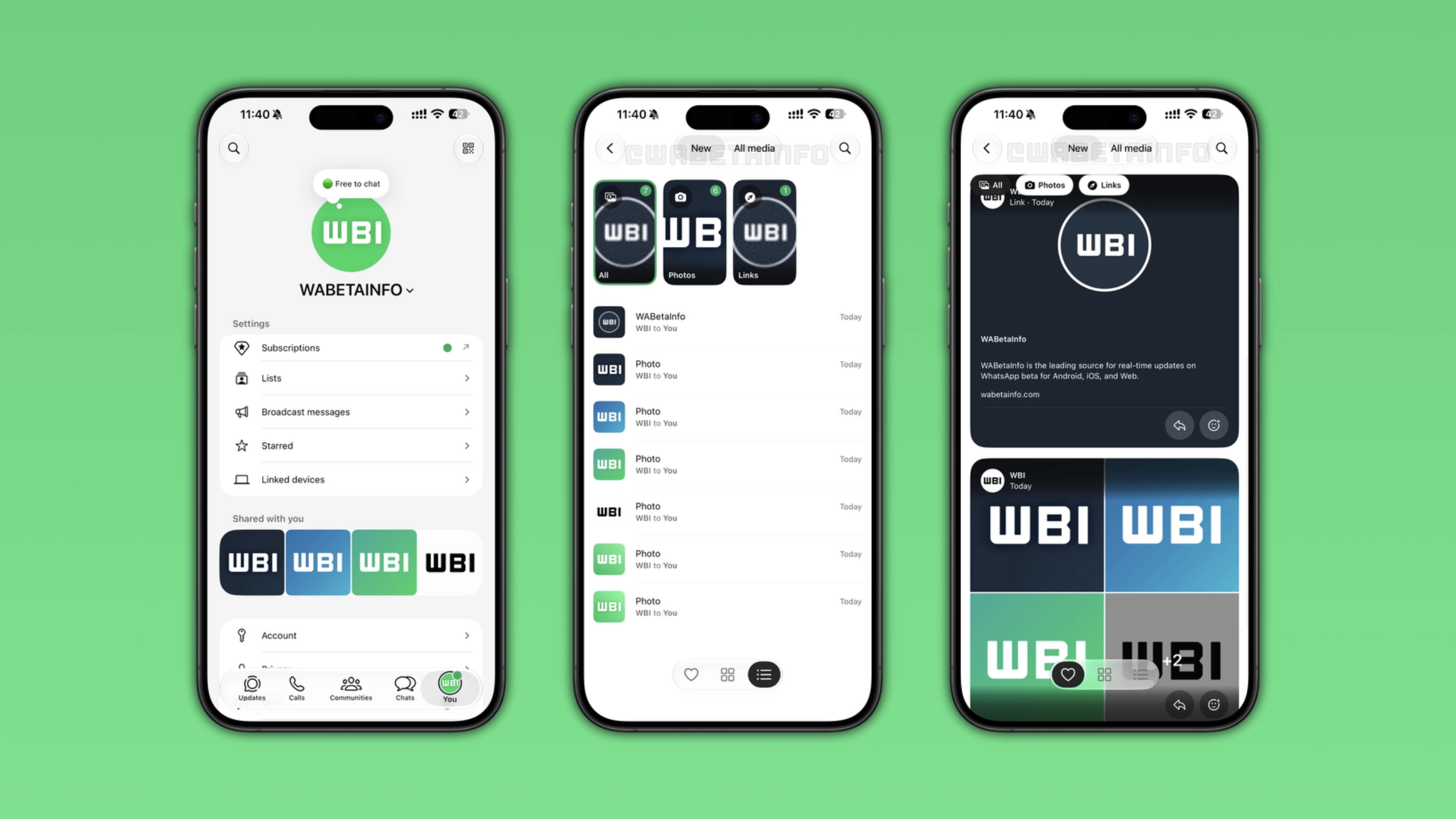
The media hub displays received photos, videos, and links
In the new media hub, WhatsApp will show only media that users received. This means that users will be able to find photos, videos, and links others shared with them. Media the user sent to others does not appear here. In addition, WhatsApp will not include disappearing media in this new screen. Once users open the hub, they will be able to see recently received media or all media. The New tab shows media that the user received recently. Instead, WhatsApp will show everything in the All media tab. Users will be able to filter this section by choosing the content they want to see. In particular, users will be able to choose if they want to see everything, photos, videos, or links. This feature will also let users switch between a list view and a grid view.
How to browse and filter media
With the first tab, WhatsApp will shows media that users received recently, while the All media tab shows everything. These filters let users focus on a specific type. For example, they can tap "Photos" or "Videos" to show only media content, and they can tap "Links" to see only shared links. Users can find messages they reacted to by tapping the heart symbol at the bottom of the screen. This filter allows users to quickly find specific images and videos without scrolling through everything else.
What users can do with their photos, videos, and links
For every item in the media hub, users can perform some actions. They will be able to forward a photo, video, or link to another conversation from the hub without opening the chat where they received it. They will also be able to add a reaction, star the item to save it, or open the conversation where they received the media. These actions will make the hub useful to find specific photos, videos, and links quickly.
How to search media in the new hub
WhatsApp will let users find specific content by tapping the search button at the top of the screen. Users will be able to search by the caption attached to a photo or video. This means that they will be able to find a specific photo or video even if they do not remember when they received it. This feature is also compatible with links, so users can easily find a specific URL shared in their conversations. As a result, users will not have to scroll through all the chat interface to find what they need.
WhatsApp is developing the media hub for a future iOS update
The media hub is currently under development on iOS. Since it's in development, this feature is not available yet. WhatsApp will release it to some beta testers in a future update. At the moment, WhatsApp has not announced when this feature will be available.
Connect with WABetaInfo
Follow WABetaInfo on X and visit our About page to learn more about what we do. We always appreciate your feedback on posts like this one.