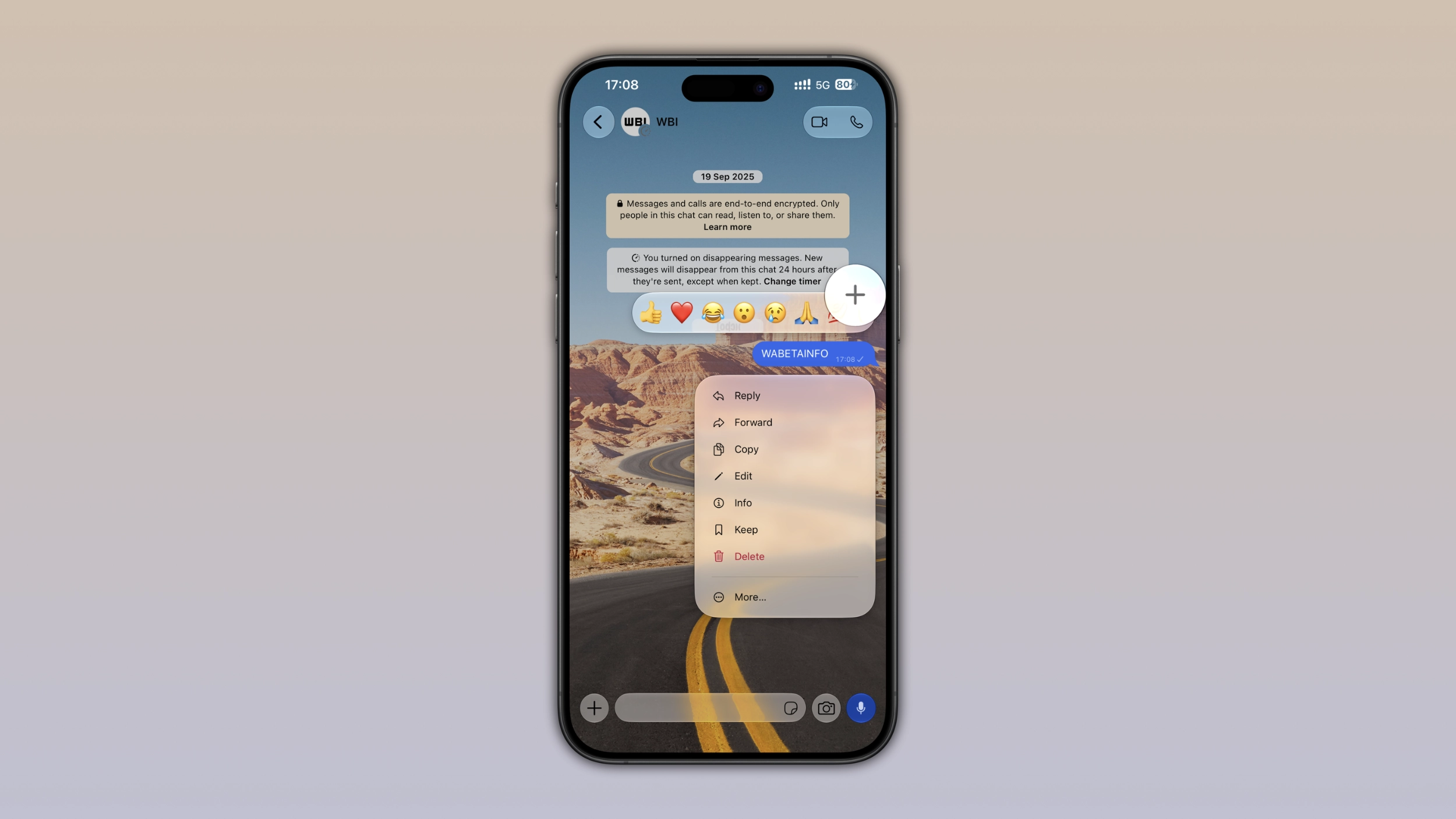
WhatsApp is finally making the reaction tray and the context menu compatible with Liquid Glass on iOS. Both now feature the same translucent appearance already visible in the chat bar. With this update, WhatsApp is refreshing the design to make every element of the message menu feel consistent with the chat screen.
| Key points | Details |
|---|---|
| Feature: | Message menu - Liquid Glass |
| Feature availability: | Some features may be under development, so they are not available to beta testers. Others may become available to users over time. If you're unable to access a certain feature, you will need to wait for a future update. |
| News shared last week: | WhatsApp introduces new security updates for iOS and Android |
| Previous article: | WhatsApp is rolling out support for up to 4 pinned messages |
Weekly WhatsApp beta updates: new features and improvements
This new weekly roundup brings together all the latest updates about WhatsApp beta shared this week. As a result, you can finally catch up on everything you might have missed from our past announcements. You can consider this summary as a way to keep up new features, improvements, and fixes. This week's highlight focuses on the message menu on iOS, which is now compatible with Liquid Glass. See what else has been announced this week.
WhatsApp introduces Liquid Glass design for the message menu
WhatsApp is rolling out a new design for the reaction tray and context menu, making them compatible with Liquid Glass. Instead of featuring a more solid appearance, the reaction tray now uses transparency and visual effects that perfectly align with the Liquid Glass design. The same applies to the context menu. The conversation remains visible behind the context menu, but without the same blur effect users were familiar with.
WhatsApp continues to refine Liquid Glass
The new design does not change how users react to messages. The update only changes how the reaction tray appears. The redesigned reaction tray also adapts to the appearance selected from the device settings. WhatsApp is also working on bringing new updates to the drawing editor and video player, which will make the drawing screen and the playback bar completely compatible with Liquid Glass. The latest change shows how WhatsApp is continuing to update the interface instead of limiting Liquid Glass to the main chat bar.
WhatsApp is rolling out the AI content label for channels on Android
With the WhatsApp beta for Android 2.26.34.5 update, WhatsApp is introducing a feature that lets channel admins disclose when they use AI to generate their media. The label lets followers know that the media was created or edited using an AI tool. In some countries, this label is not optional, but it is a legal requirement now. Channel admins can label an update by tapping and holding it, which presents the message menu, where users can find a new option called "Add AI content label". Followers can see the tag "AI content" directly on the bubble, in the bottom left corner of the message, so in the same area where there are other indicators like view counts and timestamps. Once channel admins add the AI content label, they cannot remove it, since the label is a disclosure tool, not a toggle.
WhatsApp launches AI content label for channels on iOS
WhatsApp is also bringing the AI content label feature to the iOS app. The feature is available after installing the WhatsApp beta for iOS 26.34.10.70 update from the TestFlight app. Admins can label their updates directly from the context menu, where they can find the option called "Add AI content label". This option lets channel admins add a small label to inform followers that they used AI to create or edit the media. Once they add the label, it appears on the bubble and cannot be removed since it is a disclosure tool. Channel admins need to add the label regardless of which AI tool they used to create or edit the media. This means that content created with ChatGPT, Gemini, or any other tool is subject to the same requirement as content made with Meta AI. In some countries, channel admins are legally required to label their AI-generated media.
WhatsApp is testing a safety warning for unofficial Web clients
WhatsApp is working on a new warning that appears when they connect their account through an unofficial WhatsApp Web client. The warning appears in the Linked devices screen, where users manage all the devices connected to their WhatsApp account, and it alerts users to use the official client to continue. An unofficial WhatsApp Web client acts as a middleman between the account and the server. This means that that messages, contacts, and media may be exposed to software that WhatsApp did not build and cannot verify. Users who rely on a third-party tool cannot confirm that their conversations are private, and they can lose their data or their account, even when the unofficial client looks exactly like WhatsApp Web.
WhatsApp is rolling out notifications for draft messages
After installing the WhatsApp beta for Android 2.26.35.2 update, users can experiment with a feature that shows a notification when they leave a message unfinished in a chat. The alert appears in the notification panel after 1 minute. Its title is "Your draft", and it also includes the contact name. When users tap the notification, WhatsApp opens directly that conversation, so users can finally send the message. This feature makes it easier for users to track their unfinished messages.
WhatsApp is rolling out chats with third-party agents
WhatsApp is introducing a feature that lets users create a chat with their third-party agents. Users can add their agent from the app settings, where WhatsApp is adding a new entry point that lets users configure the agent. WhatsApp supports up to five agents per account, so users can connect different agents for different purposes. Once they complete the setup, WhatsApp generates an API key needed to connect the agent to a chat.
WhatsApp is rolling out support for up to 4 pinned messages
WhatsApp is introducing a feature that lets users pin more than three messages in their chats and groups. We discovered this feature with the WhatsApp beta for Android 2.26.35.8 update, which is available on the Google Play Store. Currently, users can pin up to 3 messages at the top of the conversation screen, but now WhatsApp is extending this limit to let users pin an additional message. Users who have multiple pinned messages can tap the top bar to cycle through all of them in order. In group chats, three pinned messages may fill up fast, so a fourth slot allows users to keep more content visible at the top without removing another pinned message.
Connect with WABetaInfo
Follow WABetaInfo on X and visit our About page to learn more about what we do. We always appreciate your feedback on posts like this one.