WhatsApp is refining the channel migration tool on Android
WhatsApp is working on improving the feature that will let users migrate their channels to the Chats tab. WhatsApp will introduce smart suggestions that help users decide they want to place channels they follow. Users will be able to override any suggestion, so the final choice always belongs to them.
| Key Points | Details |
|---|---|
| Feature: | Channel migration tool |
| Status: | Under development |
| Availability info: | This feature is currently in development and not yet available for beta testing. |
| Previous news: | WhatsApp is testing Organizations to manage large communities! |
WhatsApp is working on migrating channels to the Chats tab
In the post about the WhatsApp beta for Android 2.26.39.1 update, we announced a feature that moves channels from the Updates tab to the Chats tab. WhatsApp was developing a migration tool that would ask users where they want to find their channels. This will let users choose if they want to see channels in their main chat list or in their archive. Note that WhatsApp was also testing three different configurations to decide how channels would appear in the Chats tab.
WhatsApp is refining the channel migration tool
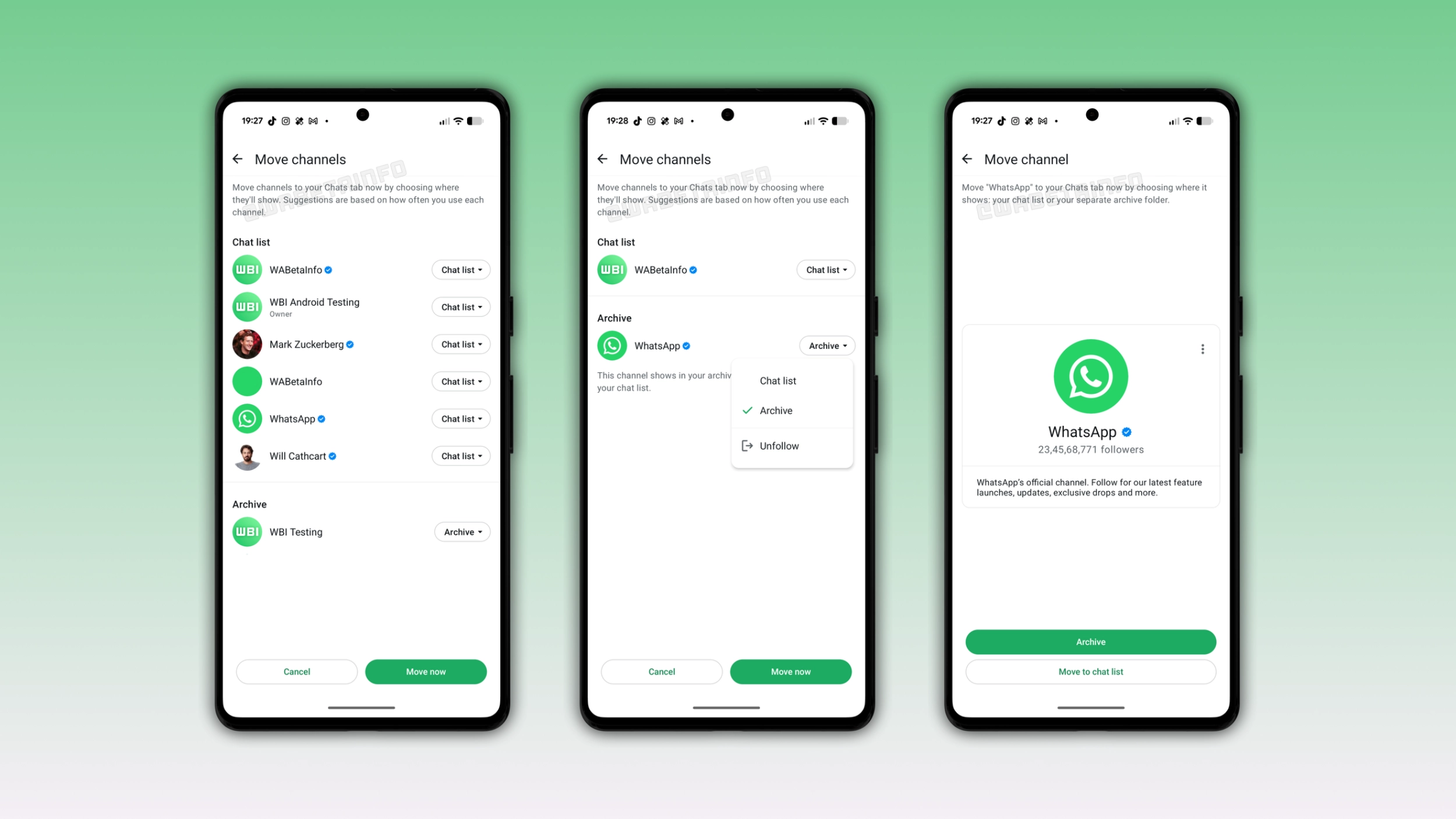
WhatsApp is continuing to work on the migration tool, but the company changed its direction. Instead of asking users to make a single choice for all their channels, WhatsApp is now developing a smarter tool. We discovered this with the WhatsApp beta for Android 2.26.43.2 update, which is available on the Google Play Store. In particular, WhatsApp is refining the channel migration tool with smart suggestions to help users decide where they want to see specific channels.
How the smart suggestions work
WhatsApp is working on bringing smart suggestions to the migration tool. WhatsApp will suggest the most active channels for the chat list. Instead, WhatsApp will suggest channels the user rarely interacts with for the archive. The suggestions appear directly in the migration screen, where WhatsApp shows a dropdown with the current suggestion for every channel. Users will be able to accept all suggestions by tapping "Move now" to complete the migration. However, they will be able to adjust the placement of any channel before confirming.
What options users have for their channels
WhatsApp will present three different options in the migration screen. Users will be able to keep channels visible in the chat list. They will be able to move channels to the archive folder, so users can still access them without seeing them every time they open the app. In addition, WhatsApp will also let users unfollow channels from this screen. Users can review specific channels before deciding which one to archive.
Why smart suggestions will make the migration easier
Users who follow many channels could find it complicated to decide which one to keep in the chat list. With smart suggestions, WhatsApp will make it easier for users to choose by doing most of the work for them. WhatsApp will make a suggestion for every channel based on usage, and users only need to change it if they disagree. For users who follow many channels, this can save time during the migration.
What happens after the migration
Once users move channels to the Chats tab, WhatsApp will no longer need the Updates tab. Status updates already appear at the top of the Chats tab for some users, and channels will follow. With both elements in the Chats tab, WhatsApp will replace the Updates tab with the new Contacts tab. This feature will let users see who is online and quickly find their contacts.
WhatsApp is developing the channel migration tool for a future Android update
The refined channel migration tool is currently under development on Android. Since this feature is in development, it is not available yet. WhatsApp will release the feature in a future update. At the moment, WhatsApp has not announced a public release for this functionality.
Connect with WABetaInfo
Follow WABetaInfo on X and visit our About page to learn more about what we do. We always appreciate your feedback on posts like this one.