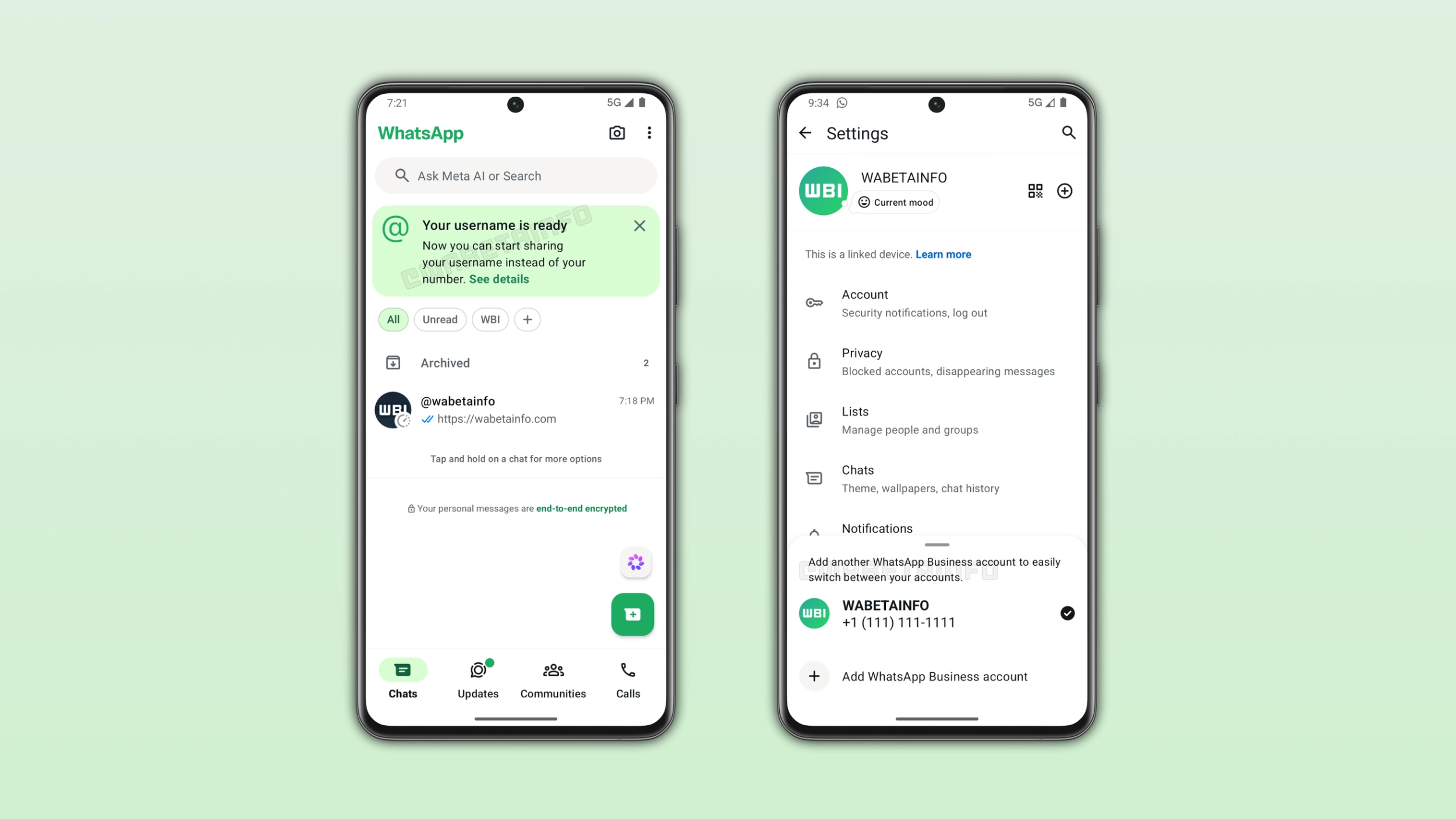
Some users can explore two major features this week. Specifically, WhatsApp is bringing multi-account to the business app, making it easier for users to manage two separate profiles. In addition, a limited number of users can now communicate with new people and businesses by username.
| Key points | Details |
|---|---|
| Feature: | Full username feature and multi-account |
| Feature availability: | Some features may be under development, so they are not available to beta testers. Others may become available to users over time. If you're unable to access a certain feature, you will need to wait for a future update. |
| News shared last week: | WhatsApp is developing a feature for birthday reminders! |
| Previous article: | WhatsApp is rolling out Liquid Glass design for the Mac app! |
Weekly WhatsApp beta updates: new features and improvements
This new weekly roundup brings together all the latest updates about WhatsApp beta shared this week. As a result, you can finally catch up on everything you might have missed from our past announcements. You can consider this summary as a way to keep up new features, improvements, and fixes. This week's highlight focuses on multi-account on WhatsApp Business, and the full username feature available to a limited number of users. See what else has been announced this week.
WhatsApp introduces the full username feature to some users
A limited number of users can finally communicate with new people and businesses by username. This means that their phone number is now hidden when they talk with new contacts. When the reserved username is ready, WhatsApp shows a new banner at the top of the chat list that informs users that their username is active. However, the update does not replace phone numbers with usernames. Other people can still contact you using your phone number if they know it. In addition, WhatsApp still requires a phone number for account registration. Note that this rollout should not be considered a global launch yet.
How to contact other by username
To start a new chat by username, open the Chats tab and tap the "+" button to open your contacts list. Here, you need to enter the full username exactly as the contact shared it with you. WhatsApp does not offer a directory where you can explore many usernames based on partial matches. Once you enter the full username, tap on it to open start the conversation. If the person you are trying to contact has a username key, WhatsApp will ask you to enter it before you can proceed.
How to manage your own username key
The username key is a barrier against strangers. When other people know your username and you enabled the key, they also need to enter the key to start a conversation with you for the first time. Users can manage their username key only from the primary mobile device. To create a username key, open WhatsApp Settings > Account > Username > Username key, and generate one. Once you have a username key, you can share it alongside your username when you want someone new to contact you.
WhatsApp introduces multi-account support on WhatsApp Business
WhatsApp is finally extending the multi-account feature to the business app. With this feature, WhatsApp is making it easier for businesses to manage two different accounts on the same device. To verify if the feature is available to your account, just open the settings page. Here, verify if you see the "+" button right next to your name. If it's available, you can add a second account to the business app.
How to switch and manage the second account on WhatsApp Business
It is possible to switch to the other at any time. Users can select the option "Switch account" right within the overflow menu in the Chats tab. To do so, they need to tap the overflow menu within the Chats tab and select Switch accounts. Users can see activity on their idle account. However, they need to switch to it to read their conversations since the accounts are separate.
WhatsApp is rolling out Liquid Glass interface for the Mac app
WhatsApp is finally bringing the Liquid Glass design to the Mac app. The new interface brings a new look aligned with the latest design language introduced by Apple. Specifically, WhatsApp redesigned the sidebar, the chat bar, and the attachment menu. In addition, users can access their locked chats and communities in two separate tabs. The update closes the design difference between desktop and mobile apps. iOS, iPadOS, and macOS now follow the same design rules that Apple set with its latest operating systems.
WhatsApp may offer its own backup storage on iOS
WhatsApp is developing its own cloud backup provider, where backups are end-to-end encrypted by default. With a future update, WhatsApp may give users on iOS the ability to choose their preferred backup provider directly from the chat backup settings. WhatsApp will offer 2 GB of free storage to start. However, WhatsApp is also exploring paid solutions. These includes a 50 GB plan priced at around $0.99 and a potential 1 TB plan. This feature is currently in the early stages of development. This means that WhatsApp may change it significantly or even decide not to release it.
WhatsApp is introducing new mic mode shortcut for iOS calls
Apple introduced mic mode in iOS 15. It is a feature that processes your voice to make it clearer during voice and video calls. Now, WhatsApp is adding a dedicated shortcut to the call interface where users can manage mic mode. Apple offers four mic modes: Standard, Voice Isolation, Wide Spectrum, and Automatic. When users switch to a different mode, the option persists until the user chooses a different one. With this shortcut, many users will discover this feature for the first time.
WhatsApp is developing a home screen widget for voice messages
We previously announced that WhatsApp is working on introducing a Home Screen widget to record voice messages. Now, WhatsApp is developing the interface where users can record voice notes. Once users record the voice message, they will be able to send it to multiple contacts at once. Instead of recording the voice note in a single chat and then forward it to other contacts, users will be able to make this process easier and faster.
Connect with WABetaInfo
Follow WABetaInfo on X and visit our About page to learn more about what we do. We always appreciate your feedback on posts like this one.