After the initial reservation phase, some users can finally communicate with new people and businesses using their username. WhatsApp is now notifying them that their reserved username is ready. For the first time, users can choose to share their username instead of their phone number with new contacts.
| Key Points | Details |
|---|---|
| Feature: | Username |
| Status: | Rolling out |
| Compatibility: | The latest updates of WhatsApp for Android and iOS are compatible. |
| Availability info: | This feature is available to some users, and it is rolling out to more accounts over the coming weeks. |
| Thanks: | Kingcyrious, for testing and reporting. |
| Previous news: | WhatsApp is rolling out mic mode controls for iOS calls! |
WhatsApp prepared users for usernames with the reservation feature
In the past month, WhatsApp introduced username reservations as the first step toward a new way to connect with new people. The feature allows users to choose their preferred username before WhatsApp activates usernames globally. This helps users secure their identity on WhatsApp ahead of the official release. Users could also reserve the same handle they use on Facebook and Instagram by linking their account to Accounts Center. However, users do not need to add their account to Accounts Center if they want to create a unique username just for WhatsApp.
WhatsApp starts rolling out full username support
WhatsApp is giving users time to reserve their preferred username before activating the full experience. This initial phase allows people to secure their username and prepare for the upcoming change. But now, WhatsApp is taking the next step by gradually rolling out the full username feature. Specifically, a very limited number of users can now start using their reserved username to communicate with new people and businesses. This does not represent a global launch yet, but it already promises to change how users share their contact information on WhatsApp.
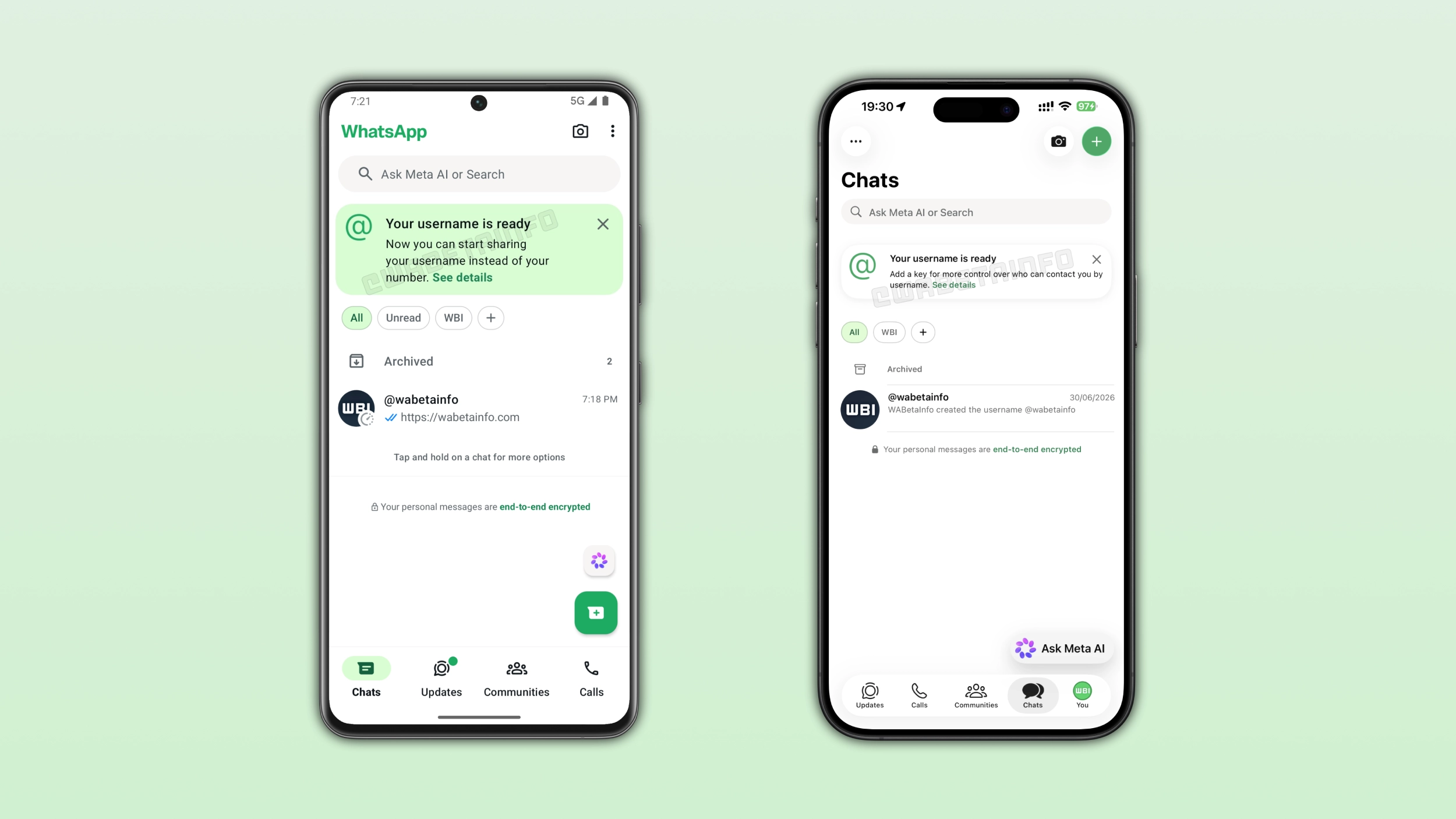
WhatsApp shows a banner when your username is ready
When your reserved username is ready, WhatsApp shows a new banner at the top of the chat list. The banner informs users that their username is active, and it explains that they can now share it with other people. At the moment, only a limited number of users can use their username. This means that they can start conversations with new people and businesses without revealing their phone number. As a result, the feature gives users more flexibility when they decide how to share their contact information with others.
How to check and manage your WhatsApp username
You can check your WhatsApp username directly from the app settings. You need to open the settings page and tap your profile section at the top of the screen. Here, you can see the username you selected during the reservation phase and whether it's already active. From the same screen, you can change or delete your username at any time. However, WhatsApp will show your phone number in your existing chats if you decide to delete your username. This does not apply if you simply change it.
WhatsApp notifies contacts when you create or update your username
When a contact creates a username, WhatsApp will notify people who already have an active chat with that person. In particular, WhatsApp will add a message to the chat to inform users that the contact has created their username. Users do not receive a push notification about this event. Instead, they will see the message when they open the conversation. This also applies whenever the contact updates their username, so it is possible to recognize the new handle immediately. This information is also visibile within the "Member changes" screen in the group info page. These events help users understand that the username belongs to the same person they already chat with.
The username feature does not replace WhatsApp phone numbers
WhatsApp is not replacing phone numbers with usernames. Other people can still contact you using your phone number if they know it. You can share your username with new contacts and keep your phone number hidden from them. This gives you more control when you interact with people you do not know personally. Note that WhatsApp still requires a phone number for account registration. Even with a username, users still need a phone number to create and access their accounts.
Existing chats will continue to use phone numbers
Conversations that users started before the username update will continue to use phone numbers as the main identifier. This means that people who already have your phone number will still see it in existing chats. Users who do not know your phone number will see your username instead. This also applies when you have saved someone's number but they do not know yours, since WhatsApp only hides the phone number from people who do not already know it.
WhatsApp may recommend setting a username key for more privacy
In some cases, WhatsApp may recommend setting a username key after activating the username feature. This option gives users more control over who can contact them for the first time. People who know your username key along with your username can start a conversation, while others cannot use the username alone. WhatsApp provides this option for users who want an additional layer of privacy.
How to contact others if you know their username
If the full username feature is available to your account, you may already be able to search for others right within WhatsApp. In the Chats tab, tap the plus button to open your contacts list. Here, you can enter the username into the search bar. Note that you need to know the exact username since WhatsApp does not offer any directory where to search for accounts based on partial matches. If someone has a username key, you need to enter it if you contact them for the first time.
When you do not need the username key
You may not need to enter the username key in several situations. For example, if you already have the person's phone number saved in your address book or you have previously chatted with them. You also do not need the username key when you're in the same group with that person, you scanned their QR code, or they started the conversation with you first. In these cases, WhatsApp will let you message that person without asking for the username key, even if they have one.
WhatsApp usernames change how people start new conversations
For years, WhatsApp has used phone numbers as the main way for people to connect with others. Usernames introduce a new option that works more like other messaging platforms. The new feature changes the first interaction between users since a phone number is no longer the only option. This makes WhatsApp more flexible for new conversations.
WhatsApp usernames are rolling out gradually to Android and iOS users
WhatsApp is rolling out the full username feature to a very limited number of users on Android and iOS. The rollout includes both beta and stable versions of the app. Note that this full username rollout should not be considered a global release yet. We're still officially in the username reservation phase. At the moment, WhatsApp is expanding access gradually through a phased rollout. That's why some accounts may receive the feature later than others. If your reserved username is not active yet, it should be ready later this year.
Connect with WABetaInfo
Follow WABetaInfo on X and visit our About page to learn more about what we do. We always appreciate your feedback on posts like this one.