WhatsApp is rolling out notifications for draft messages
WhatsApp is introducing a feature that shows a notification when users leave a message unfinished in a chat. The reminder appears in the notification panel, and it lets users open the chat where they left off. This makes it harder to forget a draft, even after the user switches to another app.
| Key Points | Details |
|---|---|
| Feature: | Notifications for draft messages |
| Status: | Rolling out |
| Compatibility: | WhatsApp beta for Android 2.26.35.2 is a compatible update. |
| Availability info: | This feature is available to some beta testers on the latest versions of WhatsApp for Android. |
| Thanks: | Sc, kingcyrious, FastenM, UnluckyTester, and shw_9876, for testing and reporting. |
| Previous news: | WhatsApp is testing a safety warning for unofficial Web clients! |
WhatsApp rolled out a draft label for the chat list on Android
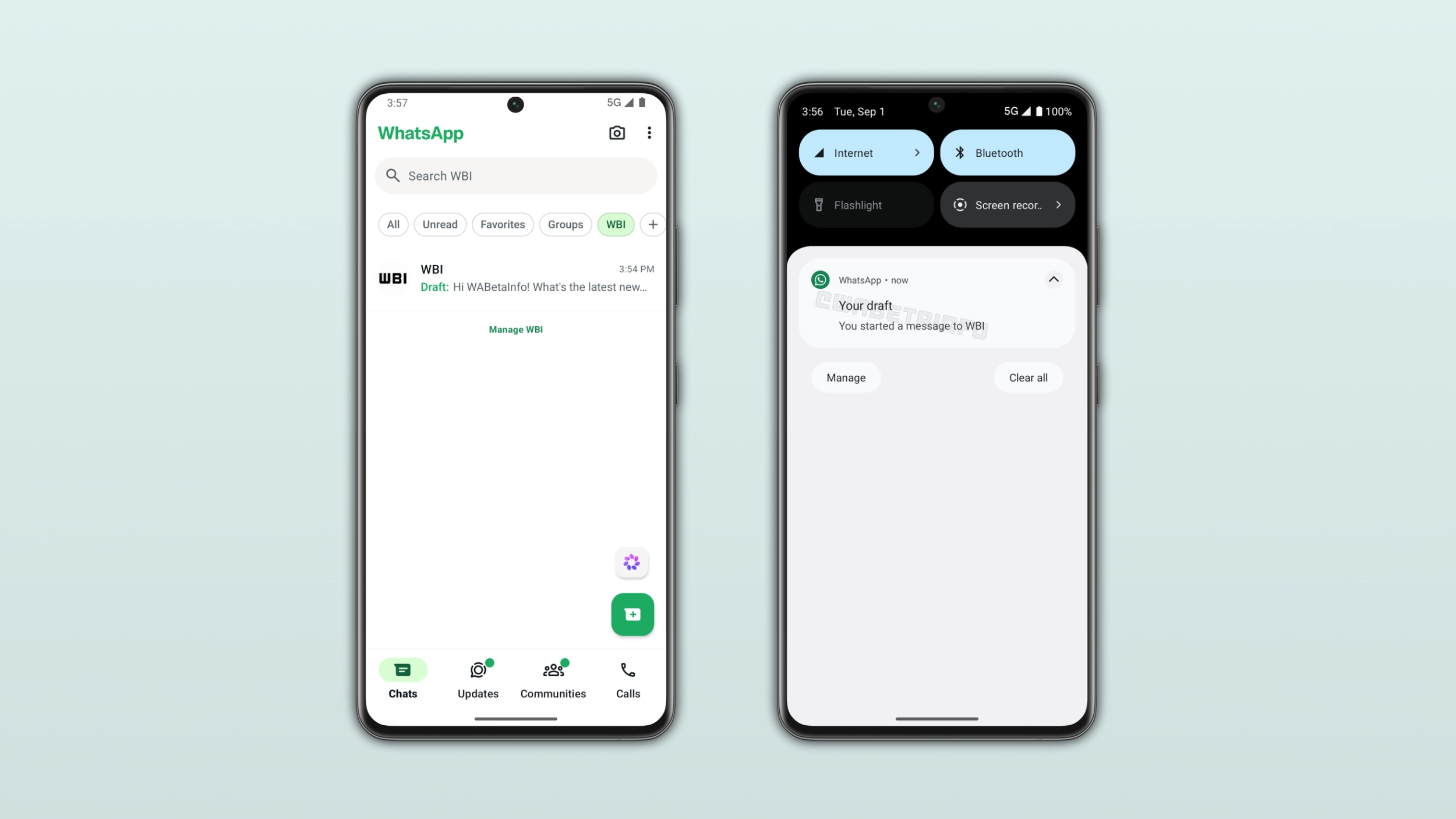
In the post about the WhatsApp beta for Android 2.24.20.24 update, we announced a message draft feature for the chat list. With this feature, users who type a message and leave the chat without sending it see a label next to the conversation in the chat list. The label shows a preview of the unfinished message, so users can notice it without opening the chat. This feature makes it easier for users to see which chats have a draft that still needs to be sent.
WhatsApp is now rolling out a notification for draft messages
With the latest update, WhatsApp is improving draft messages by introducing alerts. When users type a message, leave the chat, and switch to another app, WhatsApp sends a push notification to remind them about the unfinished message. We discovered this feature with the WhatsApp beta for Android 2.26.35.2 update, which is available on the Google Play Store. Specifically, WhatsApp is rolling out notifications for draft messages to some beta testers. This alert allows users to return to the chat immediately, even when they are using another app.
What the draft notification says
If users write a message in a chat but leave the conversation before sending it, WhatsApp saves the message as a draft. When they switch to a different app, WhatsApp schedules a notification to remind them about the unsent message. The alert appears in the notification panel after 1 minute. Its title is "Your draft", and it also includes the contact name. The notification identifies the specific chat where the user left the unfinished message. When users tap the notification, WhatsApp opens directly that conversation, so users can finally send the message.
How the notification works with the existing draft label
The draft label and the draft notification are two separate features, and they are useful for different situations. The label in the chat list is visible whenever a user opens WhatsApp, and it shows the beginning of the unfinished message. The notification does not need the user to be online. It shows up in the notification panel instead. When a user leaves a draft and does not come back to WhatsApp for a minute, the alert appears in the notification panel to bring it back to their attention. These features make sure a draft does not go unnoticed, whether the user is using WhatsApp or another app.
Why a notification is more useful than just a label
The draft label in the chat list only works when the user opens WhatsApp. If someone types a message and switches to a different app, the label in the chat list cannot get their attention. Users may not notice it the next time they open the app, especially if they have many conversations. A notification is different: it appears in the notification panel without requiring the user to open WhatsApp. For example, someone may type a reply to a colleague during a meeting. If they close WhatsApp or switch to a different application, they may complete the reply much later than intended. After 1 minute, users will receive a notification to remind them that they didn't send the message. Without the notification, they might not notice the draft immediately.
WhatsApp is rolling out draft notifications to Android beta testers
This feature is available to some beta testers who install the latest update from the Google Play Store. Since draft notifications are available to select users, you might not receive these alerts, not even after updating WhatsApp. If WhatsApp doesn't show a notification after leaving a draft, the feature will become available to your account in the future. WhatsApp has not announced when this feature will be available to everyone.
Connect with WABetaInfo
Follow WABetaInfo on X and visit our About page to learn more about what we do. We always appreciate your feedback on posts like this one.