WhatsApp is rolling out microphone mode controls for iOS calls
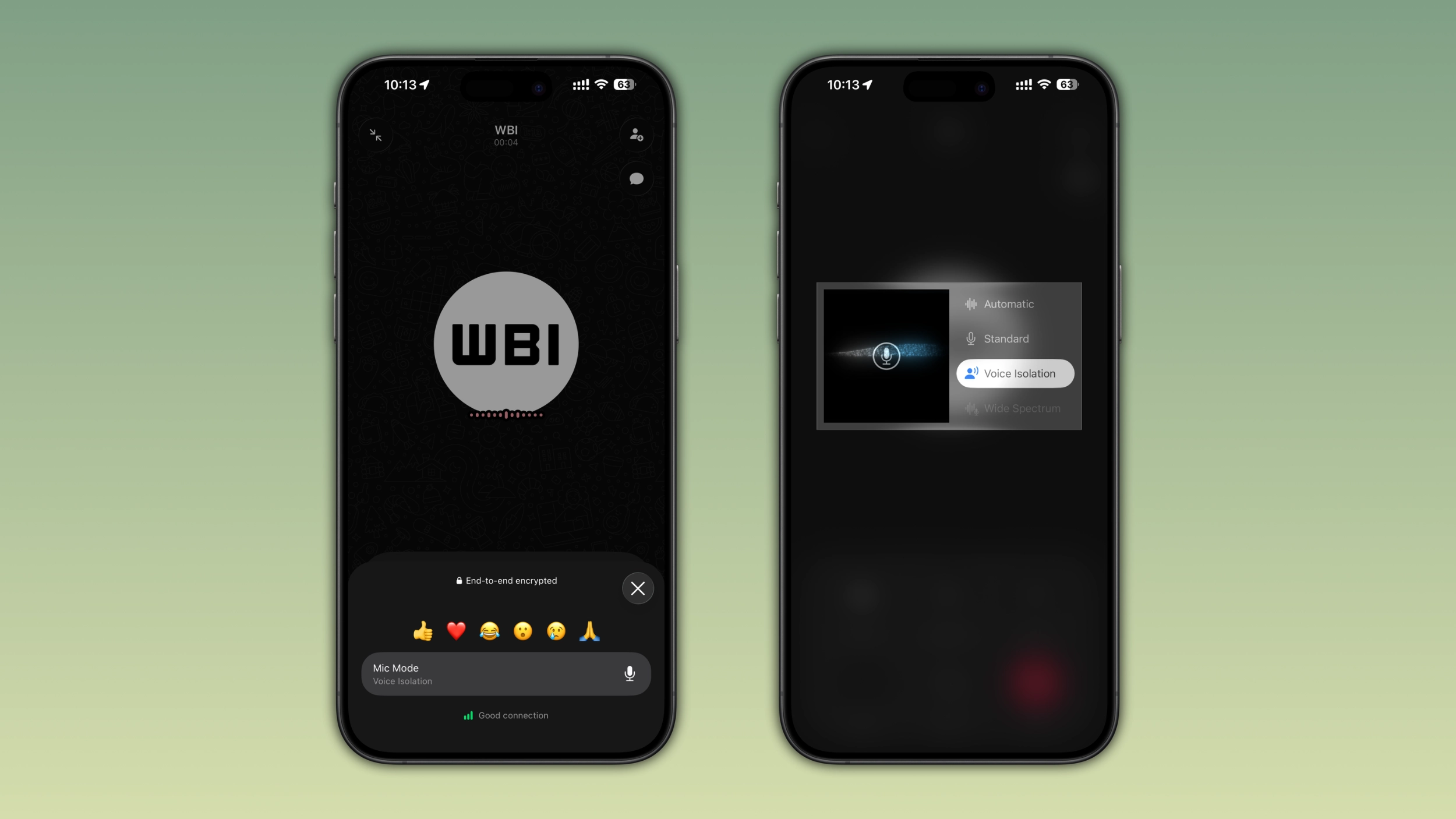
WhatsApp is introducing a new option that lets users control Apple's mic mode from the call interface. Users could already manage this feature from the Control Center since iOS 15. But now, WhatsApp is now adding it to the call screen to make it easier for users to find it.
| Key Points | Details |
|---|---|
| Feature: | Mic mode controls for WhatsApp calls |
| Status: | Rolling out |
| Compatibility: | WhatsApp for iOS 26.27.74 is a compatible update. |
| Availability info: | This feature is available to some users, and it is rolling out to more accounts over the coming weeks. |
| Previous news: | WhatsApp refines its home screen widget for voice messages! |
WhatsApp introduced noise cancellation for Android calls
In the post about the WhatsApp beta for Android 2.26.14.1 update, we announced a feature to reduce noise during voice and video calls. This feature filters out background noise in real time, so people in the call can hear the caller's voice more clearly. WhatsApp built this directly into the Android app, and users can quickly manage it from the call interface. For Android users who make a lot of calls in noisy places, this feature makes a real difference.
WhatsApp is introducing new mic mode shortcut for iOS calls
WhatsApp is not bringing its noise processing algorithm to the iOS app. Instead of building its own noise processing, WhatsApp is leveraging a system-level feature that Apple has offered for years. We discovered the news with the WhatsApp for iOS 26.27.74 update, which is available on the App Store. Specifically, WhatsApp is rolling out mic mode controls directly within the call interface to some users.
Apple introduced mic mode to improve voice processing
Mic mode gives users control over how the microphone processes audio during calls and recordings. Apple introduced Voice Isolation and Wide Spectrum in iOS 15, and both work in FaceTime and third-party apps. In addition, Apple added Voice Isolation for regular phone calls in iOS 16.4 and the Automatic mode in iOS 18. Users can access this feature through the Control Center. However, most people do not even know it exists. WhatsApp is now bringing a shortcut to mic mode into the call screen, so users can easily access it without leaving the app.
How to access mic modes during a WhatsApp call
Users can access mic mode directly from the call screen. At the bottom of the interface, users can tap the "More" button. Here, users can find the "mic mode" option that lets them choose how the microphone handles audio during the call. This option opens the system menu where users can choose between four mic modes offered by Apple. iOS applies the mode immediately without ending or interrupting the call.
How Standard, Voice Isolation, Wide Spectrum, and Automatic sound different
Apple offers four mic modes, and they handle microphone audio differently. Standard uses the basic audio processing that iOS applies by default. Voice Isolation focuses on the caller's voice and blocks background noise. This means that people in the call can hear less of the surrounding environment. Wide Spectrum does the opposite: it leaves all ambient sounds unfiltered. This is useful when users want to share the audio around them. Automatic lets iOS decide the best mode for the current call, and it adjusts as the call goes on.
Why WhatsApp built this into the call interface
Apple introduced mic mode in iOS 15, but most users never touched it. To find it, users had to open the Control Center, tap the app's audio controls, and select the mic mode option. Most people never did all that just to adjust a mic setting mid-call. As a result, a lot of users will discover this feature for the first time now that WhatsApp is adding this shortcut to the call interface.
How this differs from noise cancellation on WhatsApp for Android
On Android, WhatsApp built noise cancellation itself. It is a WhatsApp feature that runs independently of the operating system. On iOS, WhatsApp is not doing any audio processing of its own. Instead, WhatsApp is exposing Apple's existing mic mode controls in a more convenient location. For the user, the result can feel similar: cleaner audio during calls. But the technology behind it is different. On iOS, Apple handles the processing, and WhatsApp just makes it easier to find.
Mic mode settings persist between calls
Once a user selects a mic mode in WhatsApp, iOS does not reset it after the call ends. According to Apple's documentation, the option persists for the app until the user chooses a different one. This means that users who prefer Voice Isolation only need to set it once, and it will apply to all future WhatsApp calls automatically. The same applies to any other mode. Whatever users pick last is what WhatsApp will use next time.
Which mic mode works best in different situations
Voice Isolation is the right choice for most calls, especially in noisy places like streets or public transport. Users can choose Standard for quiet environments where they do not need to process audio. Wide Spectrum is useful when both the caller's voice and the surrounding audio matter. For example, users can choose this option during a live event where the other person wants to hear what's happening around the caller. Automatic is a good option for users who do not want to think about it, since iOS handles the decision automatically.
WhatsApp is rolling out mic mode controls for iOS users
Mic mode controls are available to some users who install the latest WhatsApp update from the App Store. WhatsApp is rolling out this feature gradually, so not everyone will see this option right now. If this shortcut does not appear yet, it should become available to more accounts over the coming weeks. WhatsApp has not announced when this will be available to everyone.
Connect with WABetaInfo
Follow WABetaInfo on X and visit our About page to learn more about what we do. We always appreciate your feedback on posts like this one.