WhatsApp is testing a new warning for Android users that appears when they connect their account through an unofficial WhatsApp Web client. It shows up in the Linked devices screen and asks users to switch to the official WhatsApp Web. This will make it easier for users to know when they are not using the official client.
| Key Points | Details |
|---|---|
| Feature: | Warning for unofficial WhatsApp Web clients |
| Status: | Under development |
| Availability info: | WhatsApp is already detecting unofficial Web clients, but the warning is still under development. |
| Previous news: | WhatsApp launches AI content label for channels on iOS! |
WhatsApp warns users about unofficial apps
In April, we reported that WhatsApp was alerting users targeted by government spyware via unofficial apps. At that time, WhatsApp notified around 200 users in Italy after a fake version of the app was used to install government-grade spyware on their iPhones. The unofficial app was not distributed through the App Store. Instead, it was delivered through phishing links. Once the user installed the unofficial app, the spyware could access private messages, contacts, microphone and camera activity, and even data from other applications. WhatsApp has always encouraged users to download the app from the official store to avoid any unofficial client.
WhatsApp is testing a new warning for unofficial Web clients
Today, WhatsApp is taking another step to protect users from unofficial clients, this time on the web. Users who connect their account through a third-party or unofficial WhatsApp Web client will see a new warning appear in the Linked devices screen. We discovered this feature with the WhatsApp beta for Android 2.26.35.1 update, which is available on the Google Play Store. Specifically, WhatsApp is testing a warning that alerts users when it detects they may not be using the official WhatsApp Web. This alert lets users know that they need to switch to the official WhatsApp Web to keep their account safe.
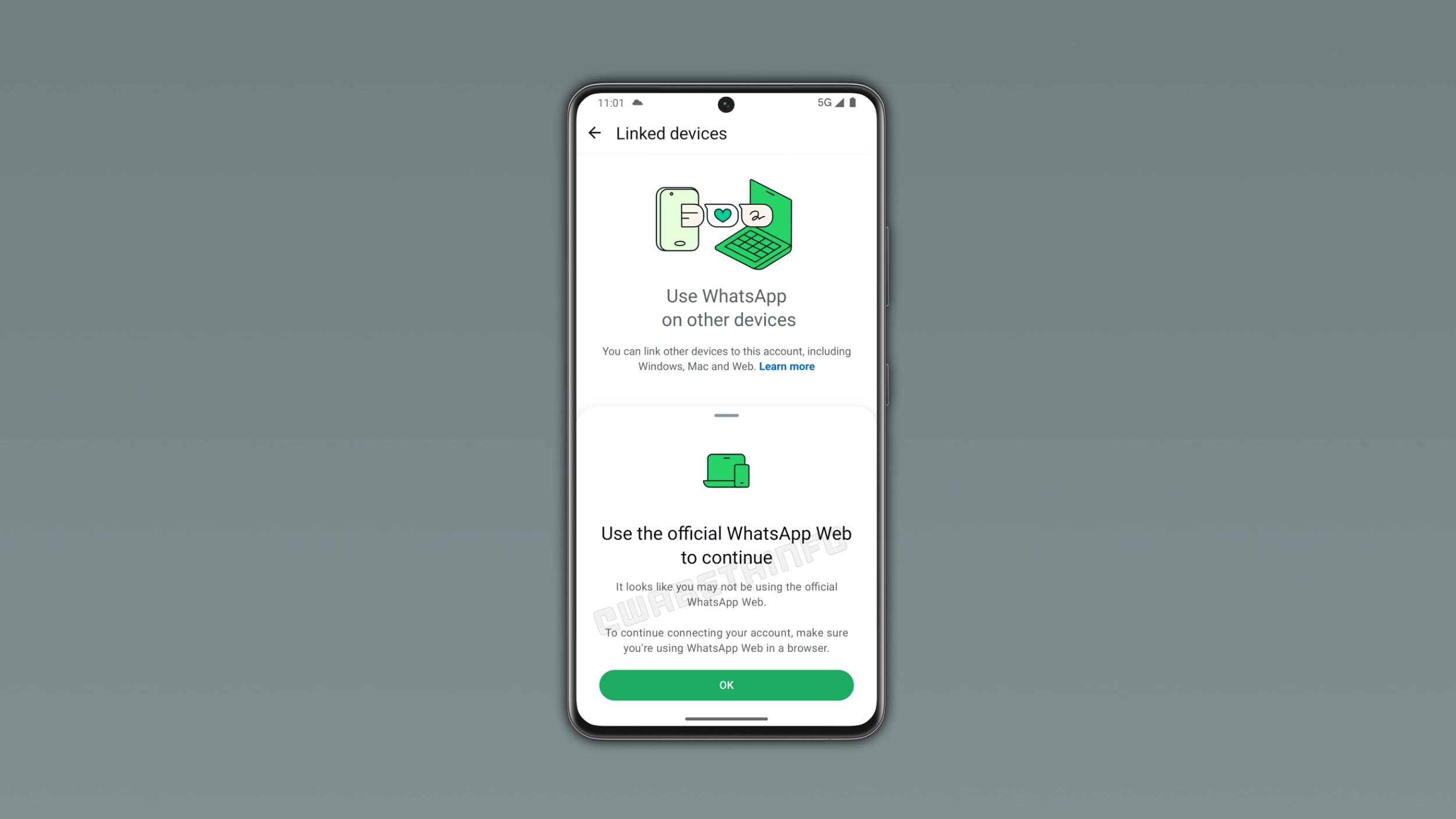
What the warning says and where it appears
The warning appears in the Linked devices screen, where users manage all the devices connected to their WhatsApp account. When users try to link their account to an unofficial web client, WhatsApp shows a message at the bottom of the screen. It alerts users to use the official client to continue. In this case, users need to check they're really using the official WhatsApp Web in a browser. Users can dismiss the warning, but WhatsApp won't stop showing it until the user switches to the official client.
What counts as an unofficial WhatsApp Web client
The warning can appear in several situations. For example, browser extensions that embed WhatsApp Web within a different interface may cause WhatsApp to show this alert. Third-party clients that replicate the WhatsApp Web experience are considered unofficial. Some tools offer new features, but they may intercept the connection between the user and WhatsApp. WhatsApp cannot see how these tools handle user data, and they do not offer the same security standards as the official app. Any client that is not the official WhatsApp Web accessed in a browser is not considered safe.
Why using unofficial Web clients is risky
An unofficial WhatsApp Web client acts as a middleman between the account and the server. This means that messages, contacts, and media may be exposed to software that WhatsApp did not build and cannot verify. The official WhatsApp Web also preserves end-to-end encryption, but an unofficial client could intercept data before it is encrypted or after it is decrypted. Users who rely on a third-party tool cannot confirm that their conversations are private. Users can lose their data or their account, even when the unofficial client looks exactly like WhatsApp Web.
How to make sure you are using the official WhatsApp Web
Users can avoid the warning by using the official client. WhatsApp Web is accessible at web.whatsapp.com in any standard browser. Users should not install suspicious extensions that modify the client. It is also possible to use the official desktop app, which is available for download directly from the WhatsApp website. Users can also check our download page for verified links to the official beta apps on Mac and Windows. Users who are not sure whether they're using the official client, they should check the URL in their browser. If it does not point to web.whatsapp.com, it is not the official WhatsApp Web.
WhatsApp is already detecting unofficial clients, but the warning is still in development
WhatsApp is already detecting unofficial Web clients in the background. However, the warning that appears in the Linked devices screen may not be yet visible to most users. As a result, WhatsApp is not enabling it for beta testers yet, even if they installed the latest update. We expect WhatsApp to make it available to users in a future update. At the moment, WhatsApp has not shared an official timeline for the public release.
Connect with WABetaInfo
Follow WABetaInfo on X and visit our About page to learn more about what we do. We always appreciate your feedback on posts like this one.