WhatsApp refines its home screen widget for voice messages
WhatsApp has made enough progress on the voice message widget that we can now share a look at the recording screen. The interface will include new controls to pause, resume, and discard the recording before sending it. Once the recording is ready, users will be able to open the contact picker to choose who to send it to.
| Key Points | Details |
|---|---|
| Feature: | Home screen widget for voice messages |
| Status: | Under development |
| Availability info: | This feature is currently in development, and it is not available for beta testing yet. |
| Previous news: | WhatsApp is developing its backup cloud provider for iOS! |
WhatsApp is working on a home screen widget for voice messages
In the post about the WhatsApp beta for Android 2.26.24.2 update, we announced a new home screen widget for voice messages. With the new widget, users can quickly record a voice message to send to multiple contacts at once. The widget has a default size of 3x1 on the home screen, but users can resize it after placing it. Users can tap it to start a recording and then choose who to send the voice note to. At the time, the feature was in a very early stage of development, so we could only share limited details about how the recording experience would work.
WhatsApp is now refining the recording experience on Android
Since that announcement, WhatsApp has continued to work on the widget and the recording screen that appears when users tap it. The recording screen is now more defined, and it reveals some controls that were not visible before. WhatsApp is also making progress on the contact picker that appears after users confirm the recording. This is the news we discovered after installing the WhatsApp beta for Android 2.26.28.2 update, which is available on the Google Play Store. Specifically, WhatsApp is refining the home screen widget for voice messages with a more complete recording interface.
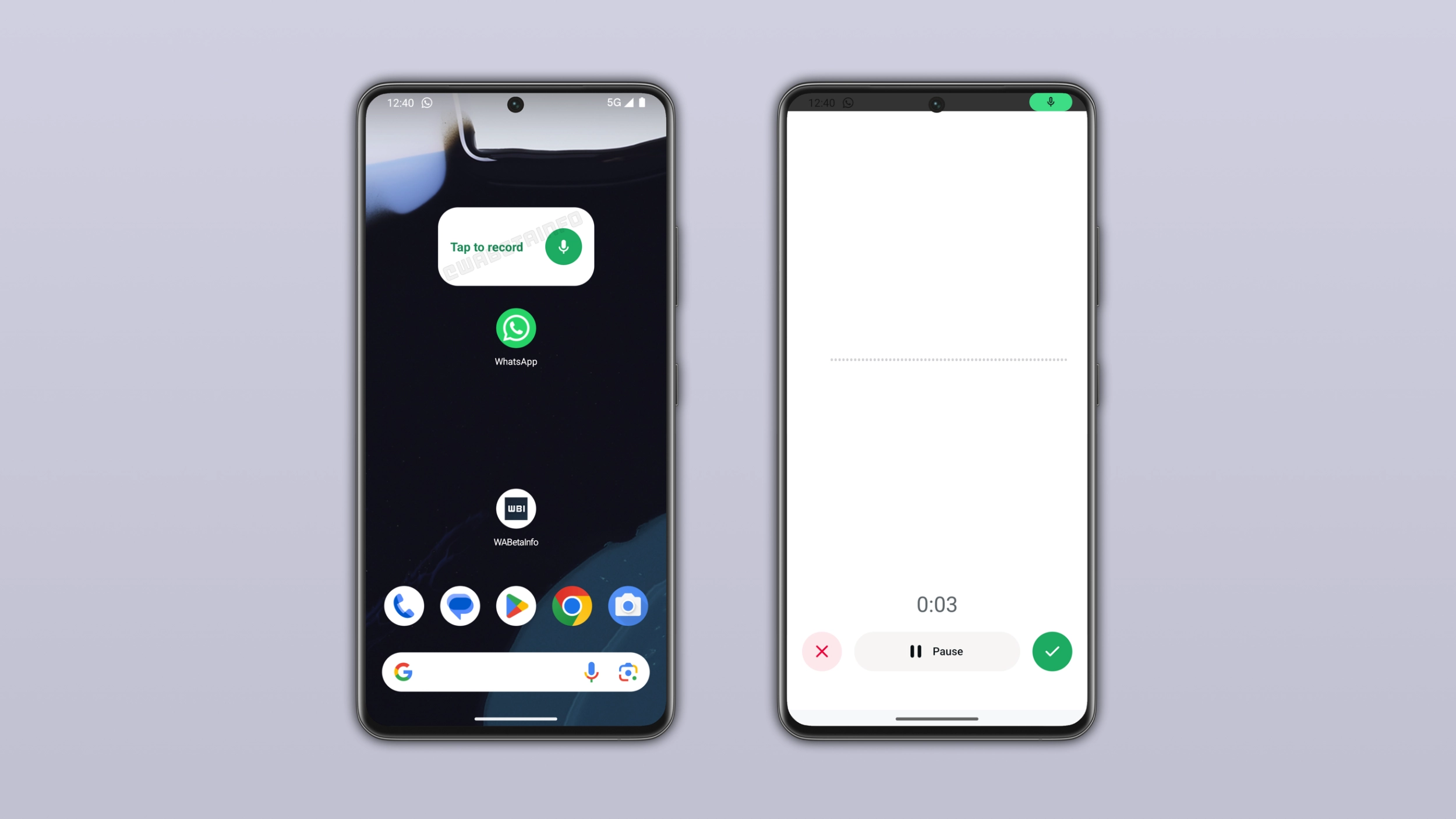
How the recording screen will work
When users will tap the widget on the home screen, it opens a new recording screen within WhatsApp. Here, users will be able to start the recording and pause it at any point if they need a moment before continuing. Users will also be able to cancel the recording if they change their mind. Once users complete the recording, they can confirm it and move to the next step.
How users will choose who to send the voice message to
After confirming the recording, WhatsApp opens a contact picker where users can select one or more recipients. Users are not limited to a single contact, but they can pick multiple people from the list and send the voice note to all of them at once. WhatsApp delivers the voice message to every selected recipient without any additional step. This is the part of the experience that makes the widget different from recording a voice note within a chat.
Why sending to multiple contacts at once may be helpful
Without the widget, users who want to send the same voice note to several people have to record it once, send it to the first contact, then forward it to the others one by one. The widget offers a better experience. Users record once, select everyone they want to send it to, and the app shares the message with all of them in a single action. For anyone who sends the same voice note to multiple people regularly, one recording is all it takes.
The widget will be optional on the home screen
We know that not every users needs a shortcut like this. As a result, WhatsApp won't force anyone to use it. The widget will only appear on the home screen if the user manually adds it, so the same way any Android widget works. Users who will find it useful can add it to the Home Screen. Those users who prefer to record voice messages right within the app can simply ignore it. It is one more option, and it not a replacement for the existing experience.
WhatsApp is still developing the voice message widget on Android
The home screen widget for voice messages is still under development on Android. WhatsApp has not enabled it for beta testers yet. In addition, WhatsApp has not shared an official timeline for its release. The recording screen now looks more complete than before, but we will share more details as the feature moves closer to a public release.
Connect with WABetaInfo
Follow WABetaInfo on X and visit our About page to learn more about what we do. We always appreciate your feedback on posts like this one.