WhatsApp is rolling out Liquid Glass design for the Mac app
WhatsApp is finally expanding the Liquid Glass interface to its Mac app, making the experience consistent with iPhone and iPad. The revamped design brings a translucent, modern look to the sidebar, the chat bar, and the attachment menu. The update also introduces new entry points in the sidebar for locked chats and communities.
| Key Points | Details |
|---|---|
| Feature: | Liquid Glass for Mac |
| Status: | Rolling out |
| Compatibility: | WhatsApp for Mac 26.27.73 is a compatible update. |
| Availability info: | This feature is available to some users, and it is rolling out to more accounts over the coming weeks. |
| Thanks: | futurebound, for testing and reporting. |
| Previous news: | WhatsApp is gradually rolling out the full username feature! |
WhatsApp was testing a new Liquid Glass interface for Mac
Back in June, we reported that WhatsApp was working on a redesigned interface for the Mac app. The update adds compatibility with the Liquid Glass design language introduced by Apple with macOS 26 Tahoe. The interface also includes new sections for locked chats in the sidebar, making it easier for users to view their sensitive conversations. We showed how the chat bar and attachment menu follow the same Liquid Glass design language that iPhone users already know.
WhatsApp is bringing Liquid Glass interface to the Mac app
After bringing the Liquid Glass design to iPad, WhatsApp is now focusing on the Mac app. Mac was the last major platform still waiting for this update, and it is finally available today. This is the news we discovered after installing the WhatsApp for Mac 26.27.73 update, which is available on the App Store. Specifically, WhatsApp is rolling out the Liquid Glass interface for the Mac app to some users.
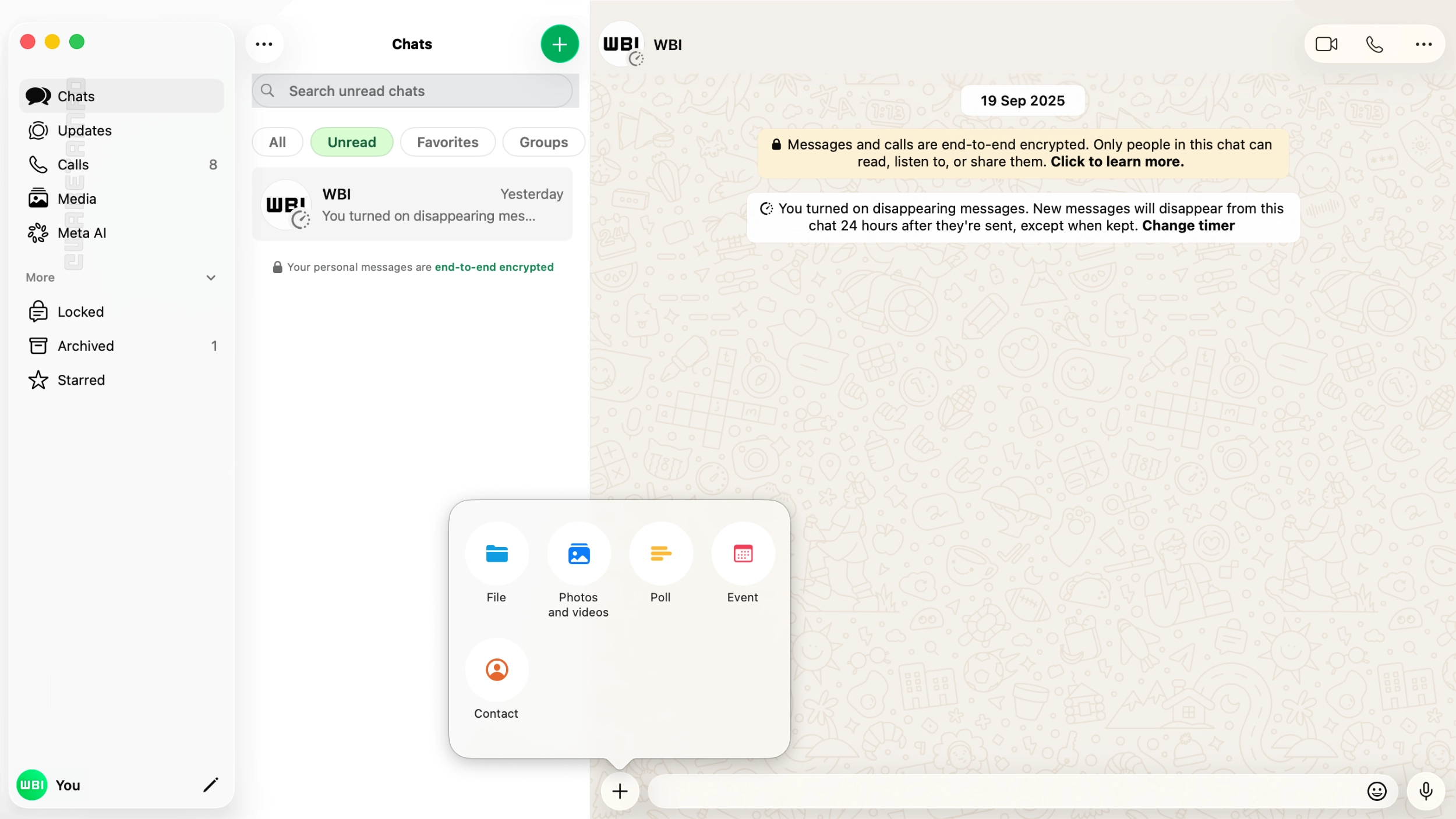
The sidebar gets a complete redesign with Liquid Glass
The sidebar on the Mac app used to show only icons for its sections, with no text labels to describe them. In the new interface, tabs in the sidebar show both an icon and a text label. This makes navigation more intuitive, since users can immediately recognize what every tab is for. The sidebar also follows the Liquid Glass design language, since WhatsApp introduced new translucent effects that blend into the macOS desktop. With this update, it feels more like a native macOS app than before.
Locked chats move to a dedicated section in the sidebar
On iPhone, locked chats are available in a dedicated section, protected by Face ID or a custom passcode. On Mac, they were visible directly within the main chat list. This means that they were not separate from other chats, and there was no authentication required to view them. The new interface changes that by adding a dedicated entry point for locked chats directly in the sidebar. Users need to authenticate before they can access this section. As a result, the experience on Mac is finally consistent with how locked chats work on iPhone. This brings the two apps to the same level of privacy.
Communities get their own entry point in the sidebar
The new sidebar also adds a dedicated entry point for communities. Previously, users had to navigate through the chat list to find their communities on Mac. Now, a dedicated tab in the sidebar allows users to quickly filter them. This makes communities easier to find and access since users no longer have to search through the chat list. The communities tab fits naturally into the new sidebar alongside the other dedicated sections.
The chat bar and attachment menu follow the Liquid Glass style
The Liquid Glass redesign extends to the chat bar at the bottom of the conversation screen. The bar now adopts the same translucent, frosted appearance that WhatsApp already introduced on iPhone. The attachment menu, which appears when users tap the "+" button in the chat bar, also presents the same Liquid Glass style now. These changes make the conversation screen on Mac feel consistent with the rest of the updated interface.
WhatsApp aligns the Mac interface with iPhone and iPad
The update closes the design difference between desktop and mobile apps. WhatsApp released Liquid Glass on iPhone first, then on iPad, and Mac is now catching up. All three platforms now follow the same design language that Apple set with its latest operating systems. WhatsApp worked toward this consistency for almost a year, and the Mac update is what finally closes the circle.
WhatsApp is rolling out Liquid Glass design for Mac to some users
The new Liquid Glass interface for Mac is currently available to some users who install the latest WhatsApp update from the App Store. The rollout includes both users on the regular App Store version and some beta testers. However, not everyone will see the new interface immediately, since WhatsApp is distributing it gradually. If the updated design does not appear yet, it should become available to more accounts over the coming weeks.
Connect with WABetaInfo
Follow WABetaInfo on X and visit our About page to learn more about what we do. We always appreciate your feedback on posts like this one.