WhatsApp is rolling out multi-account for the Android business app
WhatsApp Business beta for Android finally supports a second account on the same device. Users who manage two different business numbers no longer need a second phone to use them. Users can use and switch between their accounts at any time, making it easier to manage their conversations separately.
| Key Points | Details |
|---|---|
| Feature: | Multi-account |
| Status: | Rolling out |
| Compatibility: | WhatsApp Business beta for Android 2.24.27.5 is a compatible update. |
| Availability info: | This feature is available to some beta testers, and it is rolling out to more accounts over the coming weeks. |
| Previous news: | WhatsApp is developing a feature for birthday reminders! |
WhatsApp introduced multi-account support on WhatsApp Messenger
In 2023, WhatsApp released the multi-account feature for the Android app. With this functionality, users can run two separate accounts on the same device without duplicating the app. Before WhatsApp introduced this feature, users who needed a second number had to install WhatsApp Business as a workaround, even if they had no business use for it. However, WhatsApp Business was left out of this feature until now.
WhatsApp is now bringing multi-account to WhatsApp Business
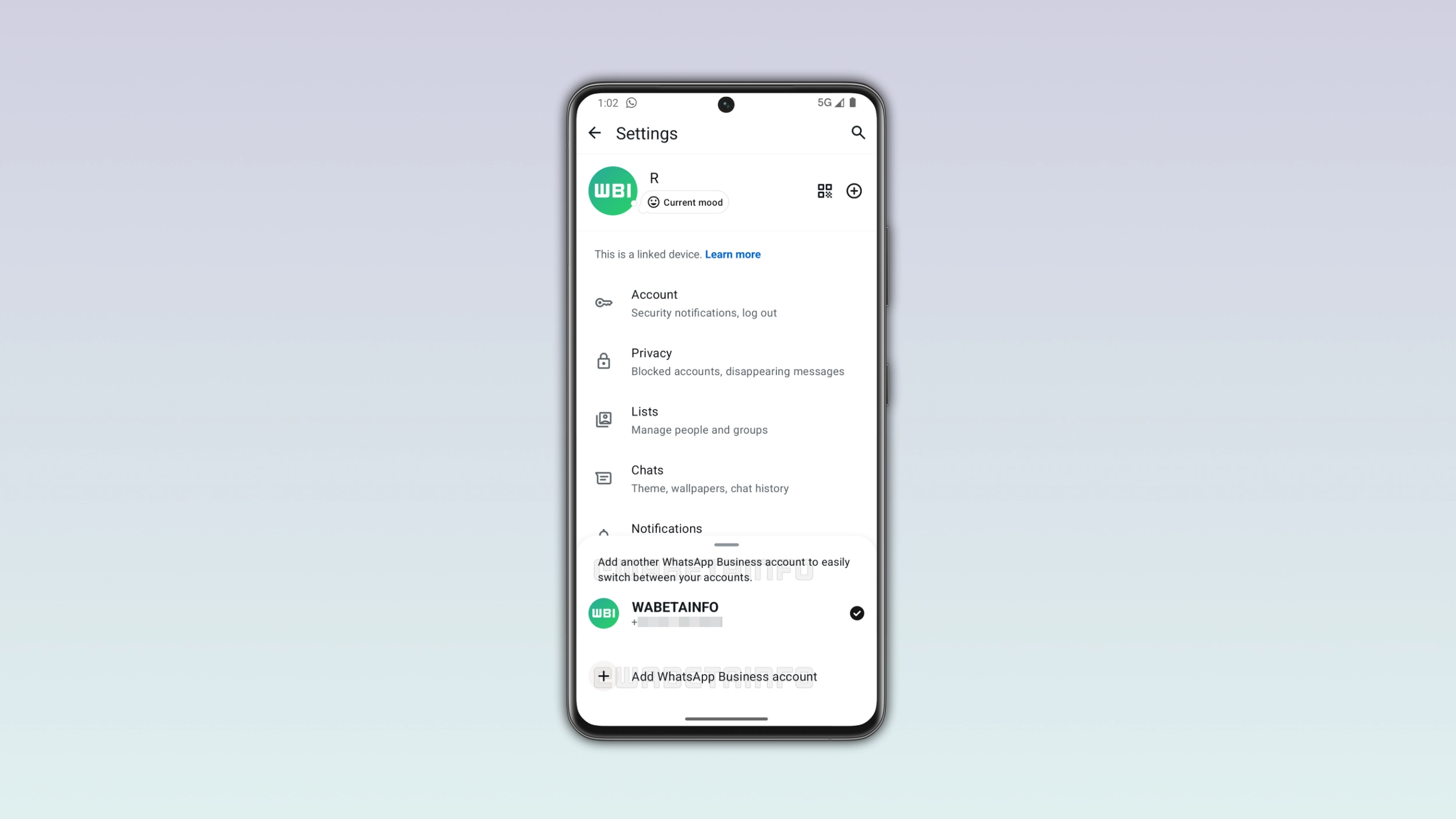
WhatsApp is now extending the same feature to its business app. This makes it easier for businesses to manage two different accounts on the same device. We discovered the news with the latest WhatsApp Business beta for Android 2.24.27.5 update, available on the Google Play Store. Specifically, WhatsApp is rolling out multi-account support, making it possible to add a second account on the same device.
How to check if multi-account is available on WhatsApp Business
If you already manage two accounts on WhatsApp Messenger, the experience on WhatsApp Business works exactly the same. Open WhatsApp Business, select the overflow menu and tap "Settings". At the top of the interface, you can see your account name. If you see the "+" button right next to your name, it means that the multi-account feature is available. Instead, the multi-account feature is not available yet in case you do not see that button.
How to add a second WhatsApp Business account
After tapping the "+" button, users can see a new menu where they can add a second WhatsApp Business account. The setup process works the same way as the first account, so there is nothing new to learn. Users just need to enter their second phone number and confirm it with the verification code. Both accounts run within the same app on the same Android device. As a result, users can finally run two completely separate business profiles without installing any parallel app or using a second phone.
How to switch between WhatsApp Business accounts
Once users set up a second account, they can switch to the other at any time. To do so, they need to tap the overflow menu within the Chats tab and select Switch accounts. The feature supports a maximum of two accounts, so users cannot add more than one additional account. Users can also see activity on the idle account, but they need to switch to it to read their conversations.
Some businesses need more than one WhatsApp Business account
Not every business runs on a single phone number. A company with two separate departments or two brands might need a second phone number. Before this update, users with two business numbers had to keep a second phone around or rely on other workarounds that were not always practical. With a second account on the same device, businesses no longer need a second phone to manage two numbers.
WhatsApp is aligning the two apps to the same experience
WhatsApp Messenger and WhatsApp Business share the same core messaging experience, but they don't always get new features at the same time. Multi-account is a good example of that. WhatsApp Messenger got it years ago, and WhatsApp Business is only now catching up. WhatsApp is putting more effort into keeping the two apps on the same page. The fewer differences there are between them, the more consistent the experience gets for users who rely on both.
WhatsApp is rolling out multi-account for WhatsApp Business beta testers
Multi-account support for the business app is currently available to some beta testers who install the latest WhatsApp updates from the Google Play Store. WhatsApp is rolling out this feature gradually, so not everyone will see it even after updating the app. If the option does not appear yet, it should become available to more accounts over the coming weeks. WhatsApp has not announced when this will be available to everyone in the stable version.
Connect with WABetaInfo
Follow WABetaInfo on X and visit our About page to learn more about what we do. We always appreciate your feedback on posts like this one.