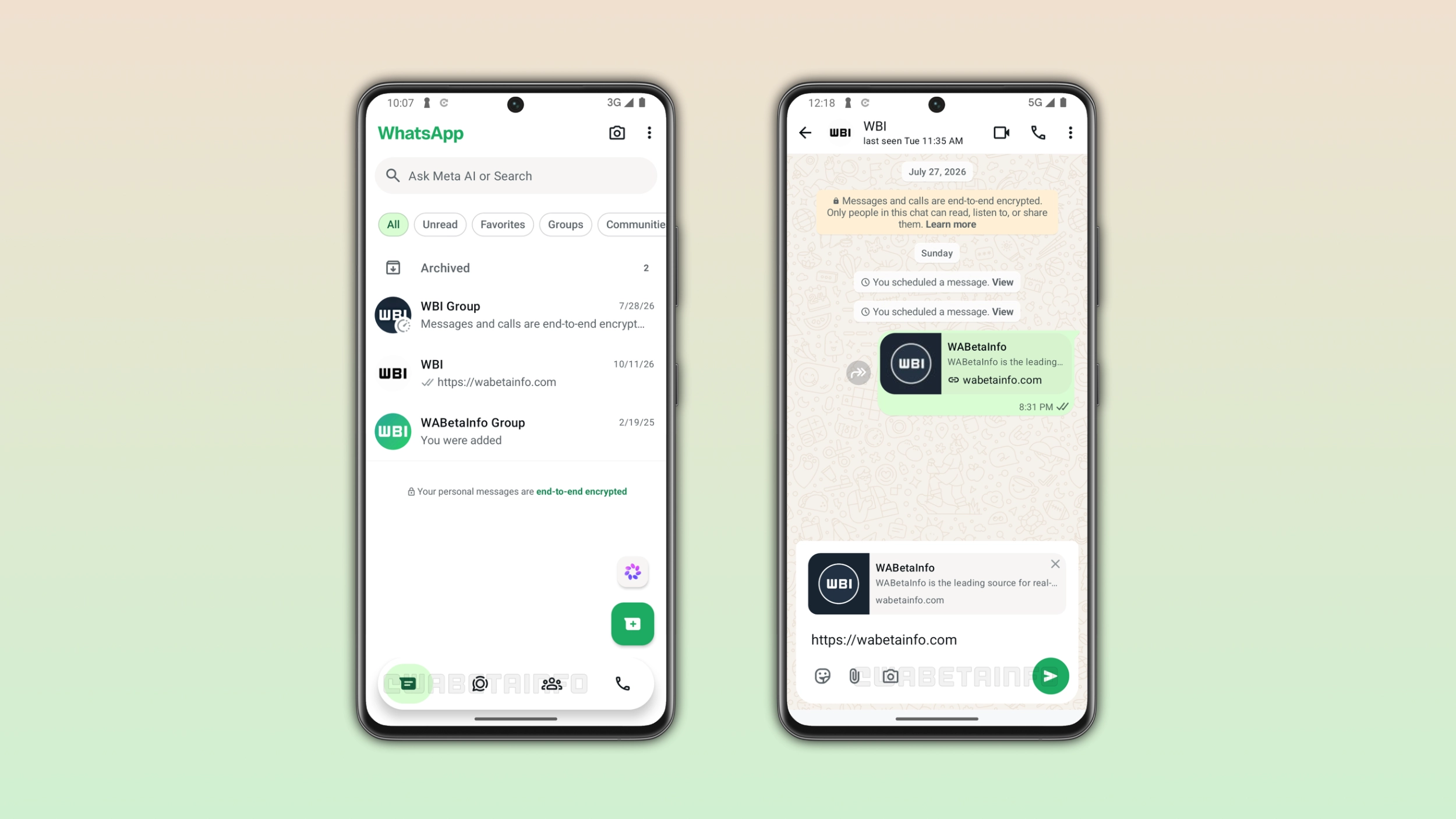
WhatsApp is developing two updates for the interface of the Android app. WhatsApp will introduce a new circular tab indicator for the bottom navigation bar. In addition, WhatsApp is working on a refreshed interface for the chat bar, making its design more modern.
| Key points | Details |
|---|---|
| Feature: | Redesigned bottom navigation bar and chat bar |
| Feature availability: | Some features may be under development, so they are not available to beta testers. Others may become available to users over time. If you're unable to access a certain feature, you will need to wait for a future update. |
| News shared last week: | WhatsApp introduces a new alert to protect devices and accounts! |
| Previous article: | WhatsApp is testing a redesigned chat bar for Android! |
Weekly WhatsApp beta updates: new features and improvements
This new weekly roundup brings together all the latest updates about WhatsApp beta shared this week. As a result, you can finally catch up on everything you might have missed from our past announcements. You can consider this summary as a way to keep up new features, improvements, and fixes. This week's highlight focuses on the new bottom navigation bar and the redesigned chat bar on Android. See what else we announced this week.
WhatsApp is refining the tab design in the bottom navigation bar
In the post about the WhatsApp beta for Android 2.26.41.7 update, we announced that WhatsApp keeps refining the bottom navigation bar. With this update, WhatsApp is working on improving the look of the tab indicator, the element that highlights the active tab. In a future update, WhatsApp will display a green circular shape to indicate the selected tab. The bottom navigation bar looks the same as the one we previously announced: floating, with rounded corners and without text labels.
The final design may still look different
WhatsApp will make the circular indicator larger and more prominent than the current pill shape. Despite being bigger, the circular style still looks clean because the shape is simple and symmetrical. This style is also similar to the design available on WhatsApp for iOS when users select a tab. In these weeks, WhatsApp has improved the design for the bottom navigation bar three times. However, there is likely more to come before WhatsApp makes the new bottom navigation bar available to the public.
WhatsApp is testing a redesigned chat bar for Android
WhatsApp is developing a new chat bar that makes the conversation screen more modern. The update will move the text input to the top of the chat bar, and the send button will no longer be a separate element outside the bar. WhatsApp is currently testing two different designs before deciding which one to release. Both of them bring these two changes as the core of the redesign.
Differences between the two designs
With the first design, WhatsApp still places the emoji button to the left side of the bar, while the attachment and camera buttons appear on the right next to the send button. With the second design, the emoji, attachment, and camera buttons all appear on the left side of the bar, and the right side has only the send button. WhatsApp has not announced the final design for the public release. As a result, the situation is similar to the bottom navigation bar, where WhatsApp has already updated the interface multiple times.
WhatsApp is rolling out scheduled messages on Android beta
With the WhatsApp beta for Android 2.26.40.7 update, WhatsApp is finally introducing a message scheduling feature. With this functionality, users can device when they want to send their text messages, photos, and videos. Users can schedule a message from the chat interface by tapping and holding the send button. Then, WhatsApp sends it automatically at the chosen time, even if the app is closed. The earliest a message can be scheduled is 10 minutes from the current time, and users can schedule a message up to two weeks in advance. Once users schedule a message, the app shows it in a dedicated section within the chat info screen. Here, users can see, manage, and delete their scheduled messages before the app sends them.
WhatsApp is testing a new sound sticker format on Android
WhatsApp is testing sound stickers that plays audio when users share it in a chat. A sound sticker looks like a standard sticker in the chat, but it includes a short audio track. Users who receive one will understand that there is something to hear by the audio icon over the sticker. On silent mode, sound stickers play without any audio. Note that WhatsApp is not only working on sound stickers for the official sticker store. Users will also be able to create their own sound stickers by combining a sticker with an audio clip.
WhatsApp is rolling out a redesigned Settings tab on iOS
WhatsApp is rolling out a redesigned Settings tab to make the interface easier to navigate. The new design replaces the old single-page layout with a two-section experience. The most used options are still available in the You tab. Instead, everything else is now available in a secondary menu accessible by tapping the gear icon in the navigation bar. The secondary menu still has the search bar at the top, making it simpler for users to find any setting without scrolling through the list.
WhatsApp is rolling out a softer edge effect for the chat interface
WhatsApp is restoring the soft edge effect for the navigation bar in the chat screen on iOS. When Apple introduced iOS 27, WhatsApp adopted its default navigation bar, which introduced a visible line between the navigation bar and the chat screen. Users shared negative feedback on social media by asking to restore the original look, and WhatsApp is finally listening to it. When the soft edge effect is active, WhatsApp applies a gradual blur below the navigation bar, so the content fades in slowly from the bottom of the bar.
WhatsApp launches guest calls for people without an account
WhatsApp is officially rolling out a feature that lets users invite anyone to their call, even if the other person does not have a WhatsApp account. Guests need to open the link in their browser, type in their name, and enter the waiting room. The host needs to approve the request to let them join the call. Guest calls support individual and group calls up to 32 participants. Guests can also share the screen, react with an emoji, and raise their hand. However, they cannot see the phone numbers of other participants, send messages, or add anyone else to the call. WhatsApp is also working on calendar integrations to let users create a WhatsApp call from Google Calendar or Outlook.
WhatsApp Web introduces an update to customize chat themes
This week, WhatsApp started to roll out 27 chat themes for the web client and the Windows app. Users can access the feature from the settings page, where they can open the Chat theme section and find the 27 themes in a grid layout. As soon as users select a theme, WhatsApp displays it in a live preview on the right side of the screen. When users select a theme, WhatsApp changes both the chat color and the wallpaper at the same time. This means that users do not need to set the color and the wallpaper separately. Only the user who sets a chat theme can see it, and other people in the conversation see their own theme or the default look if they have not set one.
WhatsApp Plus is rolling out Focus schedules to manage chat lists
WhatsApp is rolling out Focus schedules for chat lists. Premium subscribers can configure a schedule by opening the chat list settings, where they can find a new option called "New schedule". This feature lets users choose the allowed times for a list. Outside the allowed times, WhatsApp can automatically mute these chats, which silences notifications without removing them from the chat list. Users can also hide them from the chat list until the next allowed window. It is possible to create specific schedules for different lists and manage all of them from the chat list settings.
Connect with WABetaInfo
Follow WABetaInfo on X and visit our About page to learn more about what we do. We always appreciate your feedback on posts like this one.