WhatsApp is testing a redesigned chat bar for Android
After testing a redesigned bottom navigation bar, WhatsApp is now working on a new look for the chat bar on Android. With the tweaked layout, WhatsApp will move the send button into the bar and the text input at the top. WhatsApp is currently testing two different designs before deciding which one to release.
| Key Points | Details |
|---|---|
| Feature: | Redesigned chat bar |
| Status: | Under development |
| Availability info: | This feature is currently in development and not yet available for beta testing. |
| Previous news: | WhatsApp is refining the tab design in the bottom navigation bar! |
WhatsApp is refining the bottom navigation bar on Android
In the post about the WhatsApp beta for Android 2.26.41.7 update, we announced new enhancements for the new bottom navigation bar. In a future update, WhatsApp will switch the indicator that shows which tab users selected from a pill shape to a circular one. WhatsApp is also working on refining the overall layout of the bottom navigation bar, which floats above the screen with rounded corners and no text labels. WhatsApp is still redesigning the bottom navigation bar, and more updates may be available later.
WhatsApp is working on a redesigned chat bar
WhatsApp keeps working on improving the interface for the Android app. The bottom navigation bar is not the only element that WhatsApp is redesigning. Finally, WhatsApp is also developing a new chat bar that makes the conversation screen more modern. We discovered this with the WhatsApp beta for Android 2.26.41.11 update, which is available on the Google Play Store. With this update, WhatsApp is testing a redesigned chat bar with two different designs.
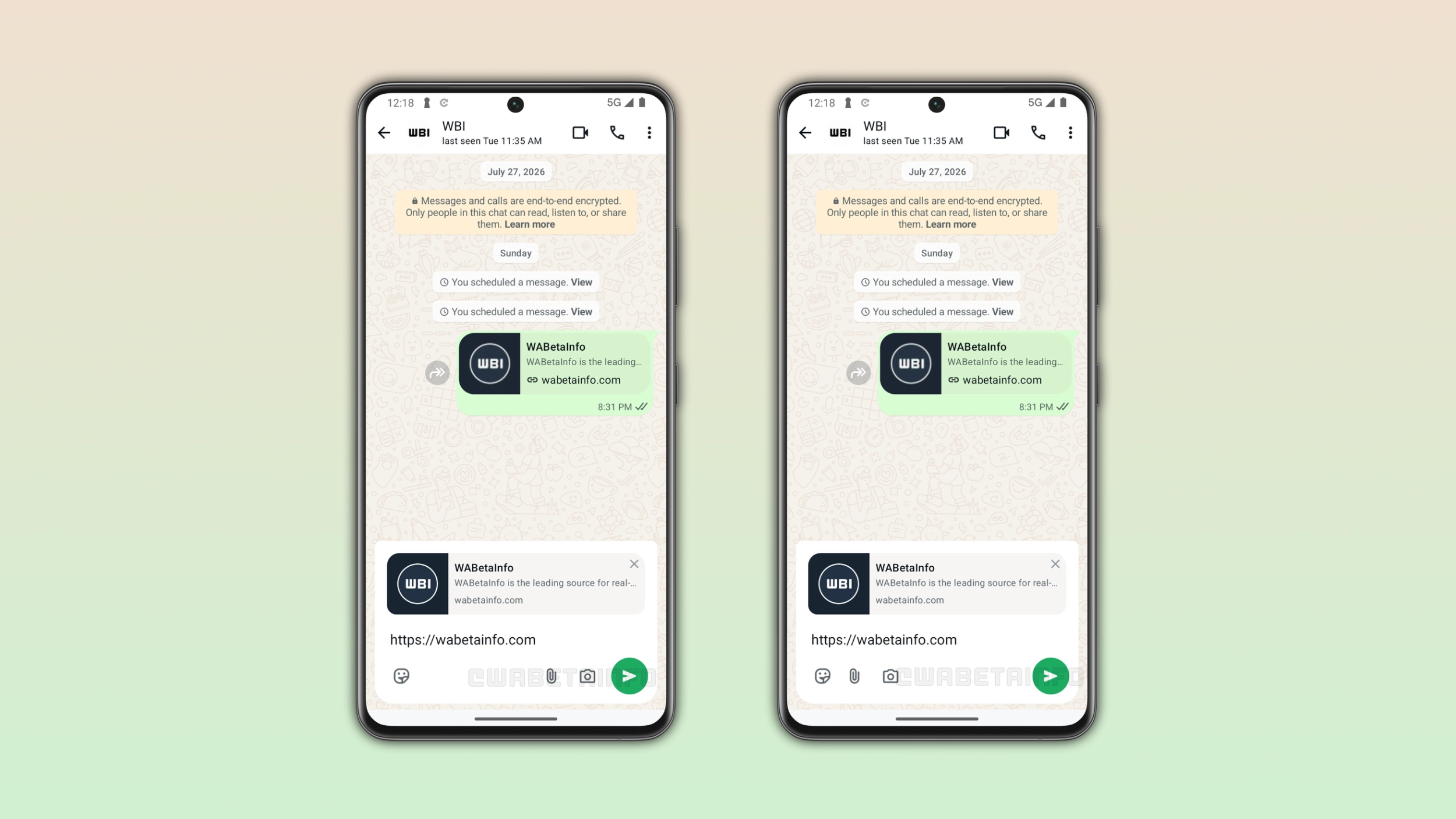
What the new chat bar looks like
There are two important changes regarding the revamped chat bar. WhatsApp will move the text input to the top of the chat bar, right above the button that opens the emoji keyboard. The send button will no longer be a separate element outside the bar. The update makes the send button part of the bar, and it will keep the same circular style integrated into the layout. WhatsApp is bringing these two changes to both designs, and they represent the core of the redesign.
The first design and how it differs from the current bar
With the first design, WhatsApp still places the emoji button to the right side of the bar. Regarding the attachment and camera button, WhatsApp places them on the left, next to the send button. This arrangement keeps the left side of the bar similar to what users already know from the current layout. The main difference is the text input at the top and the send button within the chat bar.
The second design and what makes it different
With the second design, WhatsApp is introducing a more tweaked layout. The emoji, attachment, and camera buttons appear on the left side of the bar. The right side has only the send button. Unlike the first design, the send button is the only element on the right side of the bar. Probably, this configuration is the more minimal layout of the two designs.
Why WhatsApp may keep refining the design before the release
WhatsApp has not announced the final design for the public release. The situation is similar to the bottom navigation bar, where WhatsApp has already updated the interface multiple times. WhatsApp may introduce further changes to the chat bar before it becomes available to the public. As a result, what we are seeing now may not be the final design.
WhatsApp is developing the redesigned chat bar for a future Android update
The redesigned chat bar is currently under development on Android. At the moment, the new chat bar is not available yet because WhatsApp has not enabled it for beta testers. WhatsApp will make it available to some users in the future. However, WhatsApp has not announced when the new chat bar will be available to everyone.
Connect with WABetaInfo
Follow WABetaInfo on X and visit our About page to learn more about what we do. We always appreciate your feedback on posts like this one.