WhatsApp Web introduces an update to customize chat themes
WhatsApp is rolling out 27 chat themes for the web client, making it simpler for users to personalize their conversations. With this feature, users can choose a theme that changes both the chat color and the wallpaper at the same time. The same update is also available on WhatsApp for Windows.
| Key Points | Details |
|---|---|
| Feature: | Chat themes |
| Status: | Rolling out |
| Availability info: | This feature is available to some users, and it is rolling out to more people over the coming weeks. |
| Thanks: | Sc, IgnacioAF, and Muhammad Hammad, for testing and reporting. |
| Previous news: | WhatsApp launches guest calls for people without an account! |
WhatsApp Web was testing chat themes
In May, we announced that WhatsApp was working on bringing chat themes to the web client. The feature offers 39 themes, giving users new tools to personalize their conversations. Users would be able to apply a theme to all conversations or set one for specific chats. WhatsApp also worked on 8 themes that include a wallpaper with brighter and more vibrant colors. When users set a theme, it appears only in their conversation.
WhatsApp is introducing chat themes on the web client
After working on this feature for several months, WhatsApp is finally making chat themes available to some users on the web. It is possible to access this feature from the settings page, where users can open the Chat theme section and find 27 chat themes. WhatsApp also added a real-time preview that lets users see how a theme looks before applying it. Users need to join the beta program for WhatsApp Web to check if the feature is available on their account.
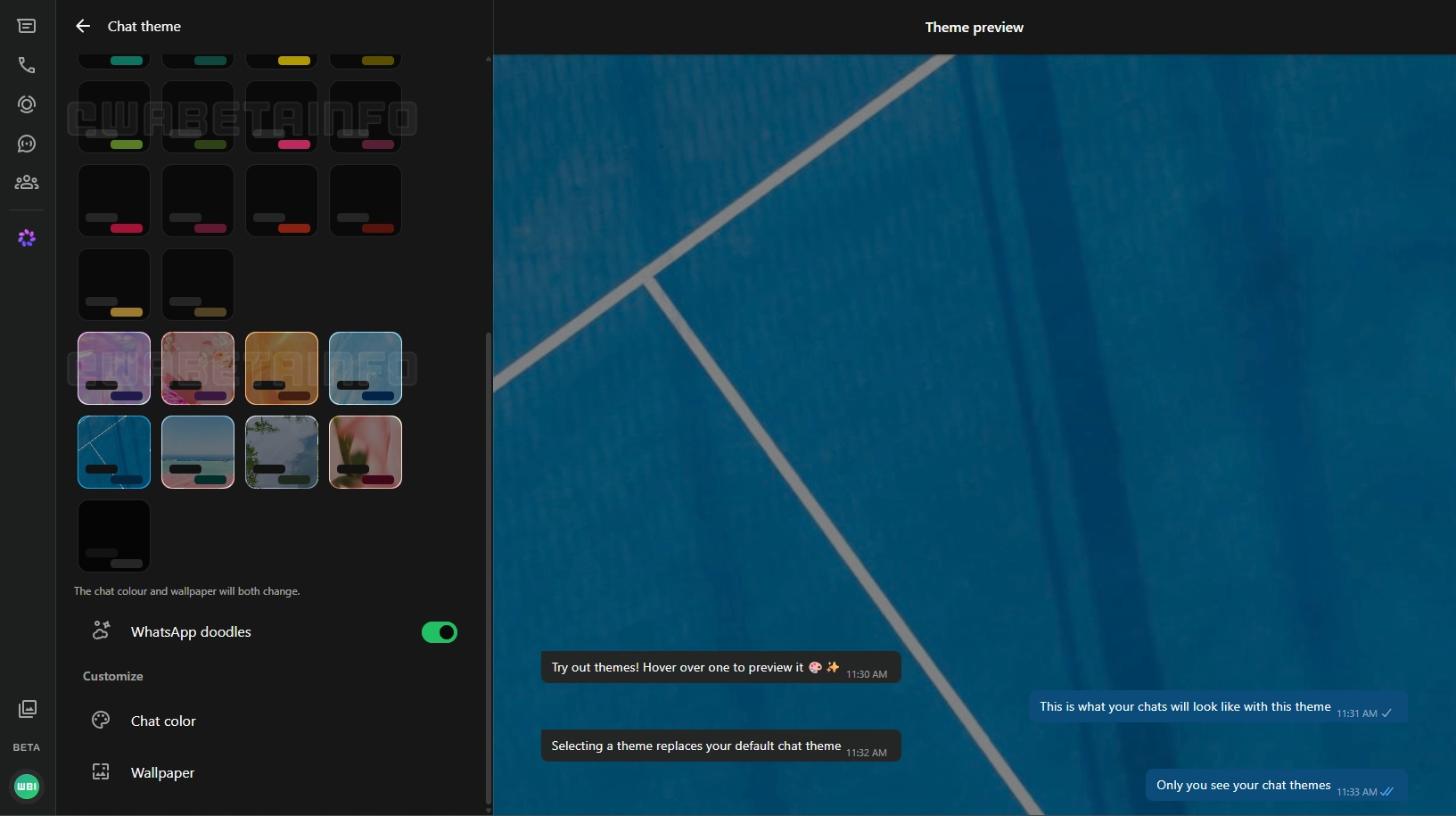
How to choose and preview a chat theme on WhatsApp Web
Users can change their chat theme by opening the section from the settings page. Here, WhatsApp shows 27 chat themes in a grid layout, making it easier for users to discover the best one that fits their preferences. For every theme, WhatsApp shows a small preview of its wallpaper and colors. As soon as users select a theme, WhatsApp displays it in a live preview on the right side of the screen. This feature allows users to see exactly how their chats will look before saving the changes. It is possible to restore the default theme at any time by tapping the first option at the top of the page.
What changes when users select a theme
When users select a theme, WhatsApp changes both the chat color and the wallpaper at the same time. This means that users do not need to set the color and the wallpaper separately. Instead, WhatsApp will automatically adjust the color based on the chat theme. WhatsApp applies the theme immediately for all conversations if they change it from the settings page. However, users can also choose a different theme for specific chats right from the chat info screen.
How users can customize a theme further
Users can further customize the look of their conversations by choosing a wallpaper and a color manually. As a result, users are not limited to the chat themes available in this section. Instead, WhatsApp lets users create a look that preset themes do not offer. Users can also choose whether default wallpapers display doodles. This lets users add or remove the classic pattern that appears on the chat background.
Chat themes are private
WhatsApp is building chat themes on the web with privacy in mind. Only the user who sets a chat theme can see it. Other people in the conversation see their own theme, or the default look if they have not set one. This means that users can personalize their experience without affecting how the conversation looks for anyone else. However, WhatsApp is also testing a feature that will allow users to sync their theme and wallpaper with other people. At the moment, this feature is not available yet.
WhatsApp Web is rolling out chat themes on the Web and Windows
Chat themes are available to some users on the latest beta version of WhatsApp Web. WhatsApp is rolling them out gradually, so not every user can customize their conversations right now. If the option does not appear yet, it should become available to more accounts over the coming weeks. Note that WhatsApp is also making this feature available on the Windows app. Since WhatsApp for Windows relies on the web client for certain features, the chat theme experience is the same on both platforms.
Connect with WABetaInfo
Follow WABetaInfo on X and visit our About page to learn more about what we do. We always appreciate your feedback on posts like this one.