WhatsApp is rolling out a redesigned Settings tab on iOS
With the latest update, WhatsApp is bringing a more simplified design to the Settings page. The new redesigned interface makes it easier for users to find the most used options in the main screen. The less frequently used options are available in a separate menu through the gear icon in the navigation bar.
| Key Points | Details |
|---|---|
| Feature: | Redesigned Settings tab |
| Status: | Rolling out |
| Compatibility: | WhatsApp beta for iOS 26.40.10.76 is a compatible update. |
| Availability info: | This feature is available to some beta testers, and it is rolling out to more people over the coming weeks. |
| Thanks: | Sc and Fuxrics, for testing and reporting. |
| Previous news: | WhatsApp is testing a new sound sticker format on Android! |
WhatsApp was testing a simplified Settings page on iOS
In the post about the WhatsApp beta for iOS 26.40.10.21 update, we announced a new layout for the Settings page. Since WhatsApp keeps adding many new options to the Settings tab, users had to scroll through this section just to find a specific setting. The redesigned tab shows the most used options, and everything else is available in a separate page. As a result, WhatsApp decided to split the tab into two sections to make settings easier to find.
WhatsApp is introducing the redesigned Settings tab
We announced the new design for the Settings tab a few days ago. This week, WhatsApp is already making it available to some beta testers. The new structure is the same one we described in our previous report. We discovered this with the WhatsApp beta for iOS 26.40.10.76 update, which is available on TestFlight. With this update, WhatsApp is rolling out a redesigned Settings tab. The new design replaces the old single-page layout with a two-section experience.
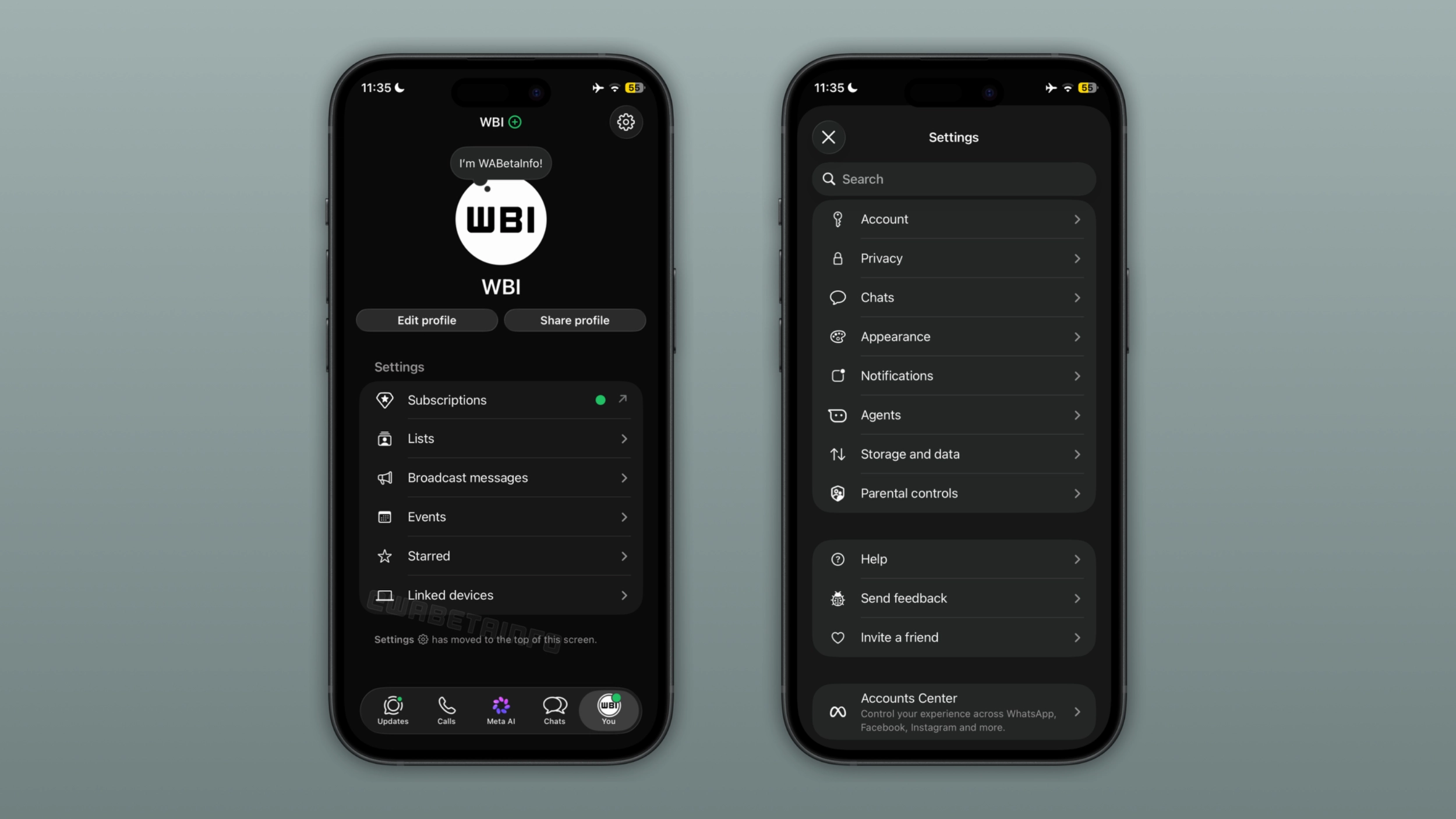
What the new You tab looks like
At the top of the new Settings tab, users can still see their profile photo. They can see their status message above the photo, where it is possible to choose a message that appears to anyone who views the profile. Users can edit their profile and share it with others by tapping one of the two buttons below their name. In this section, users can find the most relevant options WhatsApp considers important enough to keep visible. These include Subscriptions, Lists, Broadcast messages, Events, Starred, and Linked devices. A small note at the bottom of the screen informs users that more settings are available in a separate screen by tapping the gear icon at the top of the tab.
What the separate Settings menu includes
When users tap the gear icon within the navigation bar, WhatsApp opens the secondary settings page. It still has the search bar at the top, making it simpler for users to find any setting without scrolling through the list. The menu holds other settings WhatsApp moved out of the main list: Account, Privacy, Chats, Appearance, Notifications, Agents, Storage and data, and Parental controls. Below these options, users can find Help, Send feedback, and Invite a friend. At the bottom of the page, users can find the Accounts Center, which lets users connect their WhatsApp account to their other Meta accounts.
Why WhatsApp redesigned the Settings page
WhatsApp keeps adding new options to the Settings page on iPhone, making the list longer every time there is a new feature. For users who want to check their linked devices or find their starred messages, more settings may make the page harder to scan. The new layout separates the settings users open frequently from others they rarely need. The most used options are immediately visible in the You tab, while everything else is one tap away in the secondary menu.
WhatsApp is making the iOS app easier to navigate section by section
WhatsApp has updated several sections of the app this year, and the Settings page is the most recent example. Earlier this year, WhatsApp redesigned the group chat info screen with a tab system to make it easier to navigate. Recently, WhatsApp introduced a new navigation experience for chats that presents a shortcut menu with the most useful options. With the redesign for the Settings tab, WhatsApp is introducing the same simplification to one of the most visited sections of the app.
WhatsApp is rolling out the redesigned Settings tab to iPhone beta testers
The redesigned Settings tab is currently available to some users who install the latest update from TestFlight. WhatsApp is rolling it out gradually, so not every beta tester will see the new layout immediately. If users still see the old Settings page, they will get the new interface over the coming weeks. WhatsApp has not announced when the new Settings tab will be widely available.
Connect with WABetaInfo
Follow WABetaInfo on X and visit our About page to learn more about what we do. We always appreciate your feedback on posts like this one.