WhatsApp is refining the tab design in the bottom navigation bar
WhatsApp continues to work on the new bottom navigation bar for Android by focusing on the tab design. WhatsApp plans to update its selection style from a pill shape to a circular indicator. This will make the selected tab look more refined and consistent with the updated bottom navigation bar.
| Key Points | Details |
|---|---|
| Feature: | Redesigned bottom navigation bar |
| Status: | Under development |
| Availability info: | This feature is currently in development and not yet available for beta testing. |
| Previous news: | WhatsApp Plus rolls out Focus schedules for chat lists! |
WhatsApp has been refining the bottom navigation bar
In the post about the WhatsApp beta for Android 2.26.38.10 update, we announced that WhatsApp is working on a redesigned bottom navigation bar. The new bar floats above the screen with rounded corners, making the design more modern. With the WhatsApp beta for Android 2.26.39.10 update, we also noted that WhatsApp was testing a label-free version of the same bar. In these reports, we clarified that the design was not final since WhatsApp would continue to refine it.
WhatsApp is testing a new tab selection style
WhatsApp keeps refining the bottom navigation bar to make it look cleaner. Now, WhatsApp is working on improving the look of the tab indicator, the element that highlights the active tab. We discovered this with the WhatsApp beta for Android 2.26.41.7 update, which is available on the Google Play Store. With this update, WhatsApp is refining the tab design in the bottom navigation bar with a new circular shape. In the future, WhatsApp will implement the new look of the bottom navigation bar.
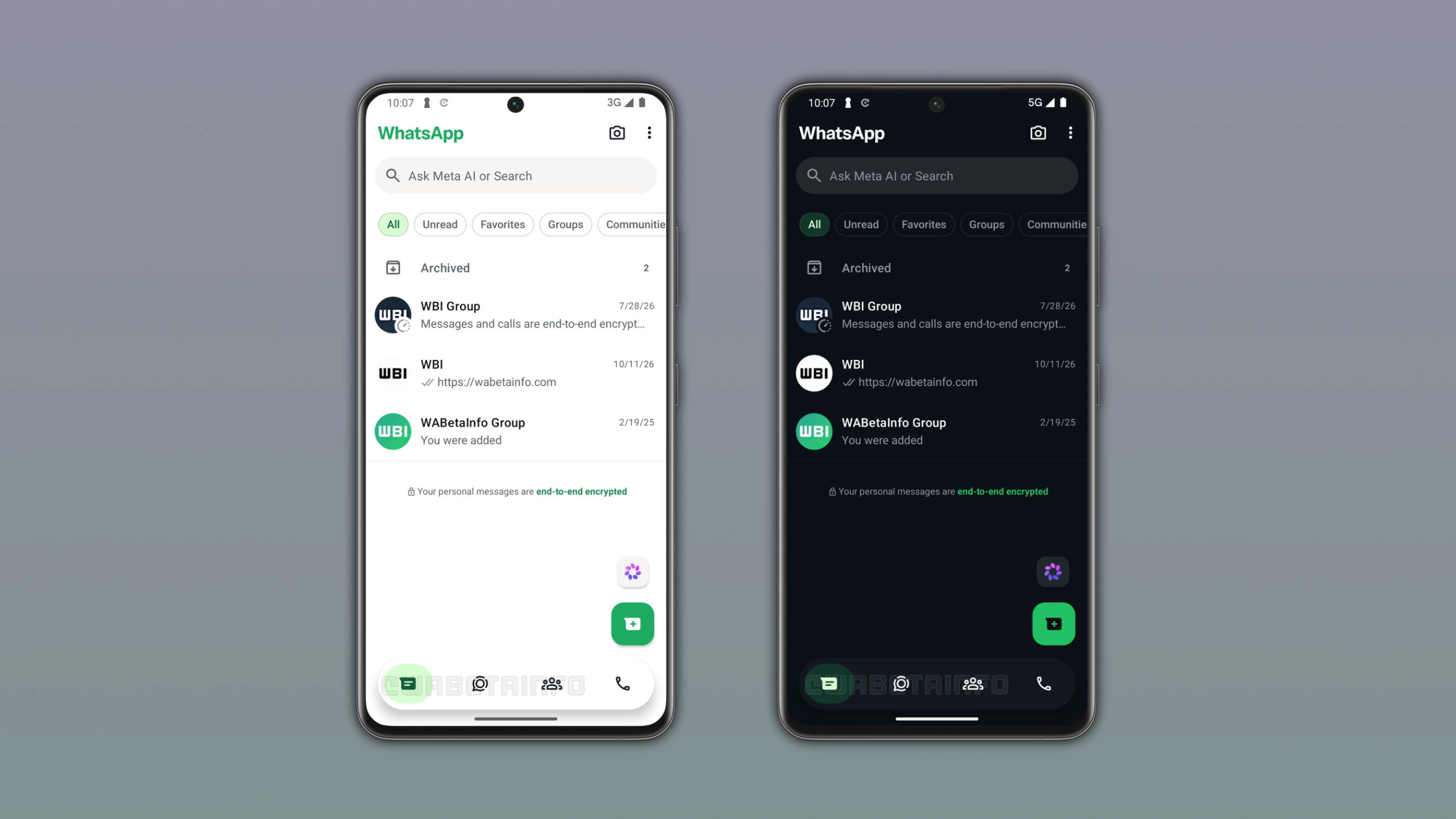
What the new tab selection style looks like
At the moment, the indicator that shows which tab the user selected is a pill shape. It is a wide, rounded rectangle that appears behind the active tab's icon. In a future update, WhatsApp will display a green circular shape to indicate the selected tab. The bottom navigation bar looks the same as the one we previously announced: floating, with rounded corners and without text labels. The only difference from the previous version is the shape of the selected tab.
How the new tab selection style differs from the pill shape
Users can immediately notice the difference between these two styles. The pill shape extends horizontally behind the icon, and it is relatively contained. Instead, the circular indicator is larger and more prominent. It fills more space below the icon. Despite being bigger, the circular style still looks clean because the shape is simple and symmetrical. This style is also similar to the design available on WhatsApp for iOS when users select a tab.
Why this update confirms the bar is still not final
In our previous posts, we reported that the bottom navigation bar was still in an early stage. As a result, WhatsApp would likely keep adjusting it. Refreshing the style of the selected tab was clearly the next step. However, WhatsApp is still deciding which direction to take to improve the bottom navigation bar.
What to expect from the new bottom navigation bar
In these weeks, WhatsApp has improved the design for the bottom navigation bar three times. The first time, WhatsApp refreshed the whole interface by introducing a floating layout. In the second update, WhatsApp removed the text labels from the icons. Now, WhatsApp is refining the style of the selected tab. We have been following this evolution with our community from the first day. However, there is likely more to come before WhatsApp makes the new bottom navigation bar available to the public. Since the final design may still look different, we will continue to report any further changes as they are ready.
WhatsApp is still developing the bottom navigation bar for Android
The redesigned bottom navigation bar is under development on Android. Since it's in development, the new bottom navigation bar is not available to the public. WhatsApp will make it available to some users in a future update. At the moment, WhatsApp has not announced when the new navigation bar will be available.
Connect with WABetaInfo
Follow WABetaInfo on X and visit our About page to learn more about what we do. We always appreciate your feedback on posts like this one.