WhatsApp is rolling out scheduled messages on Android beta
WhatsApp is finally introducing a feature that lets users schedule their text messages, photos, and videos. The update makes it easier for users to decide when they want to send a message, even if their device is offline. The feature is compatible with both individual and group chats.
| Key Points | Details |
|---|---|
| Feature: | Scheduled messages for Android |
| Status: | Rolling out |
| Compatibility: | WhatsApp beta for Android 2.26.40.7 is a compatible update. |
| Availability info: | This feature is available to some beta testers, and it's rolling out to more people over the coming weeks. |
| Previous news: | WhatsApp introduces a new alert to protect devices and accounts! |
WhatsApp was working on scheduled messages for Android
In the post about the WhatsApp beta for Android 2.26.8.11 update, we announced a feature to schedule messages. This functionality lets users compose a message and send it at a specific date and time. Users would access it by tapping and holding the send button. This action will present a bottom sheet where it is possible to choose the delivery time. The update would also offer a dedicated section in the chat info screen where users could manage their scheduled messages before they are delivered.
WhatsApp is introducing scheduled messaging on Android
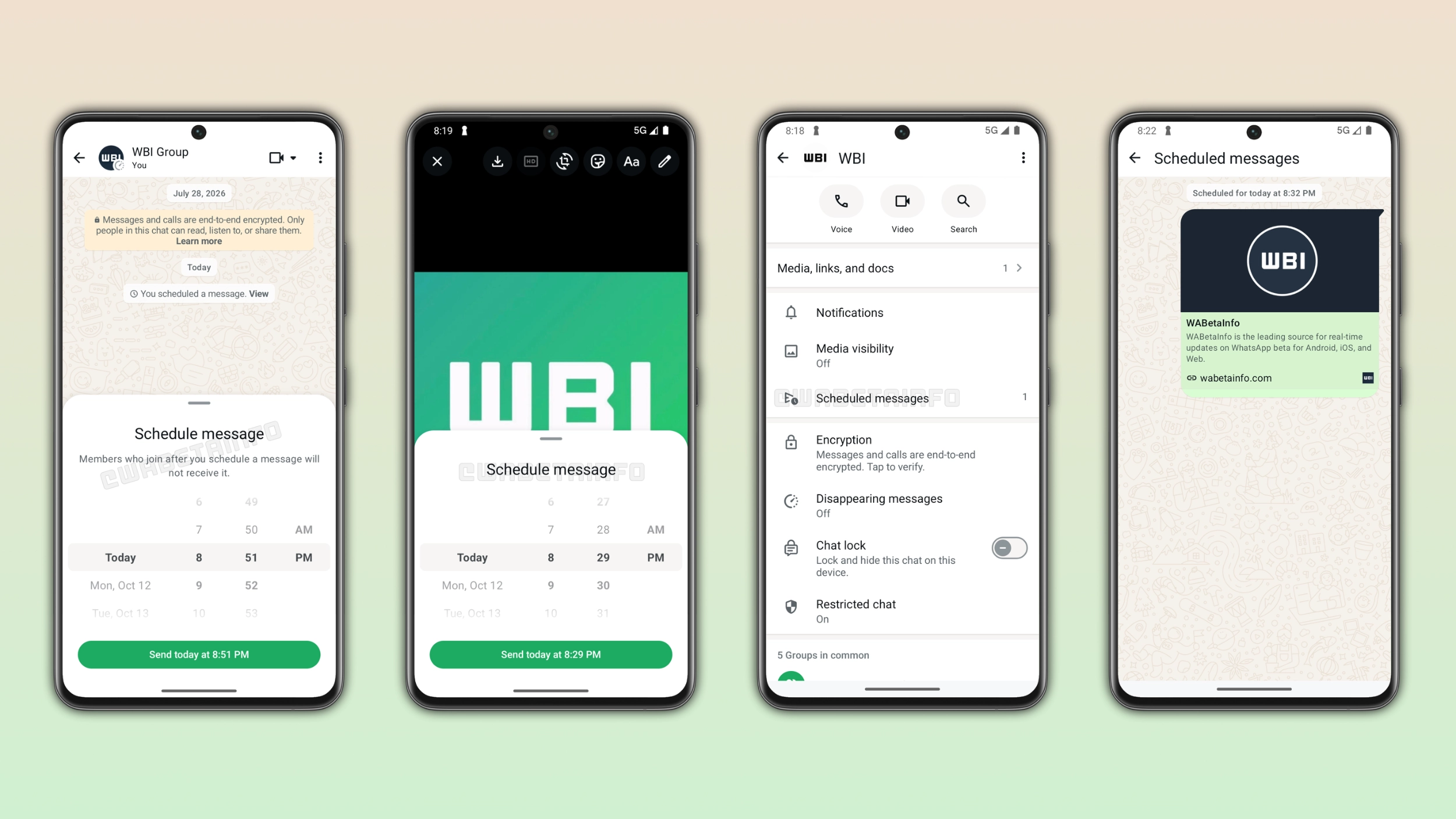
WhatsApp developed this feature for several months ahead of the official release. Finally, WhatsApp is now ready to let a limited number of users test it in their chats and groups. With this feature, users can schedule a message and the app will deliver it on a specific date, even if the device is offline. We discovered the news with the WhatsApp beta for Android 2.26.40.7 update, which is available on the Google Play Store. With this update, WhatsApp is rolling out the ability to schedule messages to some beta testers. At the moment, message scheduling supports text, links, photos, and videos, and it's compatible with end-to-end encryption.
How to schedule a text message on WhatsApp
Users can schedule a message from the chat interface. After entering a message in the chat text input, they need to tap and hold the send button in the chat. If the feature is available, this action shows an interface where users can decide when they want to send the message. The app does not send the message immediately, but it schedules its delivery until the chosen moment. Then, WhatsApp sends it automatically at the chosen time, even if the app is closed. The feature is also compatible with links.
WhatsApp supports scheduled photos and videos
Users can also schedule photos and videos to deliver at a specific time. When users open the gallery picker within a conversation, they can tap and hold the send button after selecting a photo or a video. However, the feature only supports one item at a time. This means that users cannot schedule multiple photos or videos in the same scheduled message. WhatsApp also supports scheduling from the drawing editor, where users can edit the photo or add a caption before choosing when to send it.
How far ahead users can schedule a message
WhatsApp gives users a flexible window to schedule their messages. The earliest a message can be scheduled is 10 minutes from the current time. This allows users to make any last-minute changes to their scheduled messages. In addition, users can schedule a message up to two weeks in advance. For example, users can schedule a message for later in the day or plan a birthday greeting two weeks in advance.
How to manage scheduled messages
Once users schedule a message, the app shows it in a dedicated section within the chat info screen. In this section, users can see, manage, and delete their scheduled messages before the app sends them. The recipient never gets a notification when users delete a scheduled message. They cannot even see that the sender scheduled the message.
How scheduled messages work in group chats
This feature is also compatible with group chats. However, there is one important detail to mention. WhatsApp sends a scheduled message only to the members who are part of the group when the sender scheduled it. If someone joins the group after they scheduled a message, they will not receive it. This keeps the message relevant to the group as it was when the user scheduled it. It also avoids to share information with people who were not in the group yet.
WhatsApp is rolling out scheduled messages to Android beta testers
Scheduled messages are available to some beta testers who install the latest update from the Google Play Store. If you cannot schedule messages, note that this feature should become available to more accounts over the coming weeks. Since WhatsApp is gradually rolling it out, the feature is not immediately available to everyone. However, the recipient can receive scheduled messages even if they cannot send one.
Connect with WABetaInfo
Follow WABetaInfo on X and visit our About page to learn more about what we do. We always appreciate your feedback on posts like this one.