WhatsApp Plus is rolling out Focus schedules to manage chat lists
WhatsApp is bringing a new feature to the premium plan that lets subscribers decide when they want to receive notifications from specific chat lists. Users can set allowed times for a list, and WhatsApp will automatically mute or hide its chats outside of those hours. This allows premium subscribers to create rules to manage their conversations.
| Key Points | Details |
|---|---|
| Feature: | Focus schedules for chat lists |
| Status: | Rolling out |
| Compatibility: | WhatsApp beta for Android 2.26.41.6 is a compatible update. |
| Availability info: | This feature is available to WhatsApp Plus subscribers on the latest versions of WhatsApp for Android. |
| Thanks: | UnluckyTester, Sniper, Sc, for testing and reporting. |
| Previous news: | WhatsApp Web introduces an update to customize chat themes! |
WhatsApp Plus was testing Focus schedules for chat lists
In the post about the WhatsApp beta for Android 2.26.39.9 update, we announced a feature called Focus schedules. Focus schedules let subscribers assign specific rules to notifications for chat lists. By following these rules, WhatsApp can automatically mute or hide them outside of the allowed hours. The feature is part of the second set of premium benefits, which also introduced custom emojis for the reaction tray.
WhatsApp is now rolling out Focus schedules to Plus subscribers
Today, WhatsApp is making this feature available to premium subscribers. This allows them to configure how and when WhatsApp notifies them about specific chat lists. We discovered this with the WhatsApp beta for Android 2.26.41.6 update, which is available on the Google Play Store. Specifically, WhatsApp is rolling out Focus schedules for chat lists to some beta testers.
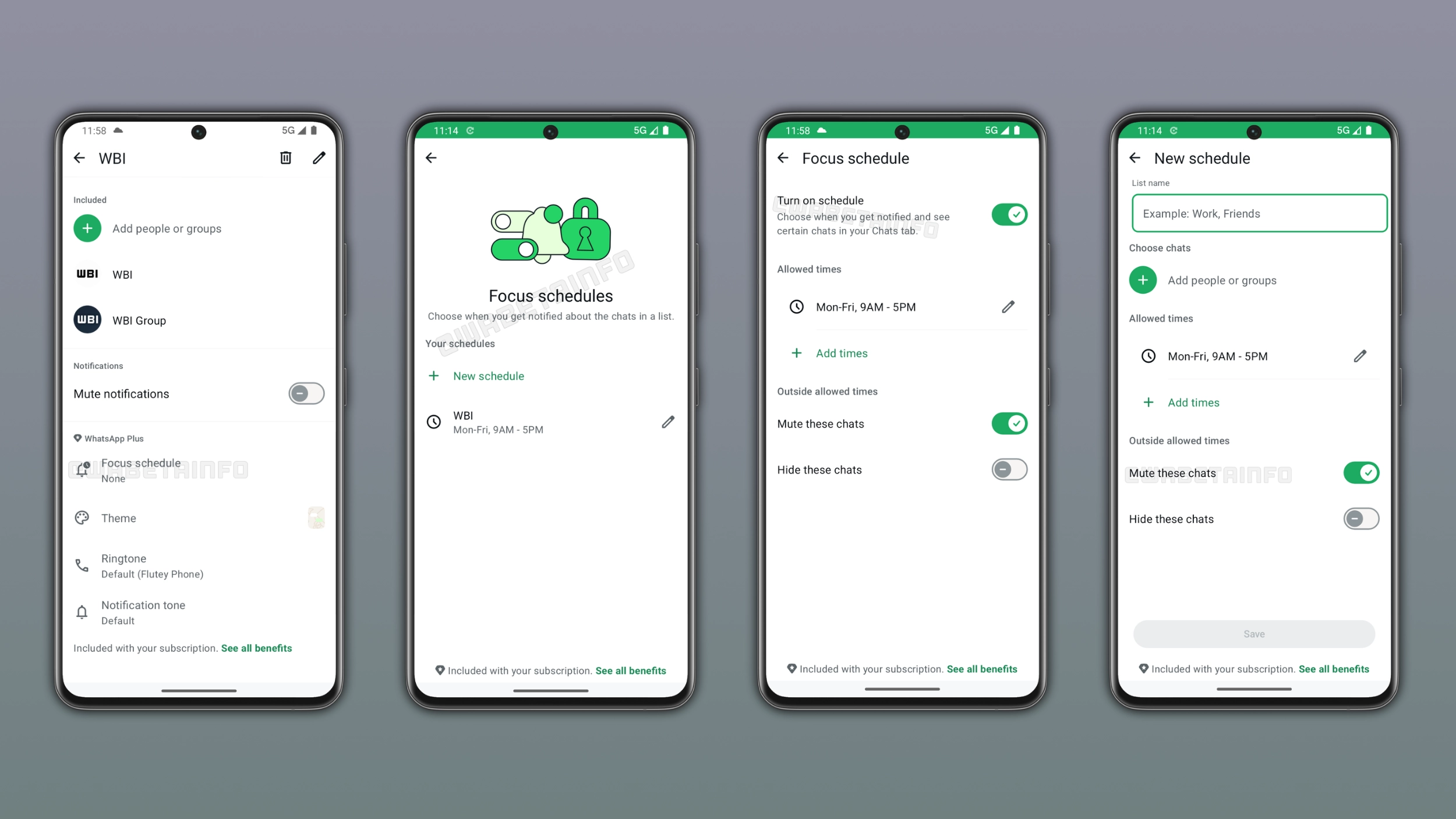
How to set up a Focus schedule for a chat list
People who subscribed to WhatsApp Plus can configure a schedule by opening the chat list settings. In this screen, they can find a new option called "New schedule", which lets users choose a name for the configuration and which chats and groups to include. They can also set the allowed times, so the hours when the app can display notifications from the list. Users can choose multiple time windows for the same schedule. For example, a notification schedule can cover both morning and afternoon on weekdays.
What happens during and outside allowed times
During the allowed times, WhatsApp shows notifications from the chat list normally. This means that users can receive notifications and interact with those chats without any restrictions. Outside the allowed times, WhatsApp applies the rule the user configured in the previous step. The most important control is offered by the chat visibility settings. This allows users to mute these chats automatically, which silences notifications without removing them from the chat list. In addition, users can hide them from the chat list until the next allowed window. These features are optional, so it's up to the user to decide if they want to mute their chats or hide them from the list.
How Focus schedules work with multiple lists
It's possible to create specific schedules for different lists. For example, a user might set a Work list to active from Monday to Friday, 9AM to 5M. When work hours end, WhatsApp mutes the Work list automatically. Users can manage all their schedules from the chat list settings, where WhatsApp shows the name and active time window.
Why Focus schedules are a valuable addition to WhatsApp Plus
With the premium plan, WhatsApp is giving subscribers more control over how the app works. Users can customize their app theme, reactions, and pin more than three chats. But now, it's also possible to choose when a chat list should send notifications and when it should not. Instead of manually managing multiple chats, subscribers can set a rule once and WhatsApp will handle them automatically. With this feature, WhatsApp is expanding the premium plan, and more is coming in the future.
WhatsApp Plus rolls out Focus schedules to Android beta testers
This feature is available to some users who install the latest update from the Google Play Store. WhatsApp is rolling it out gradually, so not every user will see the feature immediately. If the Focus schedule option does not appear in the list settings, it should become available to more accounts over the coming weeks. WhatsApp has not announced when this feature will be available to everyone.
Connect with WABetaInfo
Follow WABetaInfo on X and visit our About page to learn more about what we do. We always appreciate your feedback on posts like this one.