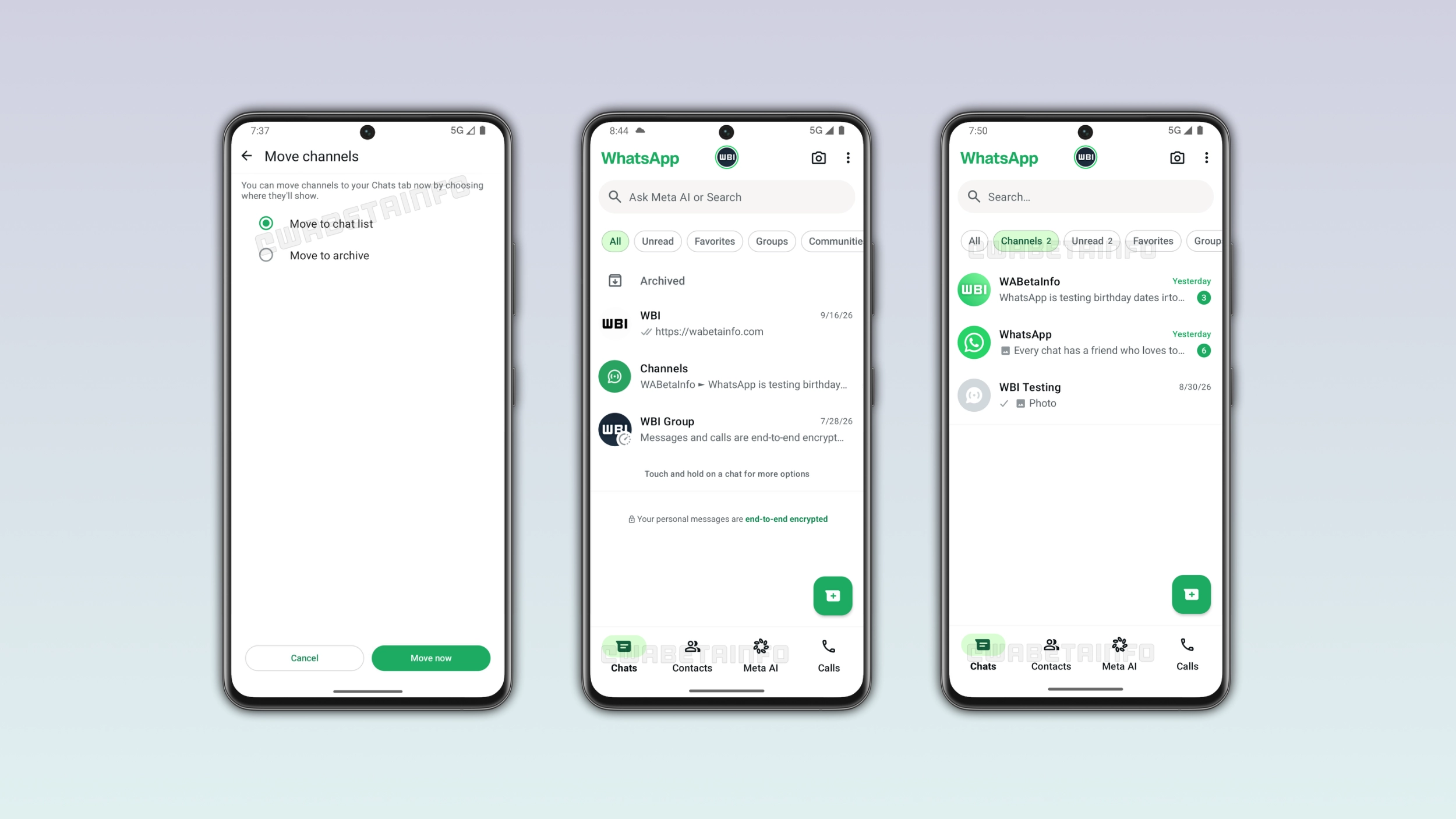
WhatsApp plans to integrate channels directly into the chat list on iOS and Android. Users will no longer need to switch to a separate tab to find their channels. Once WhatsApp moves channels to the Chats tab, the Updates tab will disappear. WhatsApp can then introduce the Contacts tab, a new section where users can see who is currently active.
| Key points | Details |
|---|---|
| Feature: | Channels in the Chats tab |
| Feature availability: | Some features may be under development, so they are not available to beta testers. Others may become available to users over time. If you're unable to access a certain feature, you will need to wait for a future update. |
| News shared last week: | WhatsApp is working on birthday reminders for contacts! |
| Previous article: | WhatsApp is rolling out the Restricted Chat feature on iOS beta! |
Weekly WhatsApp beta updates: new features and improvements
This new weekly roundup brings together all the latest updates about WhatsApp beta shared this week. As a result, you can finally catch up on everything you might have missed from our past announcements. You can consider this summary as a way to keep up new features, improvements, and fixes. This week's highlight focuses on channels, which WhatsApp will move to the Chats tab in the future. See what else we announced this week.
WhatsApp is rolling out Channel Status to more channels
WhatsApp is expanding status updates to more channels and users on Android and iOS. With this feature, channel admins can share temporary photo and video updates that disappear after 24 hours. Admins can create a status directly from the channel interface or from the Updates tab as soon as WhatsApp enables the feature for their channel. Once an admin posts a Channel Status, followers can see it in the Updates tab, in the channel interface, and in the channel info screen. Admins cannot request access for their channels, as WhatsApp enables the feature on its own terms.
WhatsApp is testing channels in the Chats tab on Android
With the WhatsApp beta for Android 2.26.39.1 update, we announced that WhatsApp will bring channels to the Chats tab. Users who already follow channels will see a prompt to decide where they should see them. The first option moves channels into the chat list, while the second option will automatically archive them. WhatsApp is testing three different configurations to show channels in the Chats tab, and it will decide which one to roll out to the public based on what their tests reveal. Once WhatsApp moves channels to the Chats tab, it will also remove the Updates tab and replace it with the new Contacts tab.
WhatsApp is working on moving channels to the Chats tab on iOS
WhatsApp is also working on bringing channels to the Chats tab on the iOS app. With this update, WhatsApp is testing the same three configurations on iOS as on Android, but it has not announced which one it will use for the public release. Once WhatsApp moves channels to the Chats tab, the Updates tab has nothing more to show. As a result, WhatsApp can replace it with the Contacts tab. This feature is currently under development and not yet available for beta testing.
WhatsApp is working on a refreshed bottom navigation bar on Android
Just a few days after our first report, WhatsApp is already testing a different configuration of the bottom navigation bar. In particular, WhatsApp is exploring a cleaner design for the bottom navigation bar without text labels. It is still the same floating bottom navigation bar with rounded corners. The bar also looks wider in this version, as WhatsApp reduced the padding between the bar and the screen edges.
The final design may still look different
WhatsApp is testing different configurations to understand what works best. This means that users should not assume that this is the final design. Without the labels, the bar feels lighter, more modern, and less cluttered. WhatsApp's icons are distinctive enough that most users would recognize them without relying on the label. WhatsApp may introduce further changes or include labels again ahead of the official release. Nobody knows yet what the final version will look like, since the redesign is still under development.
WhatsApp is rolling out group creation from poll results
WhatsApp is introducing a feature that lets users create groups based on a specific poll option. When at least two group members vote for the same option, users can create a new group from the poll details screen. After using this shortcut, WhatsApp will automatically add who voted to the new group. This action opens the group creation screen where users can complete the setup as they would for any new group.
WhatsApp Plus is testing Focus schedules for chat lists
In the post about the WhatsApp beta for Android 2.26.39.9 update, we reported a feature that lets users control when they get notified about specific chat lists, Outside of allowed times, WhatsApp can automatically mute or hide chats without any manual action from the user. This will be available in the second set of features for WhatsApp Plus. Premium subscribers will be able to create different schedules for different lists, and they will also be able to add multiple time windows to the same list.
WhatsApp is rolling out the Restricted Chat feature on iOS beta
WhatsApp is rolling out the Restricted Chat feature to a limited number of beta testers on iOS. This update replaces the advanced chat privacy feature with this new functionality. Users can find the new option in the chat info screen, where WhatsApp replaced the advanced chat privacy toggle with "Restricted Chat". The new feature adds a fourth restriction that the previous feature never had: restricted chats are not available on linked devices. With this new restriction, any AI agent added by other people cannot read the messages in the chat on linked devices. Messages and calls remain end-to-end encrypted regardless of whether the feature is active or not.
WhatsApp is rolling out restricted chats on Android beta
After installing the WhatsApp beta for Android 2.26.39.11 update, some users can enable "Restricted Chat" from the chat info screen. Once they enable the feature, WhatsApp applies four restrictions to the chat for everyone in the conversation. WhatsApp doesn't save media from the chat to their device gallery automatically, users cannot export the chat, it is not possible to use Meta AI features within the conversation, and restricted chats are not available on linked devices. By cutting off the connection for a specific chat, Restricted Chat closes the door those tools use to read messages. Users can be confident that nobody in the chat can route the messages through an unofficial tool.
Connect with WABetaInfo
Follow WABetaInfo on X and visit our About page to learn more about what we do. We always appreciate your feedback on posts like this one.