WhatsApp is testing channels in the Chats tab on Android
WhatsApp will bring channels to the Chats tab, making it easier for users to switch between their conversations and channels. Users who already follow channels will see a prompt to decide where they should see them. WhatsApp will also remove the Updates tab once it completes this transition.
| Key Points | Details |
|---|---|
| Feature: | Channels in the Chats tab |
| Status: | Under development |
| Availability info: | This feature is currently in development and not yet available for beta testing. |
| Previous news: | WhatsApp is rolling out Channel Status to more channels! |
WhatsApp was planning to move channels to the Chats tab
In the post about the WhatsApp beta for iOS 26.26.10.16 update, we announced major changes to the bottom navigation bar. In particular, WhatsApp plans to move channels into the Chats tab in a future update. This would allow WhatsApp to replace the Updates tab with the new Contacts tab. Status updates are already visible at the top of the Chats tab for some users. Channels are still in the Updates tab, but WhatsApp is now testing how to bring them into the Chats tab.
WhatsApp keeps developing channels in the Chats tab
Users can find their channels and follow new ones in the Update tab. In a future update, WhatsApp will present them in the Chats tab instead. At the moment, WhatsApp is testing three different configurations to understand which one works for users. We discovered this with the WhatsApp beta for Android 2.26.39.1 update, which is available on the Google Play Store. Specifically, WhatsApp is testing channels in the Chats tab with three distinct configurations.
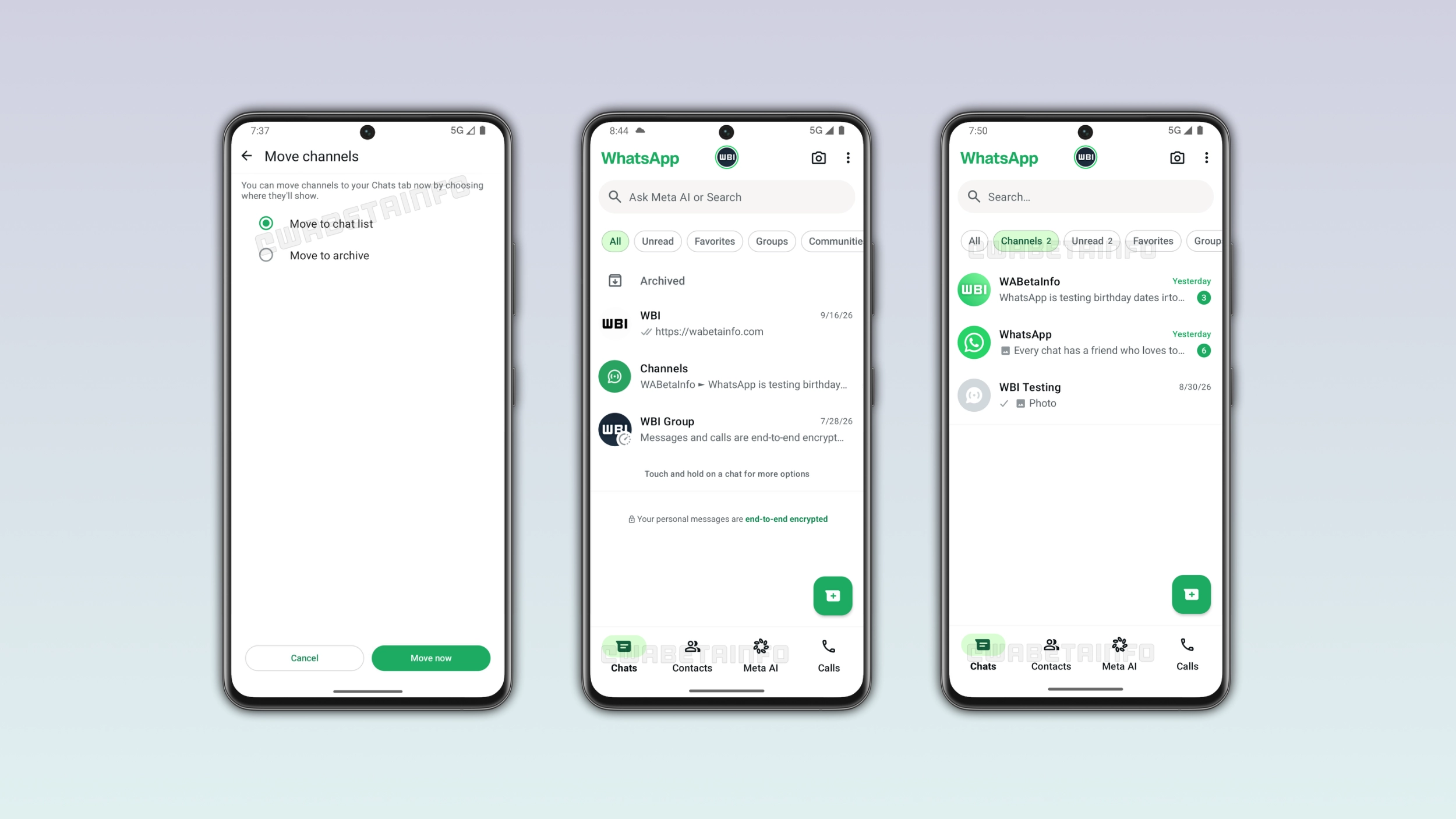
How the channel migration works on Android
WhatsApp is currently developing a feature that helps users migrate their channels in a specific inbox. The feature will ask users where they want to see their channels. The first option moves channels into the chat list, so they can appear where users find their conversations. The second option will automatically archive channels, but users can move them into the Chats tab at any time. This would keep the chat list clean for users who prefer to have their channels separate. This would also give users control over the transition rather than imposing a single choice on everyone. Users will be able to decide when to move their channels.
WhatsApp is testing three different configurations
If users decide to have their channels in the chat list, WhatsApp will decide how to present them. WhatsApp is testing three different configurations to show channels in the Chats tab. The first configuration will display channels directly in the main chat list alongside other conversations. Users will also be able to filter them using the "Channels" list at the top of the interface. However, they will also appear in the "All" inbox. The second configuration keeps channels out of the "All" inbox since they will only appear when users tap the "Channels" list. This would keep the main chat list cleaner for users who do not want channels separate from their conversations. The third configuration will introduce a "Channels" folder in the main chat list where users can see their followed channels.
Why WhatsApp is developing multiple configurations
It is unclear which configuration WhatsApp will release to the public. Some users may want channels integrated into the chat list. Others may prefer to keep them separate from their conversations. Initially, the migration tool will give users some control. Then, WhatsApp will decide which configuration to roll out to the public based on what their tests reveal. It is possible that WhatsApp will test different configurations with specific users before choosing the best one.
What happens to the Updates tab
Once WhatsApp will move channels to the Chats tab, there is no reason to keep the Updates tab. WhatsApp already shows status updates at the top of the Chats tab for some users, and channels are next. With both moved to the Chats tab, WhatsApp can remove the Updates tab and replace it with the Contacts tab. With this feature, users will be able to see who is online and find their active contacts easily.
WhatsApp is developing channel migration for a future Android update
This feature is currently under development on Android. Since it is in development, it is not available to the public. WhatsApp will release it to some beta testers in a future update. At the moment, WhatsApp has not announced when the feature will be available.
Connect with WABetaInfo
Follow WABetaInfo on X and visit our About page to learn more about what we do. We always appreciate your feedback on posts like this one.