WhatsApp is working on moving channels to the Chats tab on iOS
WhatsApp is developing a feature that will move channels to the Chats tab. At the moment, WhatsApp is testing three different configuration to find the best one. Once channels will be available in the Chats tab, WhatsApp can replace the Updates tab with the new Contacts tab.
| Key Points | Details |
|---|---|
| Feature: | Channels in the Chats tab |
| Status: | Under development |
| Availability info: | This feature is currently in development and not yet available for beta testing. |
| Previous news: | WhatsApp is rolling out group creation from poll results! |
WhatsApp is testing channels in the Chats tab on Android
In the post about the WhatsApp beta for Android 2.26.39.1 update, we announced a feature that will move channels to the Chats tab. WhatsApp is currently testing three different configurations to migrate channels to the Chats tab. The update will also introduce a migration tool to help users choose whether to move their channels into the main chat list or archive them. WhatsApp is working through multiple configurations to understand what users prefer before deciding which one to release.
WhatsApp will bring the same changes to the iOS app
In a future update for the iOS app, WhatsApp will also move channels to the Chats tab. To move channels, WhatsApp will enable a specific configuration that changes how channels appear in the chat list. We discovered this with the WhatsApp beta for iOS 26.38.10.72 update, which is available on TestFlight. In particular, WhatsApp is working on moving channels to the Chats tab on iPhone with three distinct configurations.
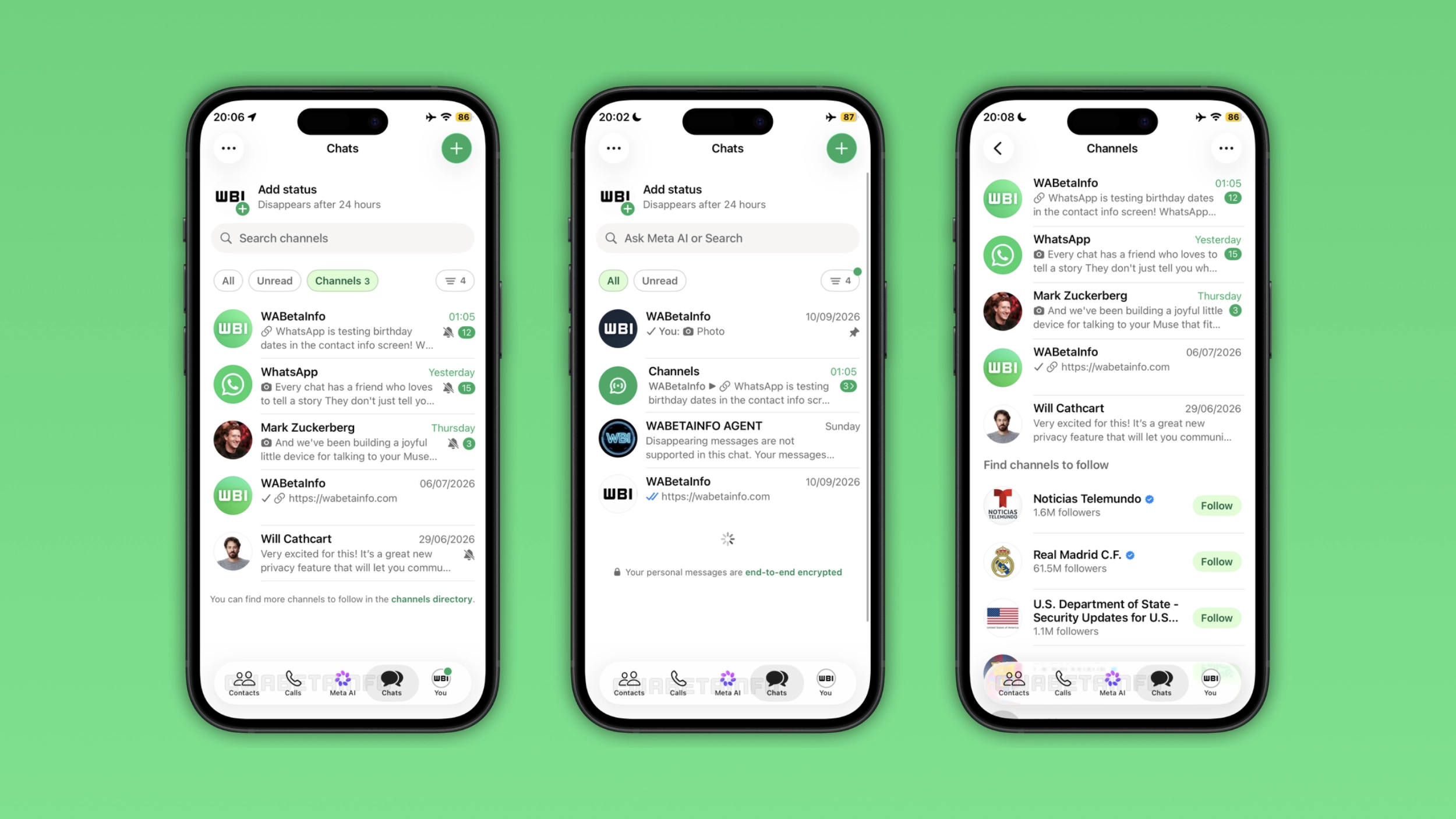
WhatsApp is exploring three configurations to move channels
WhatsApp is testing the same three configurations on iOS as on Android. The first configuration will show channels directly in the main chat list, where users can find their conversations. They can filter them using the "Channels" list at the top of the screen. However, WhatsApp will also present channels in the "All" inbox. The second configuration will make channels visible only when users tap the "Channels" list. Finally, the third configuration will a "Channels" folder to the main chat list. Here, users will find their channels and discover new ones to follow.
Why moving channels out of the Updates tab makes sense on iPhone
Users can find status updates and channels in the Updates tab. WhatsApp has already moved status updates to the top of the Chats tab for some users. Channels are the last thing that keep the Updates tab in the tab bar. Once WhatsApp moves channels to the Chats tab, the tab has nothing more to show. WhatsApp can then replace it with the Contacts tab, a dedicated section for online contacts and birthday reminders.
Which layout WhatsApp will choose
WhatsApp has not announced which configuration will use for the public release. It is possible that WhatsApp will test different configurations with specific users to collect feedback before the official release. Between the first two options, the second configuration is cleaner since it keeps channels out of the "All" inbox. However, the first configuration would give channels more visibility. The third configuration is the most distinct as it would be the first time that WhatsApp introduces a folder in the chat list. Only WhatsApp knows which direction it will take.
WhatsApp is developing channel migration for a future iOS update
This feature is currently under development on iOS. At the moment, the feature is not available yet. WhatsApp will make it available in a future update as soon as it is ready. WhatsApp has not shared an official timeline for the public release.
Connect with WABetaInfo
Follow WABetaInfo on X and visit our About page to learn more about what we do. We always appreciate your feedback on posts like this one.