WhatsApp launches more Liquid Glass updates on iOS
WhatsApp is extending the Liquid Glass design to two more screens on iOS. This update adds the glass-like appearance to the chat info screen and the toolbar in the drawing editor. With these refinements, WhatsApp is getting closer to completing the Liquid Glass transition.
| Key Points | Details |
|---|---|
| Feature: | Liquid Glass updates |
| Status: | Rolling out |
| Compatibility: | WhatsApp beta for iOS 26.45.10.70 is a compatible update. |
| Availability info: | This feature is available to some users, and it's rolling out to more accounts over the coming weeks. |
| Thanks: | IgnacioAF, Federico Trevisani, futurebound, for testing and reporting. |
| Previous news: | WhatsApp introduces a new bottom navigation bar on Android! |
WhatsApp rolled out Liquid Glass for the video player on iOS
In the post about the WhatsApp beta for iOS 26.39.10.70 update, we announced the Liquid Glass design for the video player. WhatsApp added a translucent, glass like appearance to the progress bar within the media player screen. This is exactly the same update already available in other sections of the app. The update shows the progress bar as a floating element at the top of the screen with rounded corners and a background that adapts to light and dark mode.
WhatsApp is bringing more Liquid Glass updates to iOS
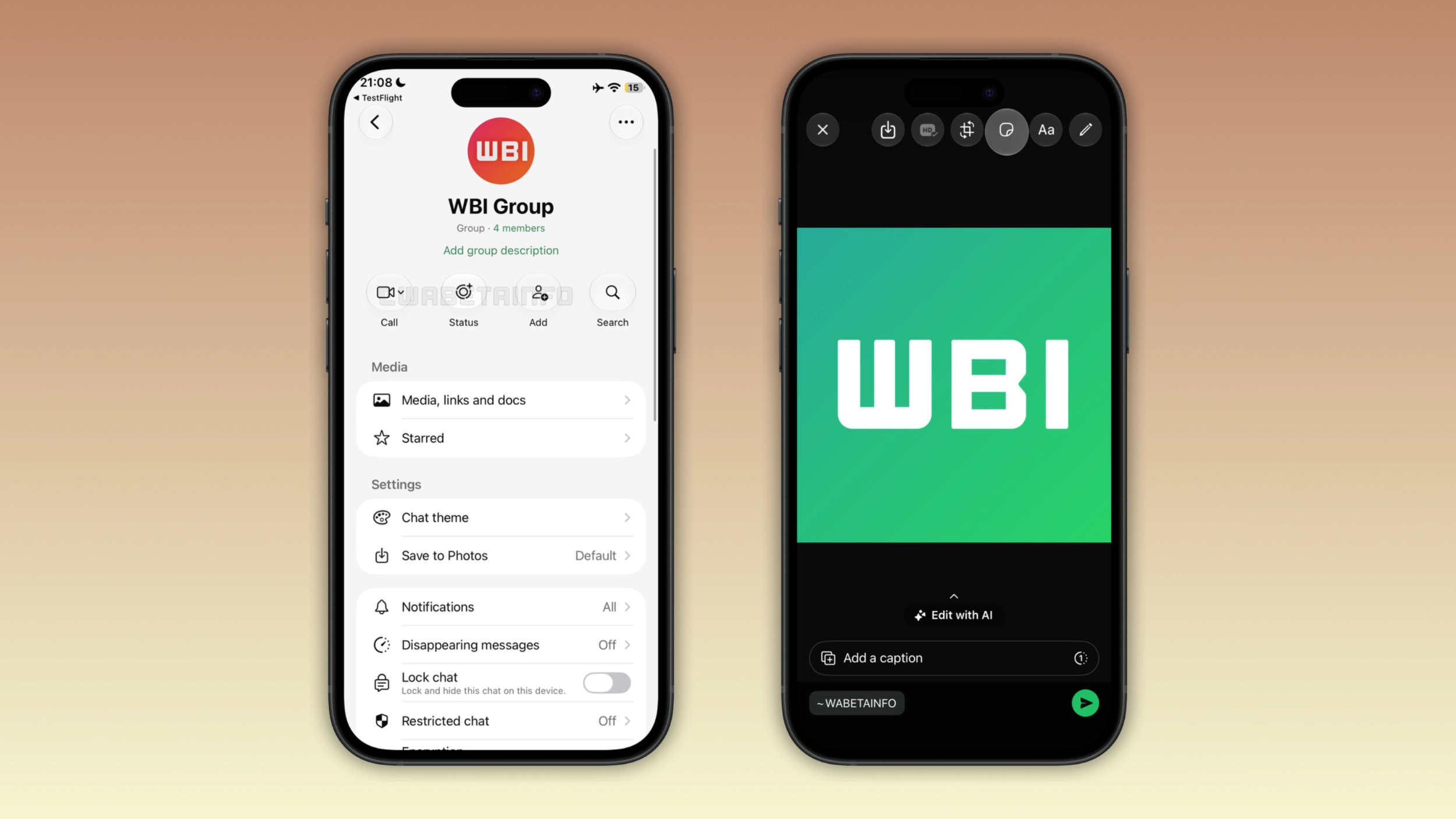
WhatsApp continues to refine the Liquid Glass interface on the iOS app. In particular, WhatsApp is now introducing two updates for the chat info screen and the drawing editor. We discovered this with the WhatsApp beta for iOS 26.45.10.70 update, which is available on TestFlight. With this update, WhatsApp is rolling out the Liquid Glass design for the chat info screen and the drawing editor to some beta testers.
What changed in the chat info screen
WhatsApp shows some action buttons below the contact or group name within the chat info screen. These buttons allows users to start a call, create a status update, add someone to a group, or search for messages. Now, WhatsApp is introducing the Liquid Glass design for these buttons. WhatsApp added a translucent effect with a glass-like appearance that shows the content behind these buttons.
What changed in the drawing editor
With the drawing editor, users can edit a photo or video before sending it. At the top of the screen, WhatsApp shows a toolbar with several action buttons to add text, draw, place stickers, crop, and more. With this update, they support the Liquid Glass design as well. This means that WhatsApp introduced the same translucent design already available in other sections of the app. As a result, this makes the appearance more consistent with the Liquid Glass design that WhatsApp adopted throughout the app.
Why WhatsApp is completing the Liquid Glass transition
WhatsApp is gradually updating the app interface since Apple introduced Liquid Glass with iOS 26. WhatsApp already supports Liquid Glass for the chat list, the tab bar, the navigation bar, the message menu, and the video player. However, WhatsApp didn't update the chat info screen and the drawing editor to support Liquid Glass. Finally, WhatsApp is taking another step toward a fully consistent interface with these two updates.
How the interface looks now, and more Liquid Glass updates are coming
With the refreshed chat info screen and the drawing editor, the Liquid Glass design is available within almost every section of the app. Users with the full Liquid Glass experience can notice that the app looks more modern now. This is especially important since iOS 27 is available, as more apps now support Liquid Glass. Note that WhatsApp is also working on even more improvements for Liquid Glass, and they will be available in the future.
WhatsApp is rolling out the new Liquid Glass updates to iOS beta testers
This feature is available to some users who install the latest update from TestFlight. This update is also available to some users who use the latest version from the App Store. Since WhatsApp is gradually rolling out Liquid Glass, it is still not available to everyone. If this update is not available yet, users should wait for a future update to get it. WhatsApp has not announced when these updates will be available to everyone.
Connect with WABetaInfo
Follow WABetaInfo on X and visit our About page to learn more about what we do. We always appreciate your feedback on posts like this one.