WhatsApp is rolling out message sticker reactions on Android
WhatsApp is making messages more expressive by adding support for multiple sticker reactions. With this feature, users can react to a message with a sticker from their existing collection. The update allows users to react to messages in their chats and groups with up to 20 stickers.
| Key Points | Details |
|---|---|
| Feature: | Message sticker reactions |
| Status: | Rolling out |
| Compatibility: | WhatsApp beta for Android 2.26.46.5 is a compatible update. |
| Availability info: | This feature is available to some beta testers, and it's rolling out to more users over the coming weeks. |
| Thanks: | Sc, FastenM, Muhammad Hammad, and Chrysalis, for testing and reporting. |
| Previous news: | WhatsApp is rolling out its first-party backup provider on iOS! |
WhatsApp was working on sticker reactions for messages
In the post about the WhatsApp beta for Android 2.26.20.5 update, we announced a feature to react to messages using stickers. This functionality allows users to choose a sticker from their collection and use it as a reaction for any message. With this addition, WhatsApp would give users a more expressive tool to react to their messages beyond the standard emoji set. Both static and animated stickers are compatible with this feature.
WhatsApp is introducing message sticker reactions on Android
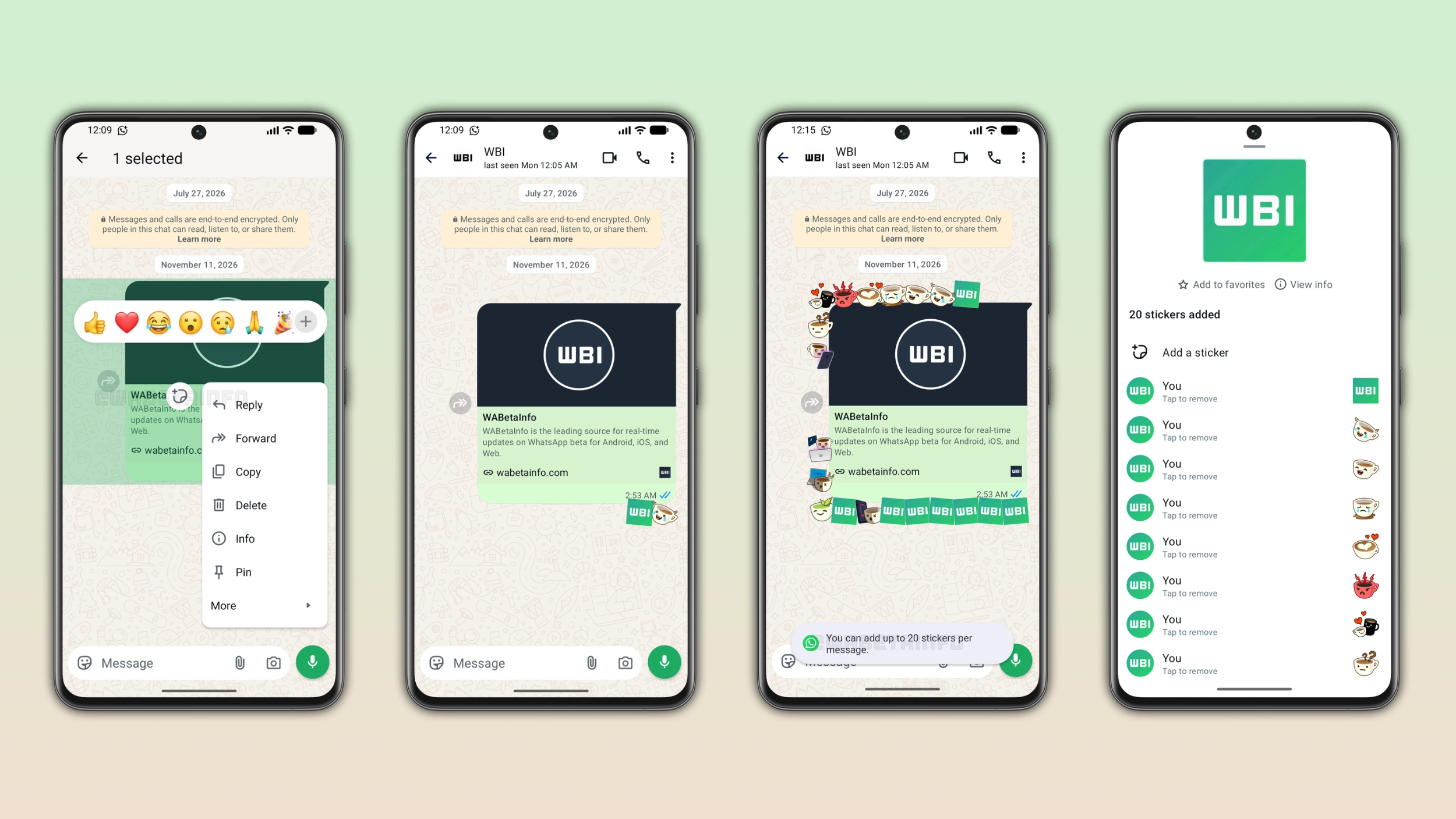
WhatsApp is finally making sticker reactions available to Android beta testers. Users now choose a sticker and add it as a reaction for their messages. We discovered this with the WhatsApp beta for Android 2.26.46.5 update, which is available on the Google Play Store. With this update, WhatsApp is rolling out message sticker reactions to some beta testers. The update adds a shortcut to the message menu where users can open the sticker keyboard and choose a reaction.
How to react to a message with a sticker
Users can add a sticker reaction by tapping on any message to open the message menu. At the top of the menu, users can see the reaction tray. Next to the message menu, WhatsApp shows a button to open the sticker keyboard. Once users tap this button, WhatsApp opens the full sticker collection, where users can explore their packs to select sticker. Users can select both static and animated stickers from the sticker keyboard. Once users choose a sticker, WhatsApp automatically adds it as a reaction to the message. The sticker appears at the bottom of the message, and it is visible to everyone in the conversation.
How sticker reactions differ from emoji reactions
WhatsApp applies different rules to emoji reactions and sticker reactions. With emoji reactions, the user can add only one emoji per message. If they tap a different emoji, WhatsApp replaces the previous one. With sticker reactions, the user can add multiple stickers to the same message. They can use different stickers or even the same sticker more than once. This makes sticker reactions more flexible since WhatsApp does not limit users to a single reaction per message.
How many sticker reactions a message can receive
At the moment, WhatsApp sets a limit of 20 sticker reactions per message. When users reach the limit, they cannot react to the message using more stickers. To make this clearer, WhatsApp shows a notification to inform users that they can add up to 20 stickers per message. Users can open the page to see sticker reaction info to view the full list of sticker reactions and who used them. In addition, it's possible to remove any sticker reaction from this screen at any time.
How sticker reactions appear in the chat
WhatsApp places sticker reactions below the message they were added to. When a message has only a few sticker reactions, they appear in a small row at the bottom of the message bubble. As users react to the message using more stickers, WhatsApp spreads them around the message to fill the space around it. With 20 sticker reactions in place, WhatsApp fills the bottom, the side, and the top of the message bubble with stickers. This makes sticker reactions more visible than emoji reactions and gives messages a distinctive look in the conversation.
WhatsApp is rolling out sticker reactions to Android beta testers
Message sticker reactions are available to some users who install the latest update from the Google Play Store. WhatsApp is rolling the feature out gradually, so not every beta tester will see it immediately. If the button does not appear yet, the feature should become available to more accounts over the coming weeks. WhatsApp has not announced when this feature will be available to everyone.
Connect with WABetaInfo
Follow WABetaInfo on X and visit our About page to learn more about what we do. We always appreciate your feedback on posts like this one.