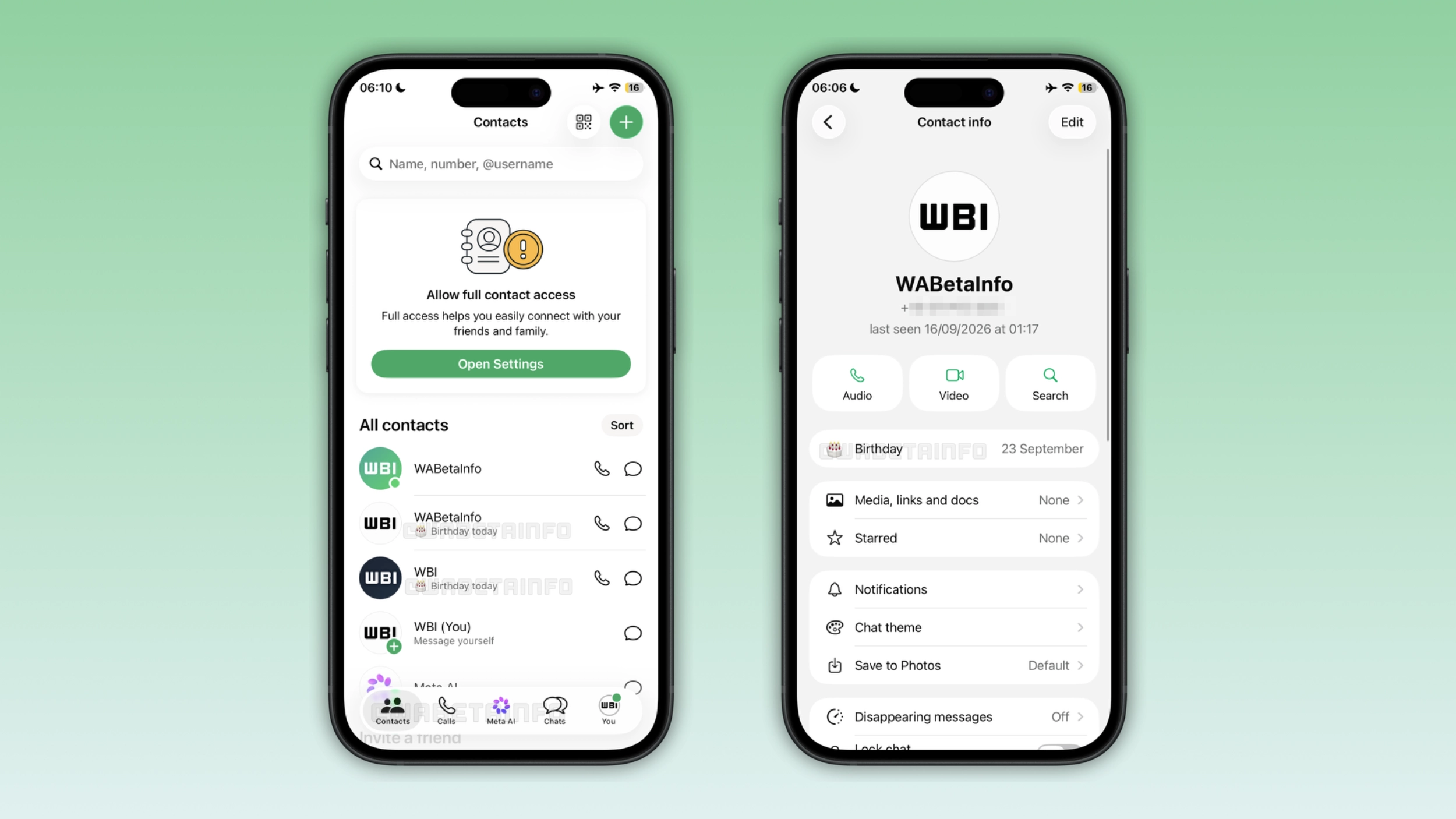
WhatsApp is developing new features to help users track their contacts' birthdays. The app will show birthday reminders in the new Contacts tab and in the contact info screen. WhatsApp extracts the birthday date directly from the phone's address book, making it possible for the app to show it automatically.
| Key points | Details |
|---|---|
| Feature: | Birthday reminders |
| Feature availability: | Some features may be under development, so they are not available to beta testers. Others may become available to users over time. If you're unable to access a certain feature, you will need to wait for a future update. |
| News shared last week: | WhatsApp introduces a new chat theme experience on Android! |
| Previous article: | WhatsApp is testing birthday dates in the contact info screen! |
Weekly WhatsApp beta updates: new features and improvements
This new weekly roundup brings together all the latest updates about WhatsApp beta shared this week. As a result, you can finally catch up on everything you might have missed from our past announcements. You can consider this summary as a way to keep up new features, improvements, and fixes. This week's highlight focuses on birthday reminders, a feature that will help users track their contacts' birthdays. See what else we announced this week.
WhatsApp is developing a redesigned bottom navigation bar on Android
WhatsApp is finally working on a refreshed bottom navigation bar for the Android app. The new design will introduce a floating bar with rounded corners to give the interface a modern appearance. It looks similar to the tab bar available on WhatsApp for iOS. However, this does not mean that WhatsApp will also add the same translucent effect to the bottom navigation bar on Android, since the Android app follows its own design guidelines.
WhatsApp is testing birthday reminders for your contacts
WhatsApp is working on bringing birthday reminders to the Contacts tab. With this feature, WhatsApp will mark a contact's birthday with a "Birthday today" label below their name. Users can see the reminder for the entire day. WhatsApp does not ask users to enter birthday dates manually within the app, but it reads the information directly from the phone's address book. Note that the Contacts tab is still under development.
WhatsApp is working on introducing birthday dates in the contact info screen
In the post about the WhatsApp beta for iOS 26.38.10.70 update, WhatsApp is developing a feature that shows birthdays in the contact info screen. WhatsApp places the field at the top of the list, so users will not need to scroll through the section to find it. WhatsApp extracts birthdays from the phone's address book. This makes it possible for WhatsApp to display it in the chat info screen automatically.
WhatsApp is rolling out access to Instagram and Facebook media
WhatsApp introduces a feature that lets users share stories, posts, and reels from their Instagram and Facebook accounts directly within WhatsApp. When users open the media picker, they can switch to the list view to see all available media sources. With this update, WhatsApp is adding Instagram and Facebook to this list as new sources. Users can also select media from the same picker in their conversations since WhatsApp shows the dropdown in both contexts. However, users who want to access Instagram and Facebook media within WhatsApp need to link their accounts through Accounts Center. Without this connection, WhatsApp cannot show Instagram and Facebook as media sources in the picker.
WhatsApp lets users bookmark their favorite status music
With the WhatsApp beta for Android 2.26.38.1 update, WhatsApp is rolling out a starred music feature for status updates. Users can save a track by tapping the star to mark it as a favorite, and WhatsApp adds the track to the Starred list. WhatsApp is also bringing the Starred filter to the music screen, so users can see only the tracks they marked as favorites. Users can star as many tracks as they want, and they can remove a star from any track by tapping it again.
WhatsApp expands emoji reactions for messages on Apple Watch
WhatsApp is introducing the full emoji set on Apple Watch. With this feature, users are no longer restricted to 6 emojis when they react to a message on their wrist. When users tap and hold a message, WhatsApp shows the reaction grid with 6 emoji. With the latest update, the interface also includes a button to open the full emoji keyboard, which shows recently used emojis at the top. In the grid, WhatsApp organizes emojis into 8 categories: Smileys, Nature, Food, Activity, Travel, Objects, Symbols, and Flags. WhatsApp adapts the interface for the small screen of Apple Watch, making it easier for users to scroll the list.
WhatsApp is rolling out chats with third-party agents on iOS
With the WhatsApp beta for iOS 26.37.10.70 update, WhatsApp is bringing chats with third-party agents to the iOS app. Users can create a chat with an agent right within the app settings, where they can customize the agent with a name and photo. After saving the changes, WhatsApp creates a chat and provides users with an API key. Users can use the API key in the service where their agent is hosted. Chats with agents are not end-to-end encrypted, since the agent developer can access these messages as part of the service.
WhatsApp Plus gets custom emoji reactions on Android
WhatsApp is rolling out the ability to customize the reaction tray. The feature allows premium subscribers to replace the six default emoji in the reaction tray with others they prefer. Users can manage their custom reactions from the app settings. Here, users can select "Chats" and find the Default reactions section. It is also possible to edit the reaction tray directly within the emoji keyboard without leaving the conversation. Non-subscribers can see the feature, but they will have to subscribe to WhatsApp Plus to use it.
WhatsApp is rolling out custom emoji reactions on iOS
WhatsApp is also bringing custom emoji reactions to the iOS app. Users can replace any of the six default emojis with any emoji they want from the full keyboard. After saving them, WhatsApp will present the updated emojis in the reaction tray the next time users react to a message. Users can also manage the reaction tray from the emoji keyboard by tapping "Edit" at the top of the keyboard. The Default reactions section is visible to all users, but they cannot edit the six emojis in the tray without an active subscription to WhatsApp Plus.
Connect with WABetaInfo
Follow WABetaInfo on X and visit our About page to learn more about what we do. We always appreciate your feedback on posts like this one.