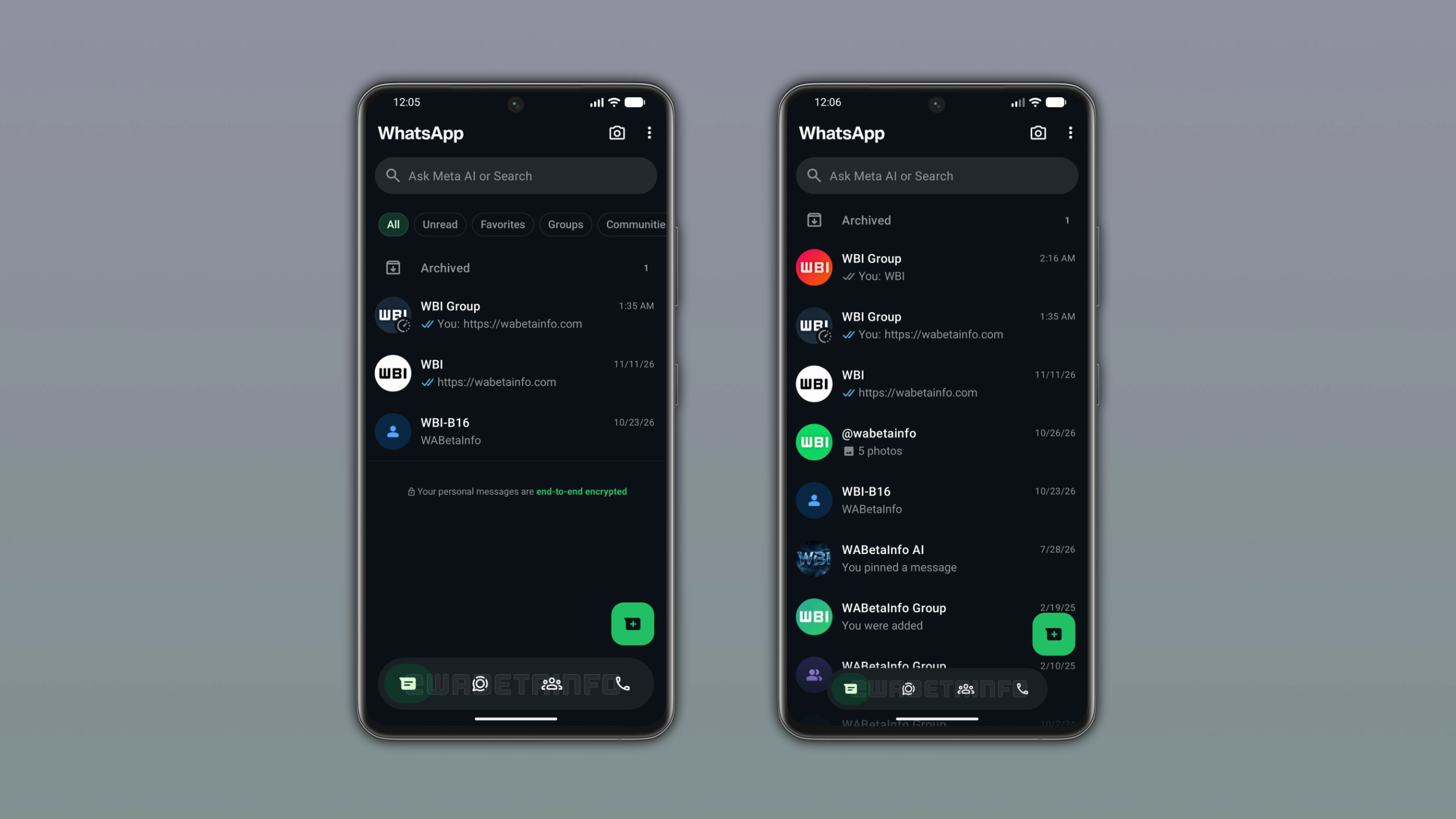
WhatsApp is rolling out a new design for the bottom navigation bar on Android. The bar now floats above the screen and the app shrinks it into a compact pill when users scroll down. WhatsApp also added a progressive blur effect and a selection color that reflects the app theme.
| Key points | Details |
|---|---|
| Feature: | New bottom navigation bar |
| Feature availability: | Some features may be under development, so they are not available to beta testers. Others may become available to users over time. If you're unable to access a certain feature, you will need to wait for a future update. |
| News shared last week: | WhatsApp introduces smart message text actions for chats! |
| Previous article: | WhatsApp is testing Zaps to send instant photos and videos! |
Weekly WhatsApp beta updates: new features and improvements
This new weekly roundup brings together all the latest updates about WhatsApp beta shared this week. As a result, you can finally catch up on everything you might have missed from our past announcements. You can consider this summary as a way to keep up new features, improvements, and fixes. This week's highlight focuses on a new bottom navigation bar available on WhatsApp beta for Android. See what else we announced this week.
WhatsApp is rolling out view-once text messages on Android
WhatsApp is rolling out view-once text messages to some beta testers. They need to type a message in the chat bar and press and hold the send button to show a menu. Here, they can select the option "view once", and WhatsApp automatically sends the message. WhatsApp does not show the message in the chat interface immediately when the recipient opens the conversation. After the recipient closes the new screen, they can no longer open it again. WhatsApp blocks screenshots and screen recordings while the recipient reads the message. In addition, the recipient cannot copy the text, forward it to another chat, or save it.
WhatsApp is rolling out a new bottom navigation bar on Android
Some users who install the WhatsApp beta for Android 2.26.45.5 update can finally experiment with a redesigned bottom navigation bar. The app keeps the bottom navigation bar separate from the main interface since it no longer touches the edges of the screen. WhatsApp changed the tab selection style from a pill shape to a circular one, so the selected tab now shows a rounded highlight around the icon. WhatsApp also added a progressive blur effect below the bottom navigation bar, which introduces a gradual transition between the bar and the screen behind it.
How the bottom navigation bar adapts to scrolling
When users scroll down through the chat list, WhatsApp gradually shrinks the bar in both width and height until it becomes a compact floating pill. WhatsApp keeps its icons visible in the compact form, but the bar takes up much less space. When users scroll back up, WhatsApp gradually restores the bottom navigation bar to its full size. Users who subscribe to WhatsApp Plus can choose a different accent color, and WhatsApp applies it to the selected tab in the bottom navigation bar as well.
WhatsApp is testing Instants to share live photos and videos
WhatsApp is testing a feature called Instants, bringing the same ephemeral experience already available on Instagram. In the future, WhatsApp will add a lightning bolt button at the top of the Chats tab. Once users tap it, WhatsApp presents the Instants camera where users can create and send ephemeral content to their contacts. The instant photo disappears after the recipient views it. As a result, users cannot upload photos from their gallery, so they have to take it with the camera.
WhatsApp is testing Zaps to send instant photos and videos
Just a few hours after our first report, WhatsApp is already refining Instants by introducing Zaps. When users take a photo using the new instant camera, they're creating a Zap. Users will be able to send a Zap to any contact and group. If the sender shares more than one Zap in the same conversation, WhatsApp groups them into a single unit that shows the total count. The Zap will disappear after the recipient views it, but the sender can still see them in the chat permanently.
WhatsApp is rolling out a new Contacts tab on Android beta
With the WhatsApp beta for Android 2.26.45.2 update, WhatsApp is bringing the Contacts tab to the bottom navigation bar. WhatsApp is replacing the Communities tab to give users quick access to their contact list. At the top of the interface, WhatsApp shows contacts users marked as their favorites. Users can sort the contact list by alphabetical order, birthdays, and activity. By selecting "activity", users can see who is online at the top of the list, marking them with a green dot. WhatsApp introduced a filter in the chat list that lets users access their communities without opening the tab. As a result, WhatsApp makes the Communities tab in the bottom navigation bar redundant with this filter.
WhatsApp is rolling out a new Contacts tab on iOS beta
WhatsApp is also bringing the Contacts tab to the iOS app. The tab allows users to see who is online, add new contacts, and invite their friends from the same screen. Users can sort the full contact list by activity, alphabetical, and birthdays. With activity, WhatsApp shows who is currently online at the top of the list, marking these contacts with a green dot. In the Contacts tab, WhatsApp shows the last seen and online status only when contacts allow it in their privacy settings.
WhatsApp is testing a native location status update on Android
WhatsApp is developing a new Location option in the status composer. Once users open the bottom sheet in the Updates tab, they will be able to select the option to share the location as a status. After they tap the option and the app has permission to access it, WhatsApp will show the current position automatically. WhatsApp will display the location as a map card in the status interface, with a green pin on the selected location, the place name, and the full address. When someone views the status update, they can tap the button to see the location at the top of the screen to expand the map and get a closer look.
WhatsApp is rolling out new text sticker designs on Android
In the post about the WhatsApp beta for Android 2.26.46.1 update, we reported a new entry point to create text stickers. Users can create a text sticker by opening the sticker keyboard. Once they select the option to create a text sticker, WhatsApp will display a new section with a search field. Here, users will see text stickers in real time as they type. WhatsApp is also expanding the number of text stickers from 5 to 10. Users can tap any style to send it immediately or keep typing to refine their text before choosing a sticker.
Connect with WABetaInfo
Follow WABetaInfo on X and visit our About page to learn more about what we do. We always appreciate your feedback on posts like this one.