WhatsApp is rolling out restricted chats on Android beta
WhatsApp is replacing the advanced chat privacy feature with restricted chats, making its purpose clearer. Restricted Chat still limits what participants can do with messages in their conversations. WhatsApp is also upgrading the feature by limiting these chats to the primary device only.
| Key Points | Details |
|---|---|
| Feature: | Restricted Chat |
| Status: | Rolling out |
| Compatibility: | WhatsApp beta for Android 2.26.39.11 is a compatible update. |
| Availability info: | This feature is available to some beta testers, and it is rolling out to more people over the coming weeks. |
| Previous news: | WhatsApp keeps refining the bottom navigation bar on Android! |
WhatsApp was testing Restricted Chat on Android
In the post about the WhatsApp beta for Android 2.26.36.4 update, we announced restricted chats, an upgraded version of Advanced Chat Privacy. Initially, Advanced Chat Privacy confused some users into thinking their chats were not protected without it. In reality, WhatsApp always secures messages and calls with end-to-end encryption. Restricted Chat makes the purpose clearer: it is an optional layer of control, and it is not a requirement for secure messaging. WhatsApp was also adding a new restriction to the feature: the ability to limit chats to the primary device only.
WhatsApp is now rolling out Restricted Chat to Android beta testers
This week, WhatsApp is finally upgrading advanced chat privacy. Some users who install the latest updates can finally restrict their conversations from the chat info screen. We discovered this feature with the WhatsApp beta for Android 2.26.39.11 update, which is available on the Google Play Store. Specifically, WhatsApp is rolling out Restricted Chat to some beta testers.
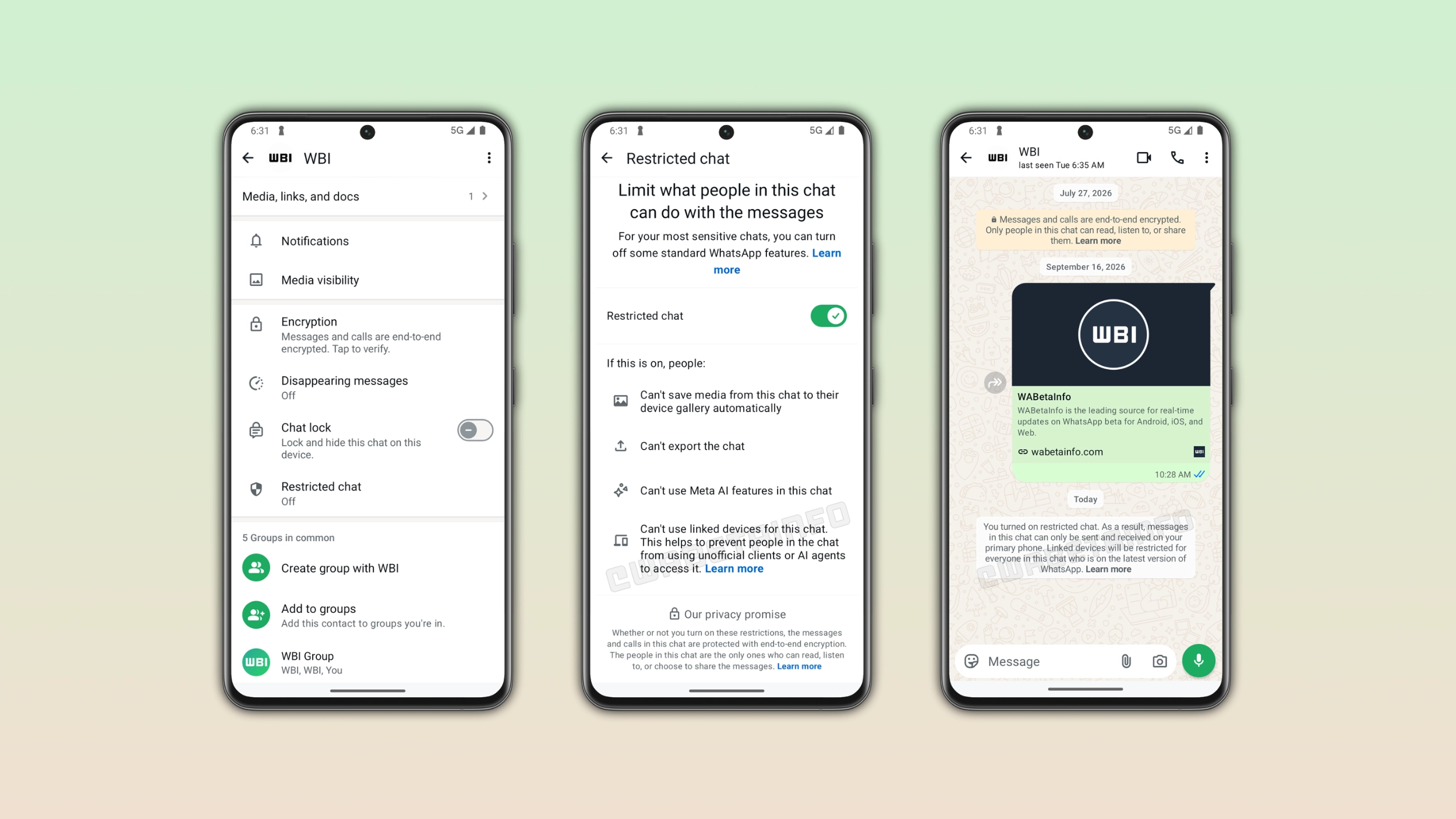
How to enable Restricted Chat on Android
Users can enable "Restricted Chat" from the chat info screen. This option is disabled by default, so users need to enable it manually. Once they enable the feature, WhatsApp applies four restrictions to the chat for everyone in the conversation. At the moment, restricted chats are only available for individual conversations.
What Restricted Chat limits in a conversation
When users restrict a chat, WhatsApp applies four restrictions. WhatsApp doesn't save media from the chat to their device gallery automatically. Users cannot export the chat and it is not possible to use Meta AI features within the conversation. With this new update, restricted chats are not available on linked devices. Conversations where advanced chat privacy was active were available on linked devices. With this feature, WhatsApp now supports this new limitation.
What the system message says when Restricted Chat is enabled
As soon as users restrict a chat, WhatsApp shows a system message in the conversation. It confirms that messages in the conversation can only be sent e received on the primary device. WhatsApp restricts access to linked devices for everyone in the conversation. The system message makes everyone aware that the chat has a new restriction.
Why the linked device restriction is the most important one
Unofficial clients and AI agents always rely on linked devices to access conversations. By cutting off the connection for a specific chat, Restricted Chat closes the door those tools use to read messages. Uses who restrict a conversation can be confident that nobody in the chat can route the messages through an unofficial tool, even if they connected one to their account.
WhatsApp is rolling out Restricted Chat to more Android beta testers
The feature is available to some users who install the latest update from the Google Play Store. WhatsApp is rolling it out gradually, so not every beta tester will see it immediately. If users still see the advanced chat privacy feature, it means that restricted chats are not available yet. WhatsApp has not announced when this feature will be available in the stable version.
Connect with WABetaInfo
Follow WABetaInfo on X and visit our About page to learn more about what we do. We always appreciate your feedback on posts like this one.