WhatsApp tests a redesigned interface for the Settings tab on iOS
WhatsApp is working on a more simplified interface for the Settings page, making it easier for users to find what they need. The update will move secondary options in a separate menu. This makes the Settings page clearer for users who only need quick access to the most important options.
| Key Points | Details |
|---|---|
| Feature: | Simplified Settings page |
| Status: | Under development |
| Availability info: | This feature is currently in development and not yet available for beta testing. |
| Previous news: | WhatsApp is rolling out a new navigation experience for chats! |
WhatsApp updated the group chat info interface on iOS
In the post about the WhatsApp beta for iOS 26.27.10.15 update, we announced a redesigned interface for the group info screen. The new interface introduces three tabs to organize content that previously required users to scroll through the screen. WhatsApp also added sections for chat-related settings and a security page. With this update, WhatsApp is actively working to make the interface less cluttered and easier to navigate.
WhatsApp is working on a simplified interface for the Settings page
WhatsApp added many new options to the Settings page. For example, WhatsApp introduced a new hub to create and manage events, chats with third-party agents and parental controls. These features further makes the page harder to scan. WhatsApp is now addressing this issue by splitting the tab into two parts. We discovered this with the WhatsApp beta for iOS 26.40.10.21 update, which is available on TestFlight. Specifically, WhatsApp is testing a new Settings layout that keeps the most used options in the You tab and moves everything else to a separate menu.
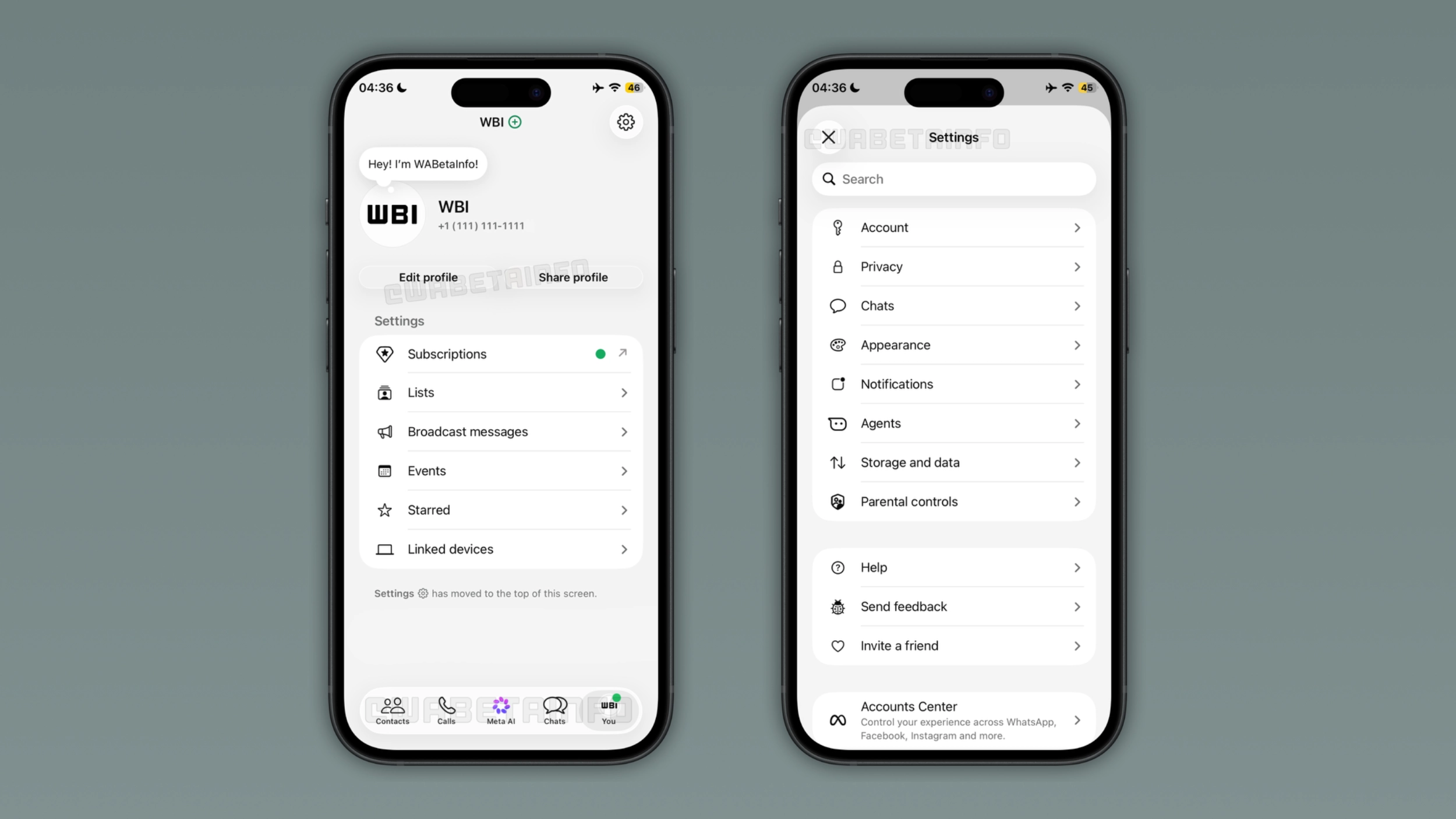
What the new You tab will look like
WhatsApp is testing a redesigned settings page that still shows the account name, profile photo, and phone number at the top of the screen. Here, users can also edit their profile and share it with others. In this screen, WhatsApp will display the options considers most useful: Subscriptions, Lists, Broadcast messages, Events, Starred, and Linked devices. WhatsApp will let users know that they can find more settings in a separate menu at the top of the screen. In particular, they can tap the gear icon within the navigation bar to view more. This makes the tab more like a profile page and less like a settings menu.
What WhatsApp will move to the separate Settings menu
By tapping the gear button, WhatsApp will present the separate settings menu. Here, users will find everything else that WhatsApp moved out of the main list. This menu includes Account, Privacy, Chats, Appearance, Notifications, Agents, Storage and data, and Parental controls. Below these settings, users can find Help, Send feedback, and Invite a friend. Users can find the Accounts Center at the bottom of the screen, which lets them connect their account to their other Meta accounts. The menu also has a search bar at the top, so users can find any setting quickly without scrolling through the list.
How to add a new WhatsApp account from the You tab
Users can add a second account by tapping the account name at the top of the screen. This entry point will keep the multi-account flow accessible without moving it to the secondary menu. However, users will still be able to switch to a different account by tapping the You tab. As a result, this action will still present the account switcher.
Why WhatsApp is simplifying the Settings page
WhatsApp has added a significant number of features to the Settings page over the past year. For users who only want to check their linked devices or find their starred messages, the long settings page makes it harder than it should be. The new layout will separate the settings users open frequently from those they rarely use. WhatsApp will keep the most used options in the You tab, while everything else is one tap away in the gear menu.
WhatsApp is developing the simplified Settings page for a future iOS update
The simplified Settings page is currently under development on iOS. Since it is in development, the feature is not available yet. WhatsApp will release it to the public in a future update. At the moment, WhatsApp has not shared an official timeline for the public release.
Connect with WABetaInfo
Follow WABetaInfo on X and visit our About page to learn more about what we do. We always appreciate your feedback on posts like this one.