WhatsApp is rolling out shared chat themes on Android
WhatsApp is making it possible to share a chat theme with everyone in a conversation. Users can set a new wallpaper or a theme and apply it to both sides of the chat at the same time. The recipient will see the same theme without updating it manually.
| Key Points | Details |
|---|---|
| Feature: | Shared chat themes |
| Status: | Rolling out |
| Compatibility: | WhatsApp beta for Android 2.26.46.8 is a compatible update. |
| Availability info: | This feature is available to some beta testers, and it's rolling out to more users over the coming weeks. |
| Thanks: | Sc, FastenM, UnluckyTester, Sniper, Muhammad Hammad, flakoflow, shw_9876, for testing and reporting. |
| Previous news: | WhatsApp is rolling out larger group chats with 1500 members! |
WhatsApp was testing chat theme sync on iOS
In the post about the WhatsApp beta for iOS 26.37.10.16 update, we announced a feature to sync chat themes. The update would add a new option to let users choose whether to apply the theme only for themselves or for everyone in the conversation. This means that users could share the same wallpaper, theme, and bubble color with the other person or with all members of a group. The other participants would see the shared theme automatically without configuring it manually.
WhatsApp is introducing shared chat themes on Android
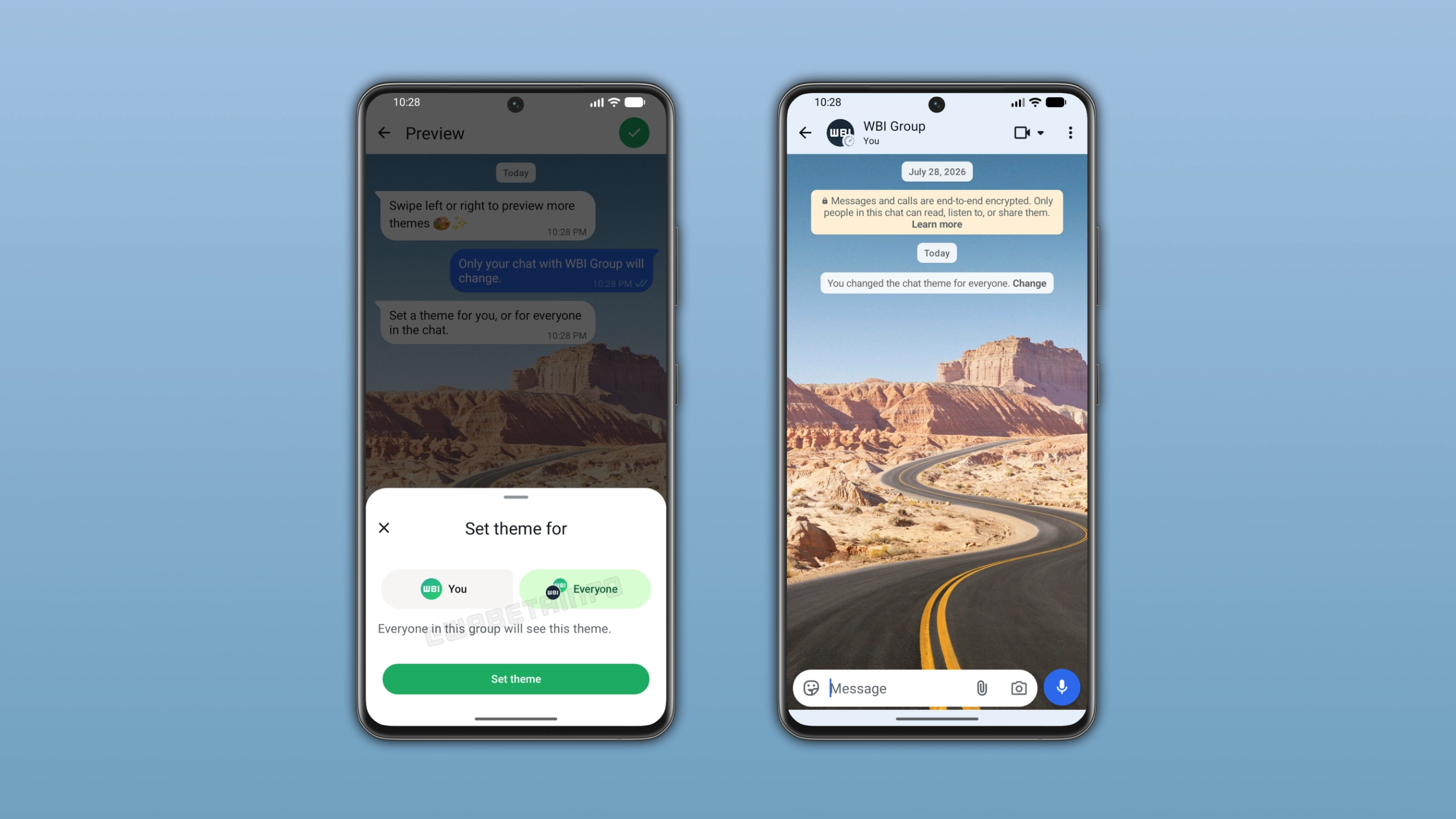
WhatsApp is making it easier for users to share the look of their conversations. When users set a theme for a specific chat, they can now choose to apply it for everyone. We discovered this with the WhatsApp beta for Android 2.26.46.8 update, which is available on the Google Play Store. With this update, WhatsApp is rolling out shared chat themes to some beta testers. The update adds a new option in the theme settings that lets users decide who can see the theme they choose.
How to share a chat theme on Android
Users can share a theme by opening a conversation. Here, they need to tap the overflow menu and select "Chat theme". After choosing a theme or a wallpaper, WhatsApp shows a bottom sheet where users can choose if they want to share the theme. If they select the option to share the theme with everyone, WhatsApp applies the wallpaper and bubble color to both sides of the conversation. After applying a theme, WhatsApp shows a system message in the chat interface to confirm that the app changed the theme for everyone. If users do not like the theme others shared, they can change it again from the theme page.
What participants see when a theme is shared
When someone shares a theme, everyone in the conversation sees the same wallpaper and bubble color. WhatsApp applies the theme immediately to both sides without requiring any action. The system message in the chat lets everyone know who changed the theme. As a result, everyone in the conversation knows when the app changed the theme and who shared it.
How shared themes work in group chats
WhatsApp is not limiting this feature to individual chats. The update is also available for group chats, so all members of a group can share their theme with others. When a group member shares a theme with everyone, everyone in the group will see the same wallpaper and bubble color. Even in groups, WhatsApp will add a system message to let everyone know who shared the theme. Any member of the group can update the theme at any time.
What users can share beyond preset themes
WhatsApp does not limit shared themes to the predefined theme categories. Users can also share custom wallpapers from their photo library. They can share any image from their gallery as a wallpaper for a conversation. Note that this feature is protected by end-to-end encryption. This means that WhatsApp cannot see which wallpaper users choose to share.
WhatsApp is rolling out shared chat themes to Android beta testers
Shared chat themes are currently available to some users who install the latest update from the Google Play Store. WhatsApp is rolling the feature out gradually, so not every beta tester will see it immediately. If the option to share a theme is not visibile, the feature should become available to more accounts over the coming weeks. WhatsApp has not announced when this will be available to everyone.
Connect with WABetaInfo
Follow WABetaInfo on X and visit our About page to learn more about what we do. We always appreciate your feedback on posts like this one.