WhatsApp is rolling out a feature to sync chat themes on iOS
WhatsApp is introducing a feature that lets users share their chat themes and wallpapers. With this functionality, users can choose whether to keep their theme personal or share it with everyone in the conversation. The update makes it easier to personalize the chat interface with other people.
| Key Points | Details |
|---|---|
| Feature: | Shared chat themes |
| Status: | Rolling out |
| Compatibility: | WhatsApp beta for iOS 26.45.10.72 is a compatible update. |
| Availability info: | This feature is available to some beta testers on TestFlight. |
| Thanks: | Sc, Federico Trevisani, and gamer_elle, for testing and reporting. |
| Previous news: | WhatsApp is rolling out shared chat themes on Android! |
WhatsApp rolled out shared chat themes on Android
In the post about the WhatsApp beta for Android 2.26.46.8 update, we announced shared chat themes. With this feature, users can set a theme for a chat and choose to apply it for everyone in the conversation. The other person or the group members see the same wallpaper and bubble color automatically. The feature is also compatible with custom wallpapers from the photo library, so WhatsApp is not restricting this feature to preset themes.
WhatsApp is introducing a feature to share chat themes on iOS
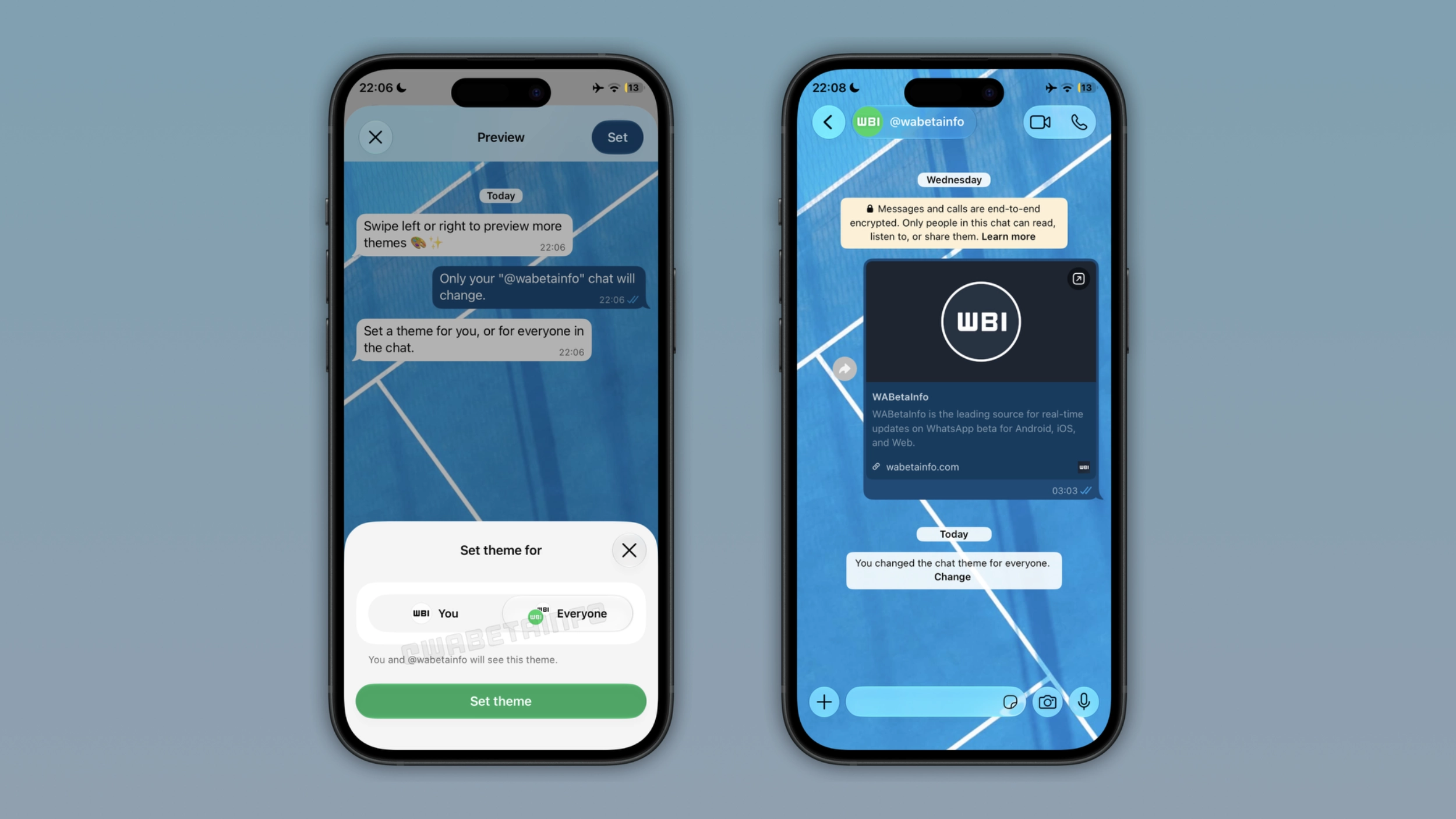
WhatsApp is not limiting the ability to share themes to Android users. Instead, WhatsApp is now extending the same capability to the iOS app as well. We discovered this with the WhatsApp beta for iOS 26.45.10.72 update, which is available on TestFlight. With this update, WhatsApp is rolling out a feature to share chat themes to some beta testers. This update introduces the same level of personalization already available on the Android app.
Why chat themes were personal by default on WhatsApp
Before this update, chat themes on WhatsApp were only personal. The wallpaper and bubble color for a conversation were only visible on the device of the person who set them. The other person in the chat could have a completely different theme set on their side. As a result, the two sides of the same conversation could look different. Now, WhatsApp wants to give users the ability to share their chat theme and wallpaper. However, users can still keep their chat theme and wallpaper private if they prefer not to share it with others.
How the new sharing option works on iPhone
Users can update their chat theme from the chat info screen. Once users choose a new theme or wallpaper, the app will present a bottom sheet where users can decide if they want to share it with the other person in the conversation. If they tap "Everyone", WhatsApp will apply the same chat theme and wallpaper automatically. Instead, WhatsApp keeps the chat theme private if users select "You". The default option is "Everyone", so users should switch to "You" if they prefer to keep the theme and wallpaper private.
What the system message looks like after sharing a theme
After users share a theme, WhatsApp shows a system message in the chat screen to inform everyone that the theme changed. The message shows who changed the change. In addition, it includes a shortcut to let people quickly change the theme. This shortcut makes it easier for everyone to update the theme if they prefer a different look. WhatsApp adds the system message to both individual and group chats.
How end-to-end encryption protects shared themes
Shared chat themes are protected by end-to-end encryption. This means that WhatsApp cannot see which theme or wallpaper users choose to share with others. Since users can also share a wallpaper, WhatsApp secures the image with the same encryption used for messages. As a result, no one outside the conversation can see the theme or wallpaper participants shared.
WhatsApp is rolling out shared chat themes to iOS beta testers
The feature to share chat themes is available to some users who install the latest update from TestFlight. WhatsApp is rolling it out gradually, so not every beta tester will be able to update the chat theme for everyone. If this option is not visibile yet, it should become available to more accounts over the coming weeks. WhatsApp has not announced when this feature will be available to everyone.
Connect with WABetaInfo
Follow WABetaInfo on X and visit our About page to learn more about what we do. We always appreciate your feedback on posts like this one.