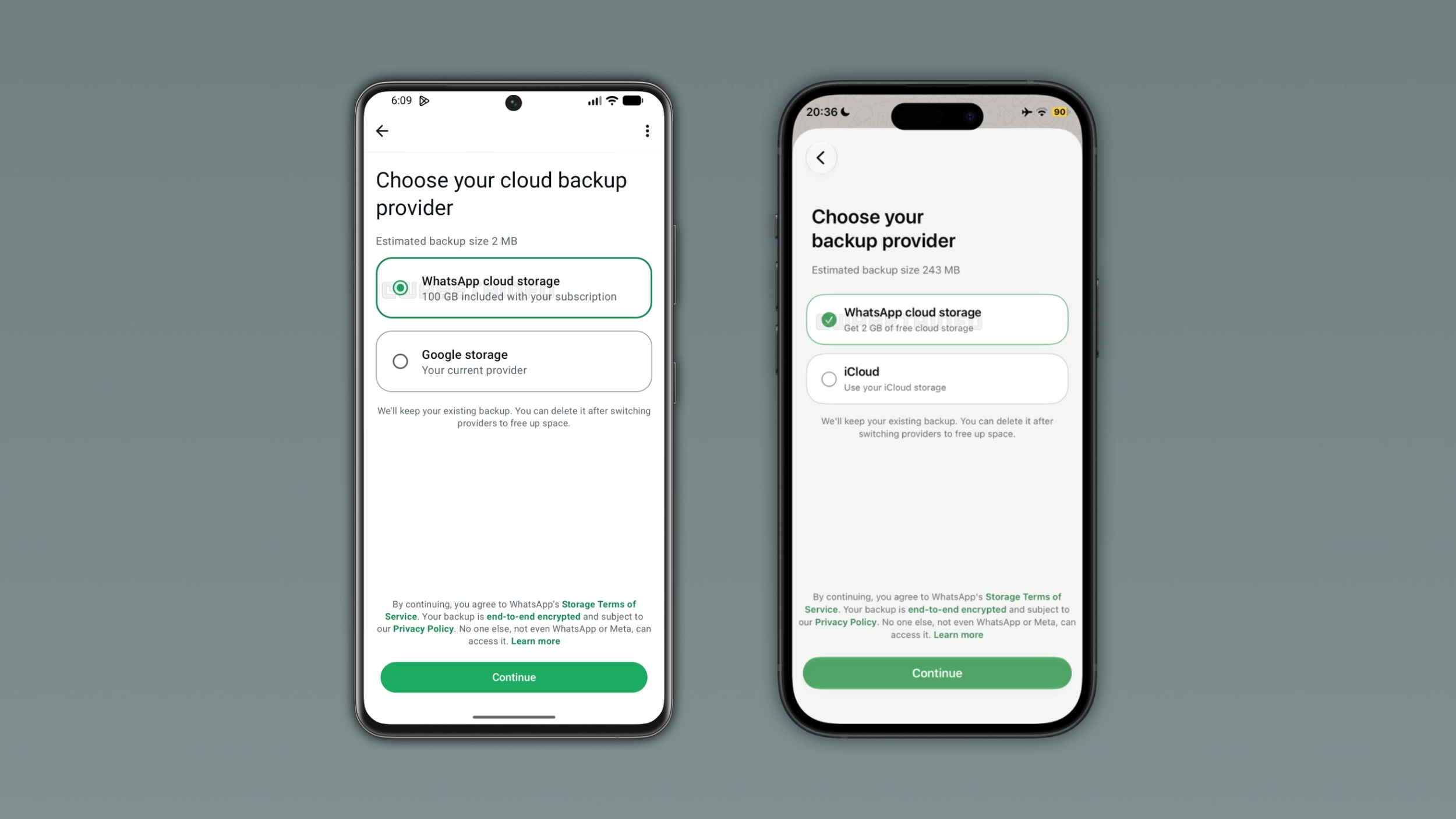
WhatsApp is adding its own cloud backup storage to Android and iOS as a new alternative to Google Drive and iCloud. Users can choose to store their chat backups on WhatsApp's servers and get 2 GB of free storage to start. Backups users store on WhatsApp's servers are end-to-end encrypted by default using a passkey or a 64-digit encryption key.
| Key points | Details |
|---|---|
| Feature: | WhatsApp cloud storage |
| Feature availability: | Some features may be under development, so they are not available to beta testers. Others may become available to users over time. If you're unable to access a certain feature, you will need to wait for a future update. |
| News shared last week: | WhatsApp introduces a new bottom navigation bar on Android! |
| Previous article: | WhatsApp is rolling out a feature to sync chat themes on iOS! |
Weekly WhatsApp beta updates: new features and improvements
This new weekly roundup brings together all the latest updates about WhatsApp beta shared this week. As a result, you can finally catch up on everything you might have missed from our past announcements. You can consider this summary as a way to keep up new features, improvements, and fixes. This week's highlight focuses on the new cloud backup storage available on Android and iOS. See what else we announced this week.
WhatsApp is rolling out a new cloud backup storage on Android
With the WhatsApp beta for Android 2.26.46.4 update, WhatsApp is rolling out its own cloud backup storage. Users can easily switch their backup provider to WhatsApp cloud storage from the chat backup screen. In this section, the app shows two different options: WhatsApp cloud storage and Google storage. End-to-end encryption is mandatory for all backups users store on WhatsApp's servers. WhatsApp offers 2 GB of free storage, but users who subscribe to WhatsApp Plus receive 100 GB of backup storage. Note that WhatsApp won't delete a backup immediately if a subscription expires, as it keeps the latest backup on its servers for 4 months after the subscription ends.
WhatsApp brings its first-party backup provider to the iOS app
Now, WhatsApp is also bringing its own backup cloud storage to the iOS app. Users can switch to WhatsApp cloud storage from the Chat backup screen. Since encryption is mandatory, they will have to secure their backups using either a passkey or a 64-digit encryption key. WhatsApp offers 2 GB of free storage, while WhatsApp Plus subscribers get 100 GB and Meta One plans go up to 4 TB. When users back up their chat history on WhatsApp's servers, they cannot use the backup to restore it on another platform, so users who change platform will need to use the built-in chat transfer feature instead.
WhatsApp introduces message sticker reactions on Android beta
WhatsApp is rolling out message sticker reactions to some beta testers. Users can add a sticker reaction by tapping on any message to open the message menu. Once they tap the button to open the sticker keyboard, WhatsApp adds the selected sticker as a reaction at the bottom of the message. As users react with more stickers, WhatsApp spreads them around the message to fill the space around it. With sticker reactions, users can add multiple stickers to the same message. Instead, they can add only one emoji per message with emoji reactions. At the moment, WhatsApp sets a limit of 20 sticker reactions per message.
WhatsApp increases the group chat limit to 1500 members
WhatsApp is increasing the maximum number of members per group from 1024 to 1500 participants on Android and iOS. This update is compatible with both groups and community group chats. WhatsApp is automatically updating existing groups to support the new limit, so admins do not need to take any action to unlock the higher capacity. The update does not affect the community announcement group since it already supports up to 2000 members. As a result, the update lets admins add up to 476 new members to their existing groups.
WhatsApp launches more Liquid Glass updates on iOS
With the WhatsApp beta for iOS 26.45.10.70 update, WhatsApp is extending the Liquid Glass design to two more screens. WhatsApp is now introducing the Liquid Glass design for the action buttons in the chat info screen. This feature introduces a translucent effect with a glass-like appearance that shows the content behind them. With the drawing editor, WhatsApp introduced the same translucent design for the toolbar at the top of the screen. WhatsApp already supports Liquid Glass for the chat list, the tab bar, the navigation bar, the message menu, and the video player, so these two updates bring the app closer to a fully consistent interface.
WhatsApp is rolling out shared chat themes on Android
The WhatsApp beta for Android 2.26.46.8 update introduces a feature to share chat themes. After choosing a theme or a wallpaper, WhatsApp shows a bottom sheet where users can choose if they want to share the theme. If they select the option to share it with everyone, WhatsApp applies the wallpaper and bubble color to both sides of the conversation. After applying a theme, WhatsApp shows a system message in the chat interface to confirm that the app changed the theme for everyone. The update is also available for group chats, so all members of a group can share their theme with others, and any member of the group can update the theme at any time.
WhatsApp also rolls out shared chat themes on iOS
WhatsApp is also introducing shared chat themes to the iOS app. Once users choose a new theme or wallpaper, the app will present a bottom sheet where users can decide if they want to share it with the other person. The default option is "Everyone", so users should switch to "You" if they prefer to keep the theme and wallpaper private. After users share a theme, WhatsApp shows a system message in the chat screen to inform everyone that the theme changed. The system message also includes a shortcut to let people quickly change the theme. Shared chat themes are protected by end-to-end encryption, so WhatsApp cannot see which theme or wallpaper users choose to share with others.
Connect with WABetaInfo
Follow WABetaInfo on X and visit our About page to learn more about what we do. We always appreciate your feedback on posts like this one.