WhatsApp is bringing parental controls to iOS settings
WhatsApp is introducing a new section to set up parental controls, making it easier for parents to discover the feature. Parents can follow the setup step by step directly from this section. When the child turns 18, WhatsApp automatically removes the parental controls and unlocks the features that were previously restricted.
| Key Points | Details |
|---|---|
| Feature: | Parental controls section for iOS settings |
| Status: | Rolling out |
| Compatibility: | WhatsApp Messenger for iOS 26.30.77 on the App Store is a compatible update. |
| Availability info: | This feature is available to some users on the App Store version. |
| Previous news: | WhatsApp introduces an alert to unmute channels on iOS! |
WhatsApp added parental controls to the Android settings
In the post about the WhatsApp beta for Android 2.26.29.5 update, we announced a new entry point for parental controls. With this update, WhatsApp added a new section directly to the Android settings screen. WhatsApp launched parent-managed accounts in select regions in March, so the feature is not new. However, many parents still do not know it exists. As a result, WhatsApp added a dedicated section in the app settings to make the feature easier to discover.
WhatsApp is now rolling out the same section for iPhone
WhatsApp is not limiting this change to the Android app. Parents who use WhatsApp on iOS can now find the same section in the app settings. This makes the experience consistent on both platforms. We discovered the news with the WhatsApp for iOS 26.30.77 update, which is available on the App Store. In particular, WhatsApp is rolling out a new section for parent controls. Parents on iOS can now easily set up and manage oversight for their child's account.
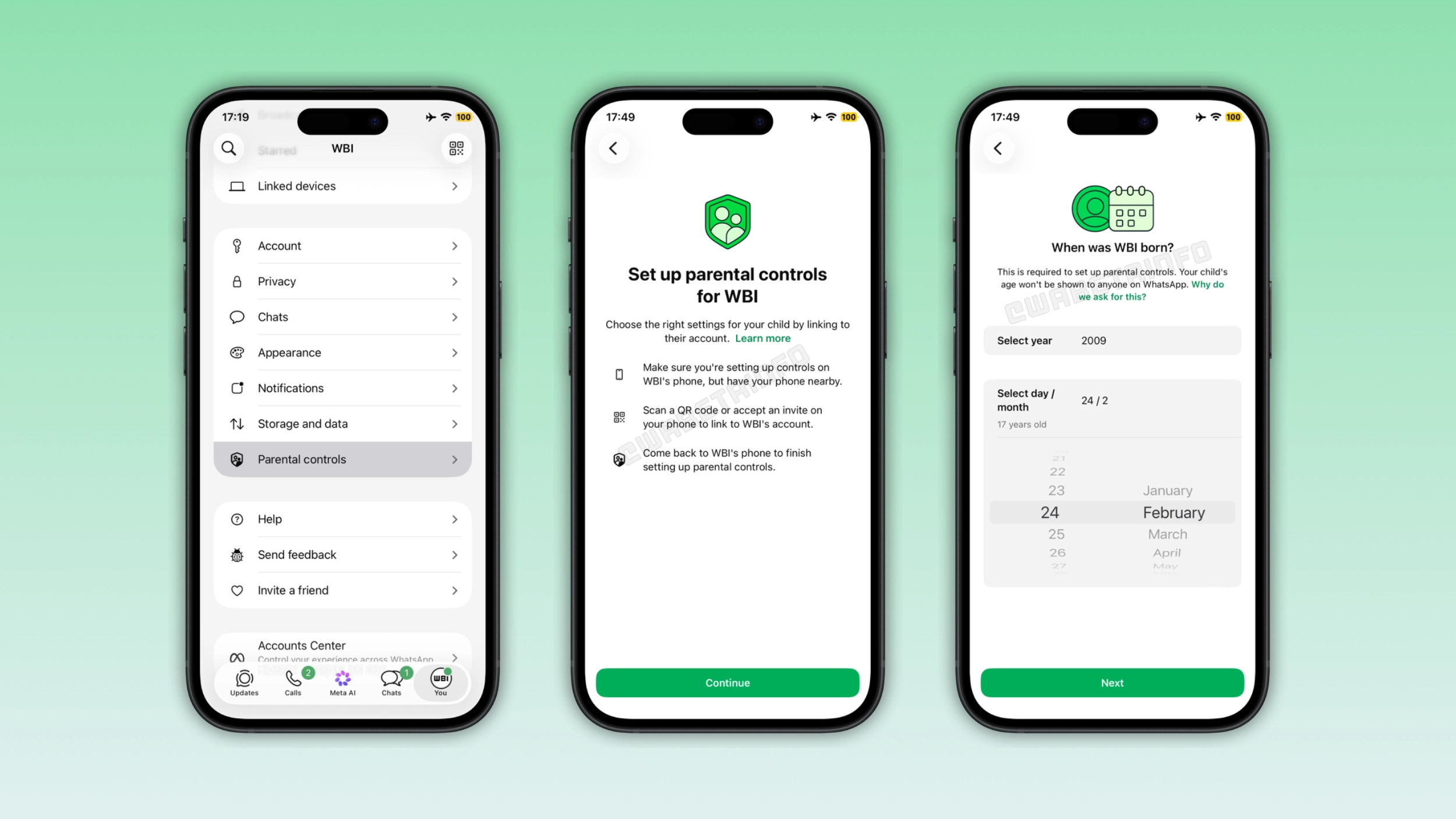
What the Parental controls section shows on the parent's device
When a parent opens the "Parental controls" section on their iPhone, WhatsApp presents a new setup screen. The parent needs to use the child's phone and keep their own phone nearby. In this section, WhatsApp asks the parent to scan the QR code or accept the invite on their phone to link their accounts. After accepting the invite, they need to switch to the child's phone to finish the configuration. WhatsApp presents the flow in a simple interface that does not require any technical knowledge.
WhatsApp asks for the child's date of birth during setup
The section asks the parent to enter the child's date of birth. WhatsApp uses this information to manage their account accordingly. The date of birth is not visible to anyone else on WhatsApp. It is private, and it is only used internally. WhatsApp uses the child's age to decide which features to restrict and when to lift those restrictions.
What changes when a child turns 18
WhatsApp uses the date of birth to track when the child turns 18. From that moment, WhatsApp will automatically remove the parental controls from the account. Note that some features are not available for parent-managed accounts, such as channels and status updates. However, they become accessible once the account is no longer under parental oversight. The parent does not need to manually disable this feature in this case. WhatsApp handles the transition automatically based on the age the user entered.
Why WhatsApp is making this section more visible
WhatsApp launched parent-managed accounts in March, but many families never set them up. A dedicated section in the app settings makes the feature easier to discover. Parents who open the app settings and scroll through the interface will see it listed alongside the other main sections. The feature is the same as before, but WhatsApp is just making sure more people find it.
WhatsApp is rolling out parental controls for iOS users
The new section for parental controls is available to some users who install the latest WhatsApp update from the App Store. WhatsApp is rolling out this feature gradually. This means that it may still not be available to your account. If the section does not appear yet in the app settings, it should become available to more accounts over the coming weeks. WhatsApp has not announced when this section will be available to everyone.
Connect with WABetaInfo
Follow WABetaInfo on X and visit our About page to learn more about what we do. We always appreciate your feedback on posts like this one.