WhatsApp is updating the group chat info interface on iOS
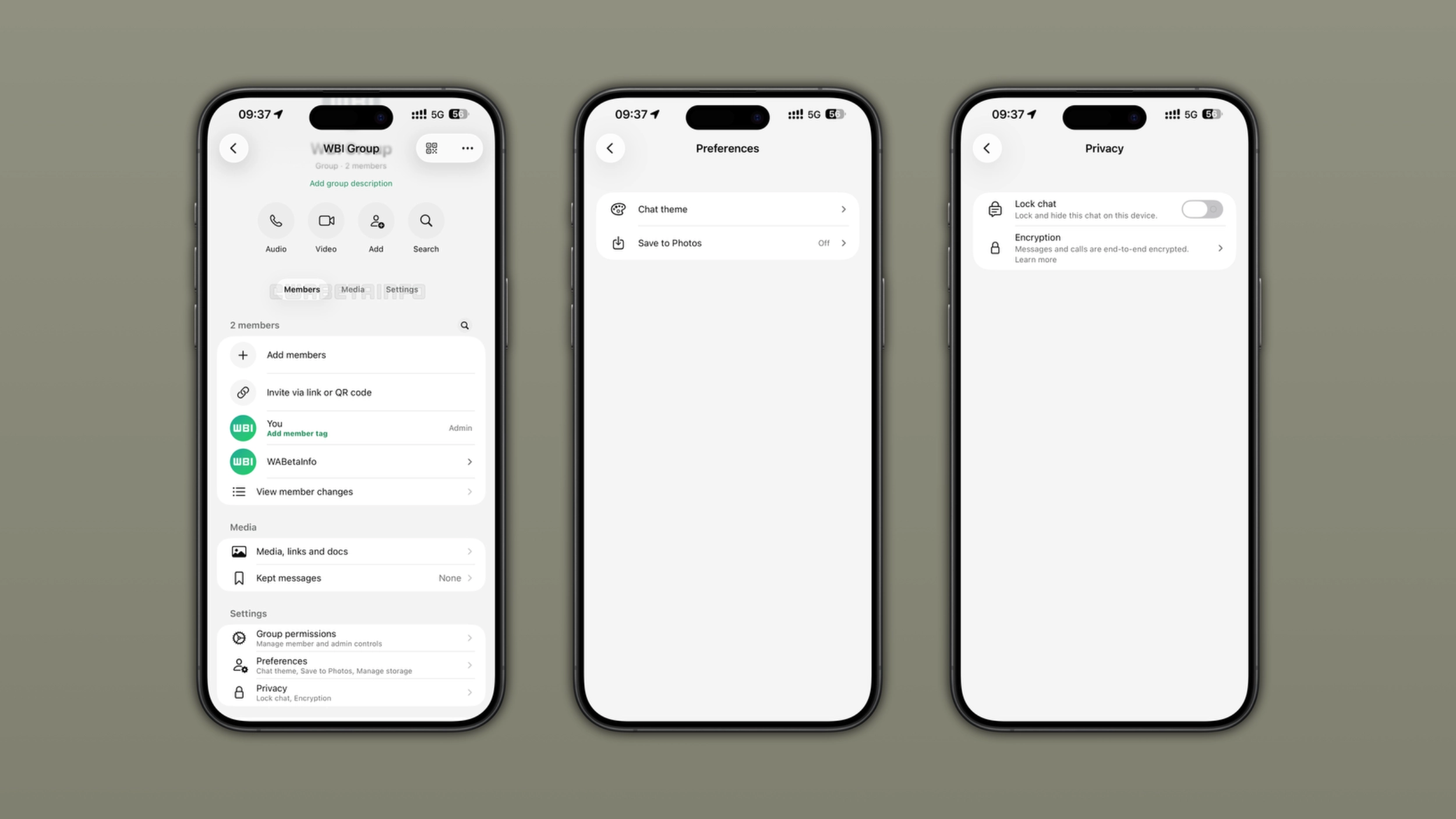
WhatsApp is rolling out a new interface for the group chat info screen on iOS. The update introduces two new sections and three tabs that organize members, media, and settings. The new interface makes it easier to find what you need without scrolling through the group info screen.
| Key Points | Details |
|---|---|
| Feature: | New group chat info interface |
| Status: | Rolling out |
| Availability info: | This feature is available to some beta testers on the latest versions of WhatsApp for iOS. |
| Thanks: | Youssef Salem, for testing and reporting. |
| Previous news: | Channel admins can now label paid partnerships on WhatsApp! |
WhatsApp introduced new sections in the group info screen on Android
The WhatsApp beta for Android 2.26.24.3 update introduces two new sections at the top of the group info screen. The first one is called Preferences, and it groups settings like Chat Theme, Media Visibility, and Manage Storage in one place. The group info screen also includes a Privacy section that brings Chat Lock and Encryption together in the same screen. Before this change, users had to scroll through the entire group info screen to find these options. The new interface makes these options immediately visible without scrolling.
WhatsApp introduced a tab system in the group info screen on Android
In the post about the WhatsApp beta for Android 2.26.20.7 update, we also announced another update for the group chat info screen. In particular, WhatsApp introduced a new navigation system within this section. With this update, WhatsApp now organizes the page into three tabs: Members, Media, and Settings. This organization makes it easier for users to quickly scroll to the section they need and find options faster than before.
WhatsApp expands the new interface for the group info screen to iOS
WhatsApp introduced a redesigned group chat info screen on Android last month, and the iOS app is finally catching up. We discovered the news after installing the latest WhatsApp beta for iOS update, which is available on TestFlight. Specifically, WhatsApp is rolling out a new interface for the group info screen to some beta testers. Even on WhatsApp for iOS, the refreshed interface follows the same structure that WhatsApp already rolled out on Android.
The Members tab shows who is in the group
The latest update moves the Members section at the top of the group info screen. As usual, it shows the full list of group participants, along with their names and roles. Group admins appear with a label that distinguishes them from other members. Users can tap on any participant to see their profile or start a conversation. This tab makes it faster to find a specific person in a large group without scrolling through the entire info screen.
The Media tab moves shared content into its own section
The Media tab brings together two rows that were previously at the top of the group info screen: "Media, links, and documents" and "Kept messages". WhatsApp is now moving both of them into the Media tab, so users can find them directly there. Users can still tap either row to open the full view, exactly as before. The tab simply gives these options a dedicated spot, separate from the member list and the group settings.
The Settings tab groups general group settings together
The Settings tab brings together several group-related options in one place. Here, users can find group permissions, notification alerts, advanced chat privacy, and other general options. Users need to tap these settings to open the full screen, exactly as before. The tab simply collects these settings in a dedicated spot, so users don't have to look through the member list or the shared media to find them.
The Preferences section gives quick access to chat settings
The settings section now includes a dedicated screen for other preferences. The section includes Chat Theme, Media Visibility, and Manage Storage. Chat Theme lets users choose the style for that specific conversation. Media Visibility controls whether media from the group can appear in the phone's gallery. Manage Storage gives a quick overview of how much space the group takes up on the device. By moving these features to a secondary section, WhatsApp keeps the main group info screen from feeling too cluttered.
The Privacy section groups encryption and chat lock together
Now, WhatsApp also groups privacy-related features into a single section. It includes Chat Lock and Encryption. Chat Lock lets users lock the group conversation behind the phone's biometric authentication or passcode. Encryption lets users verify that the conversation uses end-to-end encryption. It makes sense to have them in the same section, since both Chat Lock and Encryption allow users to manage how secure their conversation is.
Why these changes make the group info screen easier to navigate
Before these updates, the group info screen listed many settings, and it was easy to lose track of where users could find a specific option. Users had to scroll down to find anything specific, and the most frequently used settings were not always easy to spot. The new interface allows users to quickly find what they're looking for, making the most relevant settings immediately visible. Instead, the new navigation system keeps the rest organized by category. These two changes turn the group chat info screen into a structured interface that makes it easier to navigate.
WhatsApp is rolling out the refreshed group info interface to iOS beta testers
The new interface for the group chat info screen is available to some beta testers. Note that WhatsApp is gradually rolling out this update to specific accounts. These may also belong to users on the latest version available on the App Store. If the new interface does not appear yet, it should be available to more accounts over the coming weeks. WhatsApp has not announced when these updates will be available to everyone.
Connect with WABetaInfo
Follow WABetaInfo on X and visit our About page to learn more about what we do. We always appreciate your feedback on posts like this one.