WhatsApp is rolling out chats with third-party agents on iOS
WhatsApp is introducing a feature that lets users create chats with third-party agents on iOS. The update allows users to connect their own agents and interact with them right within the app. Users can create up to five agents on their account.
| Key Points | Details |
|---|---|
| Feature: | Chats with third-party agents on iOS |
| Status: | Rolling out |
| Compatibility: | WhatsApp beta for iOS 26.37.10.70 is a compatible update. |
| Availability info: | This feature is available to a very limited number of users in select countries. |
| Thanks: | Akan, Radu Oncescu, and Technical MJ TV, for testing and reporting. |
| Previous news: | WhatsApp is rolling out access to Instagram and Facebook media! |
WhatsApp rolled out chats with third-party agents on Android
In the post about the WhatsApp beta for Android 2.26.35.3 update, we announced chats with third-party agents. With this feature, users can create a chat with an agent right within the app settings. Here, they can choose a name, profile photo, and get the API key. The agent can only read what the user shares with them. Chats with agents are not end-to-end encrypted since they are managed by a secure Meta service on behalf of the agent developer. An agent is not necessarily powered by AI, but it can also be a bot.
WhatsApp is now rolling out the same feature for iPhone
WhatsApp is not limiting support for third-party agents to Android. Today, WhatsApp is finally extending this feature to the iOS app as well. We discovered this with the WhatsApp beta for iOS 26.37.10.70 update, which is available on TestFlight. With this update, WhatsApp is rolling out chats with third-party agents. This makes it possible for users to connect and chat with their agents without leaving WhatsApp.
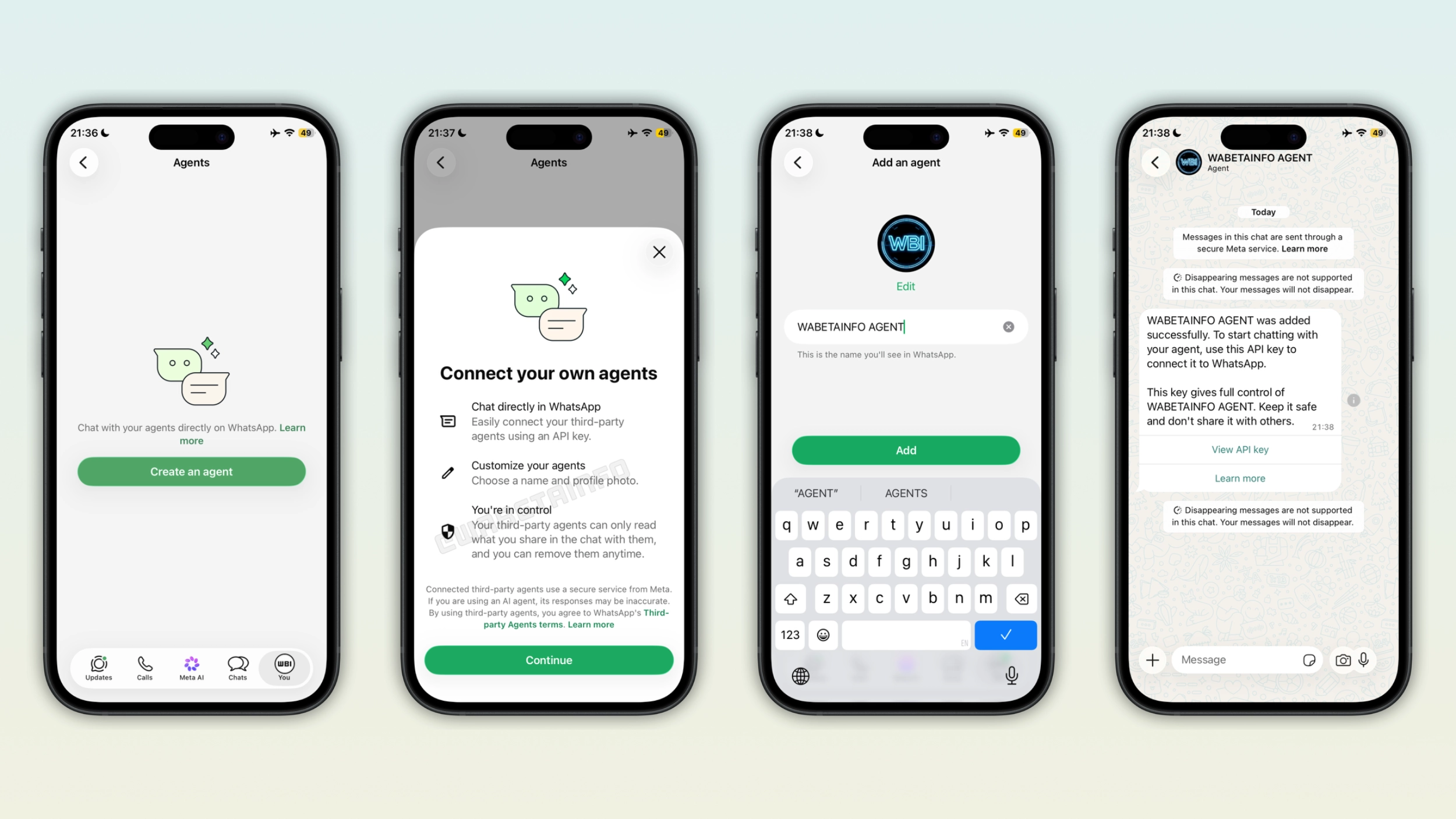
How to add an agent on iPhone
It is possible to create a chat with an agent right within the app settings. In this section, users will see a short intro screen that explains how agent chats work. Users can customize the agent with a name and photo, making it easier to distinguish it from other agents in the chat list. After saving the changes, WhatsApp creates a chat and provides users with an API key.
How the API key works on iPhone
After users create the agent, WhatsApp generates an API key and shows it within in the chat. Users can tap "View API key" to copy it and use it in the service where their agent is hosted. The API key gives full control over the agent, and users should never share it with others. Once they share the key with the third-party platform, the agent connects to the WhatsApp chat and can start responding. Users can also reset the key and generate a new one from the chat with the agent.
How chatting with an agent works on iPhone
Once users connect the agent, the conversation looks like any other chat in the app. This makes it possible for users to chat with the agent right within the app. Messages are sent through a secure Meta service, and disappearing messages are not supported in agent chats. The agent can only read what users explicitly share in the conversation. This means that it cannot access other chats, contacts, or media stored on the device.
Chats with agents are not end-to-end encrypted
Unlike other conversations on WhatsApp, chats with agents are not end-to-end encrypted. When users send a message to an agent, it travels through a secure Meta service that manages the delivery on behalf of the agent developer. The agent developer can access these messages as part of the service. This is the reason why WhatsApp does not consider messages shared with agent end-to-end encrypted. However, personal messages and calls between people on WhatsApp are still end-to-end encrypted.
WhatsApp is rolling out agent chats to iPhone users
This feature is available to some users who install the latest update from TestFlight. The feature is only available in select countries, and its availability is very limited. WhatsApp is rolling it out gradually, and it may take some months before it becomes widely available. WhatsApp has not announced when this feature will be available to everyone.
Connect with WABetaInfo
Follow WABetaInfo on X and visit our About page to learn more about what we do. We always appreciate your feedback on posts like this one.