WhatsApp is rolling out a new navigation experience for chats
WhatsApp is bringing new controls to the chat interface on iOS to access some options in the chat info screen. The update also fixes a readability problem with the navigation bar. This experience is available for accounts that already have the Liquid Glass interface enabled.
| Key Points | Details |
|---|---|
| Feature: | New navigation experience for chats |
| Status: | Rolling out |
| Compatibility: | WhatsApp for iOS 26.39.75 on the App Store is a compatible update. |
| Availability info: | This feature is available to some users, and it is rolling out to more people over the coming weeks. |
| Thanks: | Sc, Federico Trevisani, and anhelloooo, for testing and reporting. |
| Previous news: | WhatsApp rolls out double speed for status updates on Android! |
WhatsApp widely rolled out the full Liquid Glass experience
In the post about the WhatsApp for iOS 26.35.72 update, we announced the full Liquid Glass design for the chat interface. The update makes the chat bar, navigation bar, and the message menu compatible with Liquid Glass. The navigation bar is transparent on iOS 26 and a uniform background layer on iOS 27 when content scrolls behind it. However, some users experienced a readability issue with certain wallpapers. As a result, the contact name at the top of the screen was hard to read against the background.
WhatsApp launches a new navigation experience for chats and groups
WhatsApp is now introducing a feature that solves the readability issue. At the same time, the update also adds new functionality to the navigation bar. We discovered this feature with the WhatsApp for iOS 26.39.75 update, which is available on the App Store. With this update, WhatsApp is rolling out a new navigation experience in chats and groups. The feature is currently available for accounts that already have the Liquid Glass interface enabled.
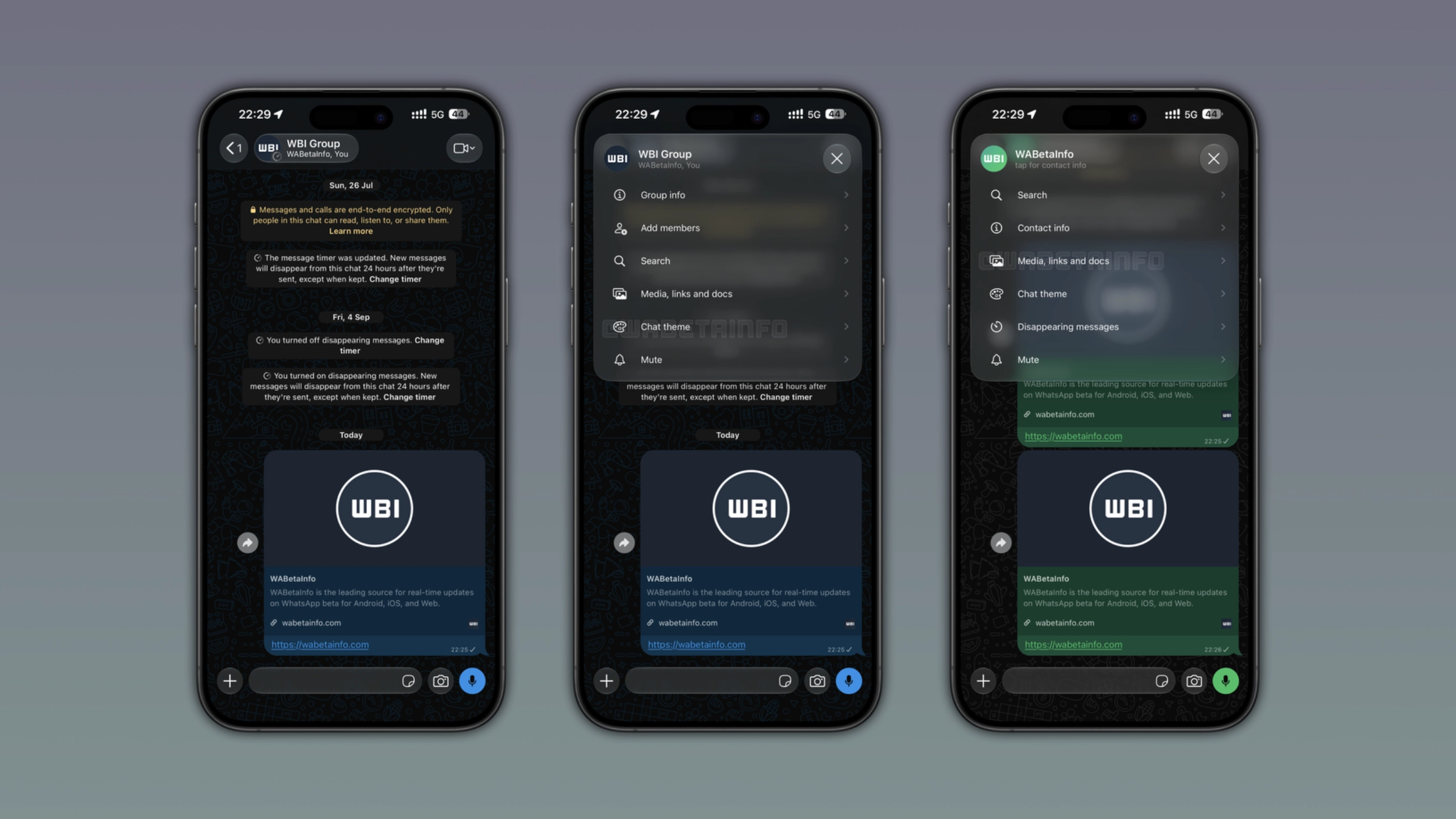
What the new navigation button shows
The latest update brings a new button to the navigation bar that includes the profile photo, the name, and the online status or last seen. The button uses the Liquid Glass design, so its background adapts to the wallpaper behind it. At the same time, it keeps the text readable regardless of the wallpaper behind it. The update looks more polished and works better with the Liquid Glass interface.
What happens when users tap the button
WhatsApp presents a popup menu from the top of the screen when users tap the new button within the navigation bar. The menu uses the same Liquid Glass design as the button, with a translucent background that lets the chat show through behind it. The menu presents some shortcuts to the most useful actions for the conversation. WhatsApp shows different shortcuts for individual chats, group chats, and business accounts. With this menu, users do not need to open the chat info screen to view some sections.
What the menu shows for individual chats and group chats
For individual chats, the menu shows 6 options: Search, Contact info, Media links and docs, Chat theme, Disappearing messages, and Mute. For group chats, the menu shows the same shortcuts, but it also includes the ability to add new members to the group. These options reflect what users may need in a conversation without opening the full chat info screen. Chats with business accounts offer a similar version of the menu.
Why WhatsApp replaced the contact name with a button
The navigation bar looks great on most wallpapers, but certain backgrounds made the contact name hard to read. Unlike a Liquid Glass element, plain text looks the same regardless of the wallpaper behind it. A button compatible with Liquid Glass can make the difference. WhatsApp solved the readability issue and made the navigation bar do more than it ever did before. This gives users quicker access to the tools they use most often.
WhatsApp is rolling out the new chat navigation to some users
This feature is available to some users who install the latest from the App Store. It is also available to some beta testers after installing the latest version from TestFlight. WhatsApp is gradually rolling it out, so it is not visible to all users right now. WhatsApp has not announced when this will be available to everyone.
Connect with WABetaInfo
Follow WABetaInfo on X and visit our About page to learn more about what we do. We always appreciate your feedback on posts like this one.