WhatsApp is rolling out a dual camera mode on Android
WhatsApp is introducing a feature that lets users capture photos and videos with both cameras. WhatsApp shows them on the screen simultaneously, and users can decide which camera appears in the foreground. Users can share the final photo or video in their chats, groups, and status updates.
| Key Points | Details |
|---|---|
| Feature: | Dual camera mode |
| Status: | Rolling out |
| Compatibility: | WhatsApp beta for Android 2.26.46.9 is a compatible update. |
| Availability info: | This feature is available to some beta testers on the Google Play Store. |
| Thanks: | Sc, troncarlo, and Saadh Jawwadh, for testing and reporting. |
| Previous news: | WhatsApp introduces view-once text messages on iOS! |
WhatsApp is testing Zaps to send instant photos and videos
In the post about the WhatsApp beta for Android 2.26.46.2 update, we announced a new feature to share ephemeral photos and videos. With this feature, users can take an instant photo or video and send it to their groups. The functionality is called Zap, and WhatsApp groups multiple Zaps in the chat as a single unit. At the moment, WhatsApp does not show Zaps in the chat info screen, so users will have to view them from the conversation interface.
WhatsApp is introducing a dual camera mode on Android
WhatsApp keeps working on improving the camera capabilities. Now, WhatsApp is bringing a new mode to the camera to enable both the front and back cameras. We discovered this with the WhatsApp beta for Android 2.26.46.9 update, which is available on the Google Play Store. With this update, WhatsApp is rolling out a dual camera mode to some beta testers. Users can capture a scene and show their reaction in a smaller frame at the same time.
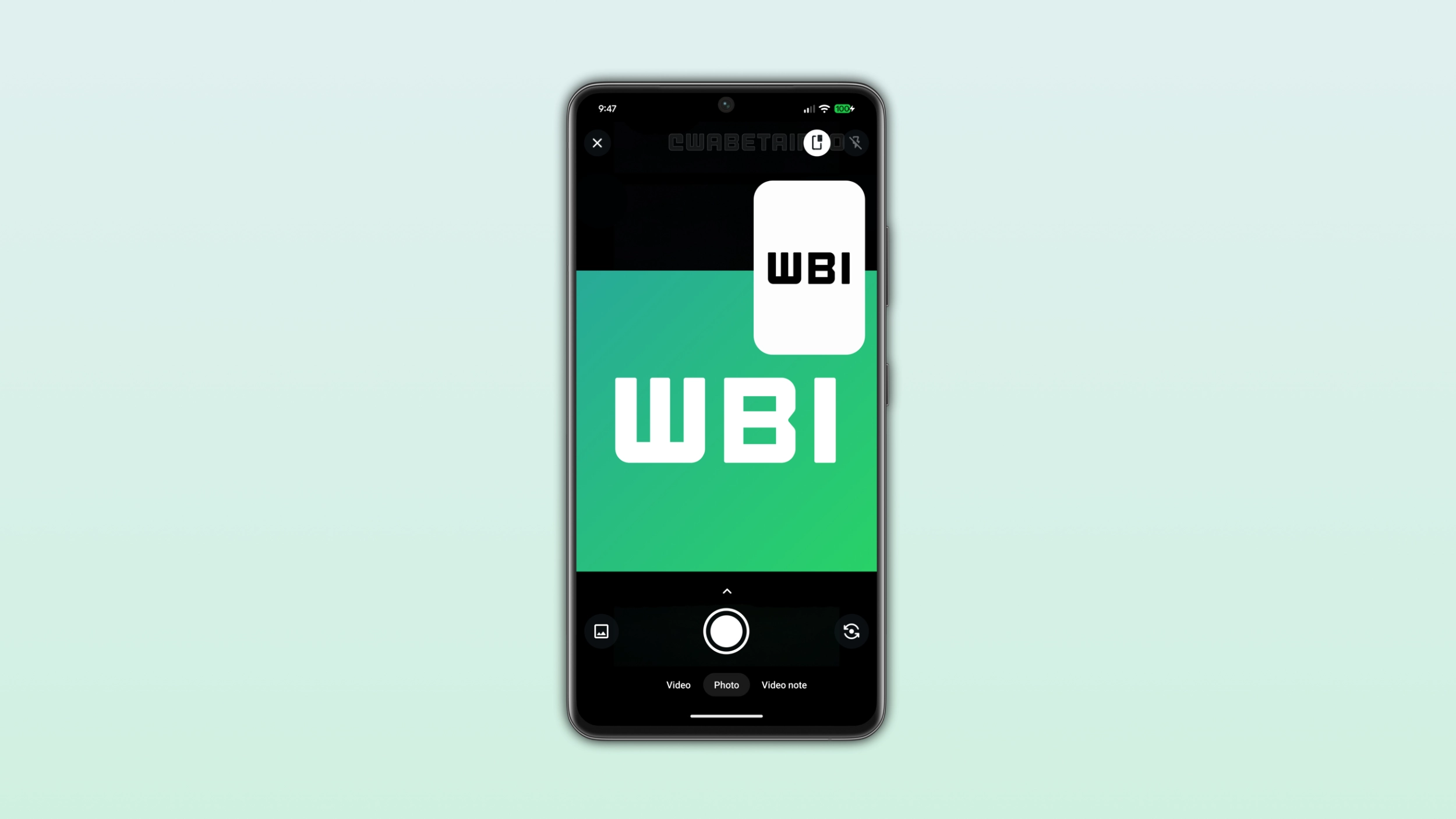
How to activate the dual camera mode
Users can activate the dual mode from the camera screen. WhatsApp added a new button at the top of the interface that lets users enable the dual mode. Once users activate it, WhatsApp places the front camera in a small rectangular frame in the top right corner. Instead, WhatsApp fills the screen with the back camera. Users can switch between them by tapping the rotate button in the interface. As a result, WhatsApp can capture both views in a single photo or video.
How to reposition and customize the dual camera view
WhatsApp does not lock the small frame in place. Instead, users can drag it to any position on the screen to place it where they want. If users tap the rotate button to switch cameras, WhatsApp moves the front camera to the full screen and places the back camera in the small frame. This lets users decide how they appear on the screen.
What users can capture with dual camera mode
The dual camera mode is compatible with both photos and videos. When users take a photo, WhatsApp combines both camera views into a single image. When users record a video, WhatsApp records both cameras simultaneously to combine the footage into a single clip. This means that users can capture any moment with both cameras.
Where users can share dual camera content
Users can share photos and videos they captured with the dual camera mode anywhere they can share other media on WhatsApp. This includes chats, groups, channels, and status updates. The dual camera mode is always available in the camera interface, regardless of where users opened it. After capturing the photo or video using the dual camera mode, users can add a caption, apply edits in the drawing editor, or send it without any changes.
WhatsApp is rolling out dual camera mode to Android beta testers
The dual camera mode is available to some users who install the latest update from the Google Play Store. WhatsApp is rolling it out gradually, so not every beta tester will see the new camera mode. If this feature does not appear yet, the feature should become available to more accounts over the coming weeks. WhatsApp has not announced when this feature will be available to everyone.
Connect with WABetaInfo
Follow WABetaInfo on X and visit our About page to learn more about what we do. We always appreciate your feedback on posts like this one.