WhatsApp is testing a dynamic bottom navigation bar on Android
WhatsApp will make the bottom navigation bar smarter by changing its size based on the scroll direction. This design keeps the content clean while users scroll through their chats. This is another update that makes the bottom navigation bar more modern.
| Key Points | Details |
|---|---|
| Feature: | Dynamic bottom navigation bar |
| Status: | Under development |
| Availability info: | This feature is currently in development and not yet available for beta testing. |
| Previous news: | WhatsApp is developing a call filtering feature for the Android app! |
WhatsApp is refining the bottom navigation bar
In the post about the WhatsApp beta for Android 2.26.38.10 update, we announced a refreshed bottom navigation bar. The new bottom navigation bar floats above the screen with rounded corners and no text labels under the icons. With the WhatsApp beta for Android 2.26.41.7 update, WhatsApp is also working on switching the tab selection style from a pill shape to a circular one. We noted in these reports that the design is not final, as WhatsApp would likely keep refining it.
WhatsApp is working on a dynamic scrolling behavior
WhatsApp keeps working on improving the bottom navigation bar. Now, WhatsApp is focusing on how the bar responds to scrolling. When users scroll down through their chat list, the bar will shrink into a compact floating pill. When they scroll back up, the bar will return to its full size. We discovered this with the WhatsApp beta for Android 2.26.41.6 update, which is available on the Google Play Store. Specifically, WhatsApp is testing a dynamic bottom navigation bar that changes its size depending on the direction of the scroll.
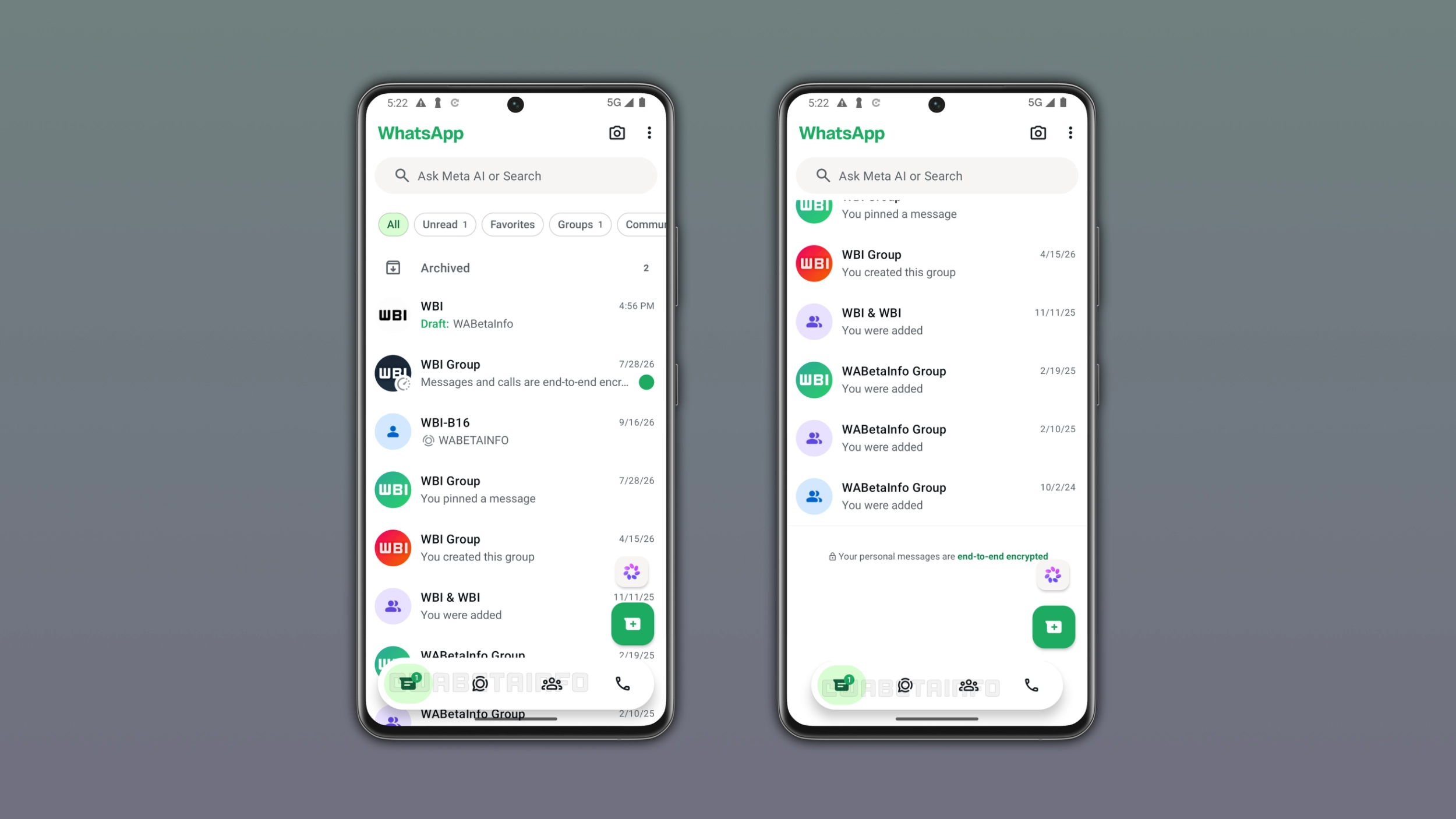
What the bar looks like in its full and compact form
In its full form, WhatsApp expands the bottom navigation bar to the full width of the screen. This is the version users see when they open any tab for the first time they launched the app. When users scroll down the interface, WhatsApp gradually reduces the bar in both width and height. This turns the bottom navigation bar into a compact pill that floats at the bottom of the screen. The icons are still visible in the compact form, but the bar takes up less space than before.
Why the bar shrinks while scrolling
Although this applies to any tab, the chat list is the best example to understand why a smaller bottom navigation bar makes sense. When users scroll through their chat list, they are looking for a specific conversation. The bottom navigation bar is not relevant when users are focused on finding a specific chat. Users are not trying to switch tabs, but they are trying to find a conversation. With a smaller bottom navigation bar, WhatsApp is making it easier for users to find their conversations without any distractions. When users want to go back to the top, WhatsApp expands the bar to its full size again.
How this compares to Instagram's navigation bar
This behavior is not new to Meta's apps. For example, the bottom navigation bar available on Instagram works the same way. Instagram shrinks it into a compact pill when users scroll down the feed and expands it again when they scroll up. WhatsApp is now working on the same behavior, which makes sense since both apps belong to the same company. Users who are familiar with the bottom navigation bar on Instagram will recognize it on WhatsApp.
The bottom navigation bar may still not be final
This is the fourth change WhatsApp introduced to the bottom navigation bar. WhatsApp refined the layout, removed the tab labels, and improved the tab indicator. Now, WhatsApp is bringing a new scrolling behavior to the bottom navigation bar. WhatsApp is still experimenting with the bottom navigation bar. As a result, the final design may look still different. We will continue to follow the evolution of this design to report any further changes as they are available.
WhatsApp is developing the dynamic navigation bar for a future Android update
The dynamic bottom navigation bar is currently under development on Android. Since it's under development, the refreshed bottom navigation bar is not available yet. WhatsApp will make it available to some beta testers in a future update. At the moment, WhatsApp has not announced a date for the official release.
Connect with WABetaInfo
Follow WABetaInfo on X and visit our About page to learn more about what we do. We always appreciate your feedback on posts like this one.