WhatsApp is rolling out chats with third-party agents
WhatsApp is introducing a feature that lets users create a chat with their third-party agents. After adding and configuring an agent, users can chat with it right within the app. WhatsApp is currently testing this feature with a very limited number of users in select countries.
| Key Points | Details |
|---|---|
| Feature: | Chats with third-party agents |
| Status: | Rolling out |
| Compatibility: | WhatsApp beta for Android 2.26.35.3 is a compatible update. |
| Availability info: | This feature is available to some users, and it is rolling out to more accounts over the coming months. |
| Previous news: | WhatsApp introduces Liquid Glass design for the message menu! |
What an AI agent is
An AI agent is a tool that can understand natural language and respond as if it were a person. Unlike a simple chatbot that follows a script, an agent can handle very complex requests and perform tasks on behalf of the user. Developers build agents using platforms and APIs provided by AI companies. For example, OpenAI, Google, and Anthropic offer the infrastructure needed to create and deploy agents. However, an agent is not necessarily powered by AI. It can also be a simple bot that performs specific tasks or responds to predefined commands. Until now, users who wanted to interact with an agent had to open a dedicated app, visit a website, or use a browser extension.
WhatsApp is introducing support for third-party agents
WhatsApp is making it possible to connect third-party agents directly within the app. Users can now add, manage, and chat with an agent without leaving the app. We discovered this feature with the WhatsApp beta for Android 2.26.35.3 update, which is available on the Google Play Store. With this update, WhatsApp is rolling out a feature to chat with third-party agents. This new functionality lets users communicate with an agent in a dedicated conversation, without giving it access to their other chats.
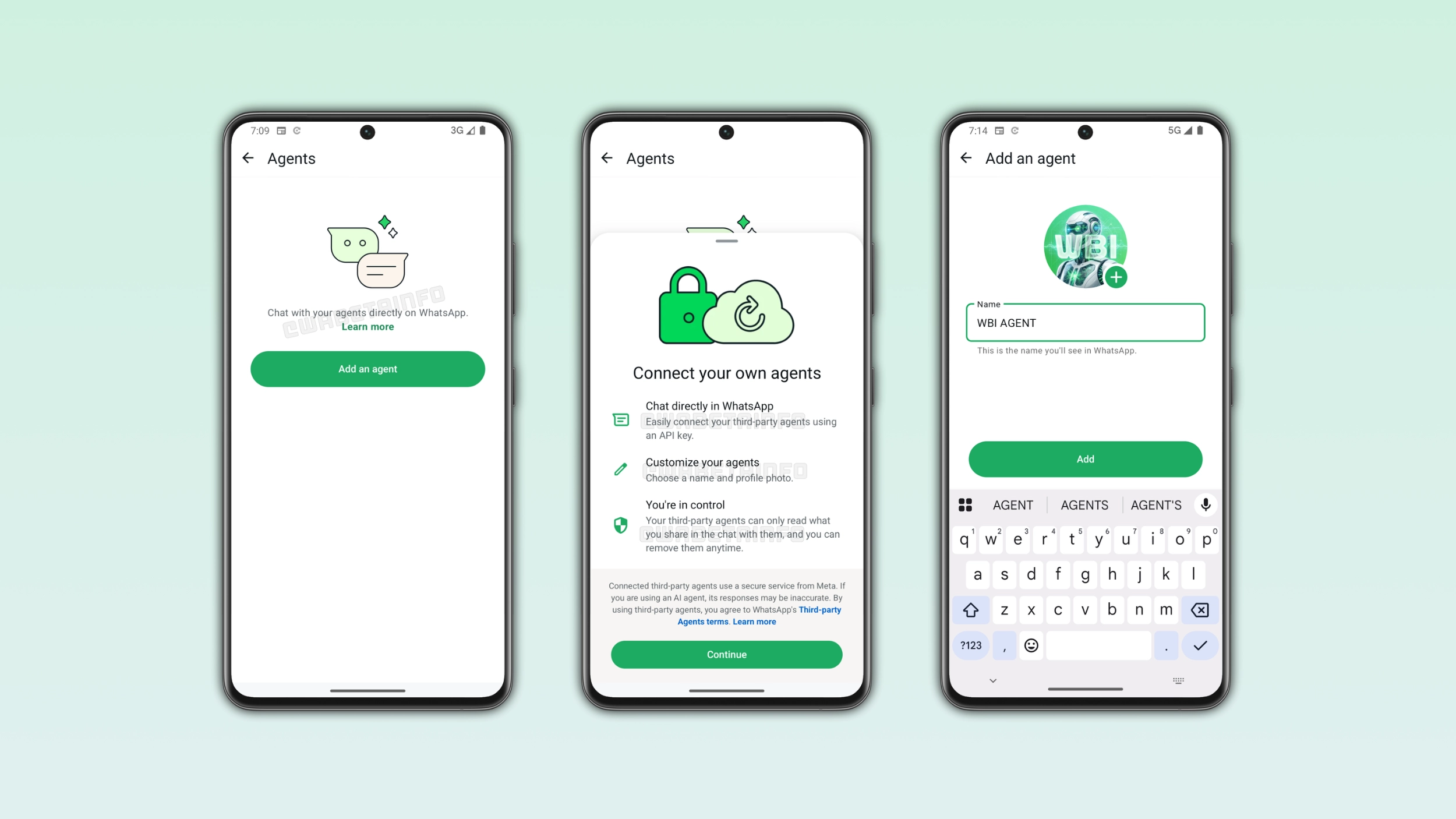
How to link an agent to a new chat on WhatsApp
Users can add their agent from the app settings. Here, WhatsApp is adding a new entry point that lets users configure the agent. In this screen, users can enter a name for the agent and choose a profile photo. The name the user enters is what they will see in the chat list, making it simpler to recognize the agent. WhatsApp supports up to five agents per account, so users can connect different agents for different purposes. Once they complete the setup, WhatsApp generates an API key needed to connect the agent to a chat. WhatsApp supports both AI agents and bots, so it is possible to connect any compatible service using the generated key.
How to connect the agent using an API key
The API key is the information needed to link the third-party agent with a WhatsApp chat. After WhatsApp generates it, the user needs to copy and use it in the service where their agent is hosted. The exact steps depend on the platform, but most services have a field where users can paste the key. Once the user enters the API key, they can finally communicate with the agent on WhatsApp. Users who need to reset the connection can generate a new API key from the same screen at any time.
How users can chat with an agent on WhatsApp
Once the agent is connected to a WhatsApp chat, users can open the new conversation to communicate with it. Users can send messages to the agent and receive responses directly within the app. Note that the agent can only read what the user shared in the chat with it. This means that the agent cannot access other conversations, contacts, or media. At the moment, it is only possible to chat with the agent in an individual chat. For this reason, users cannot add it to group chats and communities. In case the agent is an AI, WhatsApp notes that its responses may be inaccurate. As a result, users should always double-check anything the agent tells them.
How to manage your agents
Users can manage their agents from the app settings at any time. In this section, it is possible to select the agent to update its name or profile photo. For example, a user who connects a new version of their agent might want to rename it to avoid confusion with the old one. Additionally, a user who set up an agent without a photo might add one later to make the chat easier to find.
What happens to your conversation after removing an agent
WhatsApp disconnects the agent from the chat as soon as the user removes it. In this case, the user can no longer send messages to the agent or receive responses from it. However, WhatsApp doesn't delete the chat history automatically. WhatsApp keeps the previous messages visible in the chat, so users can still read what they discussed with the agent. Users can reconnect with their agent later, but they would need to create it again using a new API key.
Chats with agents are not end-to-end encrypted
When users send a message to an agent, WhatsApp delivers the message securely to the destination. WhatsApp considers messages end-to-end encrypted only when they go directly between the devices of the people in the conversation. Since chats with agents are managed by a Meta service on behalf of the agent developer, they are not considered end-to-end encrypted. This does not mean that other people can read them, but the agent developer can access the messages as part of the service. However, personal messages and calls between people on WhatsApp remain fully end-to-end encrypted. This means that only the people in the conversation can read or hear them, and not even WhatsApp or Meta can access them.
WhatsApp is rolling out third-party agent support to Android users
WhatsApp is making the ability to create a chat for an agent available to a limited number of users. At the moment, WhatsApp is gradually rolling out this feature, and most users won't see the Agents section within the app settings right now. If the feature does not appear, it will become available in a future update. WhatsApp has not announced when it will extend this functionality to everyone.
Connect with WABetaInfo
Follow WABetaInfo on X and visit our About page to learn more about what we do. We always appreciate your feedback on posts like this one.