WhatsApp is testing an in-app browser for chats on iOS
WhatsApp is developing a feature that will let users open links from the chat interface. Users will be able to enable the in-app browser from the app settings, making it easier to open links without leaving the app. WhatsApp previously limited this feature to business links, but users will be able to open any link in the future.
| Key Points | Details |
|---|---|
| Feature: | In-app browser for chats |
| Status: | Under development |
| Availability info: | This feature is currently in development and not yet available for beta testing. |
| Previous news: | WhatsApp is working on two new interface updates for Android! |
WhatsApp rolled out a browser for business links on iOS
In the post about the WhatsApp beta for iOS 25.14.10.72 update, we announced a feature to open certain business links within the app. With this feature, users could tap a business link and open it without switching to Safari. WhatsApp limited this feature to links from businesses that met specific technical requirements. For example, the website needs to use HTTPS to ensure a secure connection. Users who preferred to use their default browser could switch to it through the three-dot menu.
WhatsApp is working on a full in-app browser for all links
WhatsApp is now extending this concept much further. Instead of limiting the feature to business links, WhatsApp is developing an in-app browser compatible with any link shared in the chat. We discovered the news with the WhatsApp beta for iOS 26.41.10.72 update, which is available on TestFlight. With this update, WhatsApp is developing an in-app browser that will let users open any link right within the conversation screen.
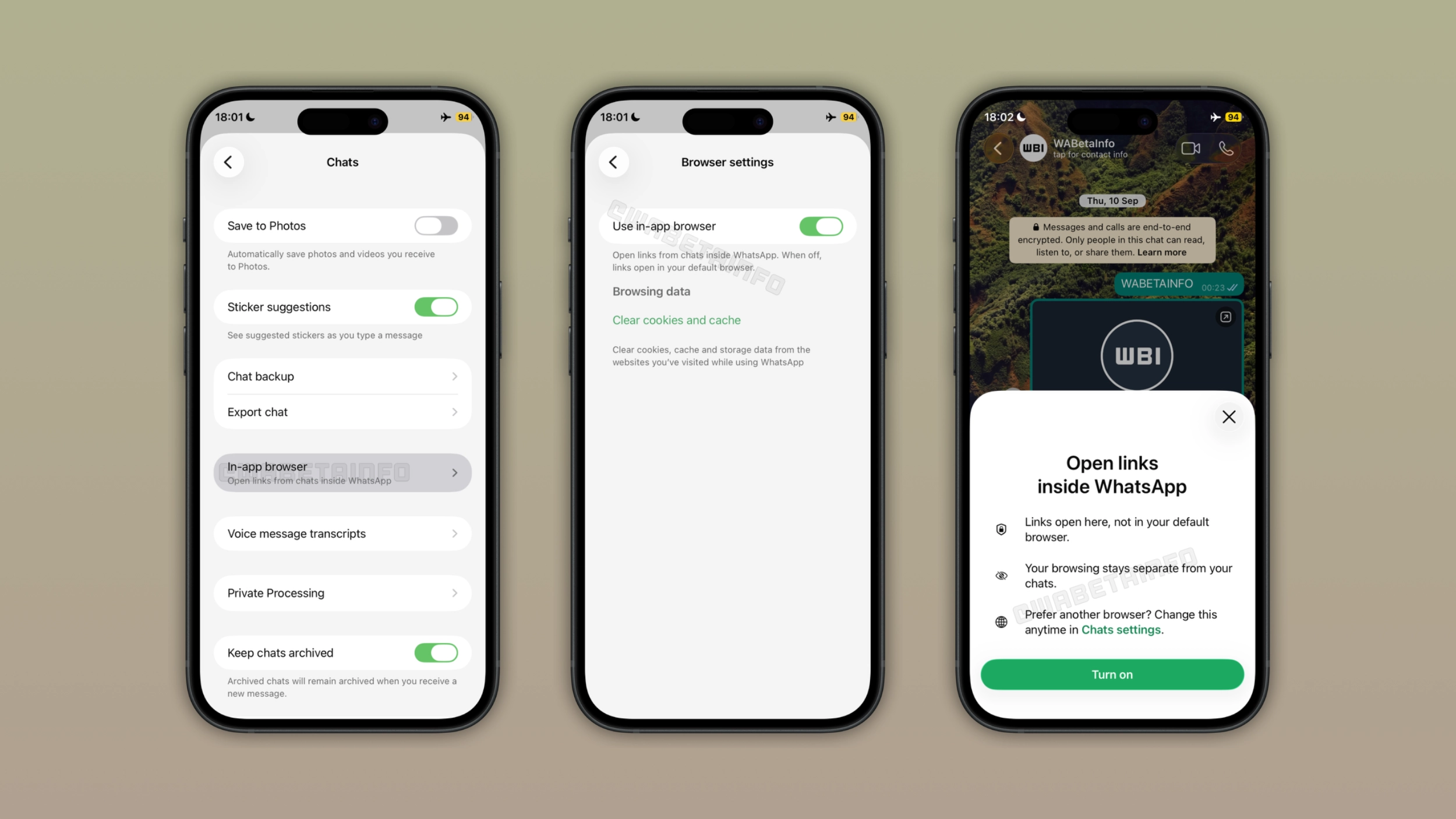
How users will be able to enable the in-app browser
Users will be able to enable the in-app browser from the app settings. Here, WhatsApp will add a new option called "In-app browser". When users enable this feature, they will be able to open any link they send and receive in the chat screen. When users enable this option for the first time, WhatsApp will show a bottom sheet that explains how the feature works. It informs users that they can now open any link within WhatsApp rather than in the default browser. Users will be able to restore the default browser at any time.
What changes when the in-app browser is active
When users enable the in-app browser, they can open any link within WhatsApp. This means that users will not need to switch to Safari, Chrome, or any other browser they installed on their device. The browsing session is separate from the chat, so users can browse without affecting the conversation. If users prefer to open links in the default browser instead, they can select the option available in the three-dot menu. This feature will be available for all chats and links, not just those shared from businesses.
How to manage browsing data
The Browser settings screen will also include a section to manage data. Here, users will be able to clear cookies and cache from the websites they visited while using WhatsApp. This will give users control over the data the in-app browser stores on their device. WhatsApp cannot see links shared in the conversation and which ones users open. WhatsApp stores browsing data locally on the device, just like Safari does. Neither WhatsApp nor Apple can see which links users open.
Why this is a bigger step than the business link feature
WhatsApp introduced a feature that lets users open business links in their conversations. This feature was only compatible with specific links that met WhatsApp's technical requirements. As a result, most links users shared in their conversations did not qualify. With the new in-app browser, WhatsApp will finally remove this restriction. Users will be able to open any link in their chats, whether it is a business link or not. This will be helpful for users to frequently open multiple links during their conversations.
WhatsApp is developing the in-app browser for a future iOS update
The in-app browser is currently under development on iOS. Since it's in development, the feature is not ready for release. WhatsApp will make it available to some beta testers in a future update. At the moment, WhatsApp has not announced when this feature will be available to the public.
Connect with WABetaInfo
Follow WABetaInfo on X and visit our About page to learn more about what we do. We always appreciate your feedback on posts like this one.