WhatsApp is testing birthday dates in the contact info screen
WhatsApp is developing a feature that will display birthdays in the chat info screen. This feature will make it easier for users to check a contact's birthday without opening the calendar app. WhatsApp will show the information from the phone's address book, and the app updates it automatically when users edit a contact.
| Key Points | Details |
|---|---|
| Feature: | Birthday dates in the contact info screen |
| Status: | Under development |
| Availability info: | This feature is currently in development and not yet available for beta testing. |
| Previous news: | WhatsApp tests a redesigned bottom navigation bar on Android! |
WhatsApp is testing birthday reminders in the Contacts tab
In the post about the WhatsApp beta for iOS 26.38.10.18 update, we announced birthday reminders in the new Contacts tab. When a contact has a birthday, WhatsApp will show cake emoji and a "Birthday today" label in the Contacts tab. WhatsApp extracts this information from the phone's address book, so the birthday can appear automatically. The reminder is visible for the entire day, so users can notice it whenever they open the tab. In a future update, WhatsApp will add this feature to the new Contacts tab, which is still under development.
WhatsApp will add birthday dates to the contact info screen
WhatsApp won't limit the birthday feature to the Contacts tab. Today. WhatsApp is developing a feature that shows birthdays in the contact info screen. This could give users a new place to check when a contact's birthday is at any time. We discovered this with the WhatsApp beta for iOS 26.38.10.70 update, which is available on TestFlight. With this update, WhatsApp is testing a dedicated Birthday field in the contact info screen. This will make it simpler to track a contact's birthday without opening the calendar app.
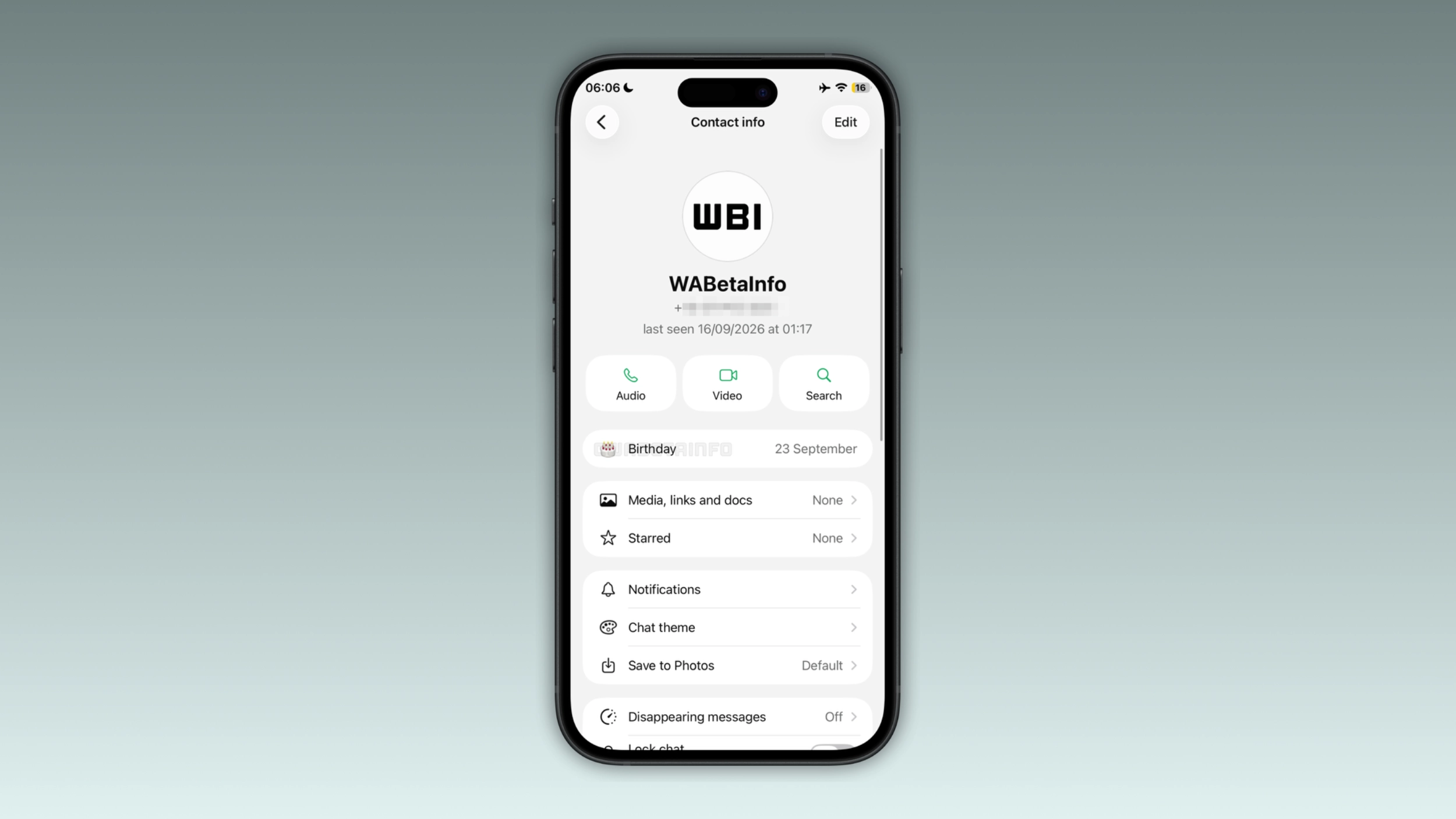
Where the birthday appears in the contact info screen
When users open the contact info screen for a contact who has a birthday saved in the address book, WhatsApp shows the field with the date. WhatsApp places the field at the top of the list, making it easier to notice a birthday immediately. This means that users will not need to scroll through the section to find it. It will show up early in the screen, right after the contact's name and last seen status.
Where WhatsApp extracts birthdays
As mentioned in the previous article, WhatsApp extracts birthdays from the phone's address book. If users already saved a birthday for a certain contact in their address book, WhatsApp can display it in the chat info screen. Users who want to add a birthday for a contact can open the Contacts app, find the contact, and add the birthday field. WhatsApp will show it automatically the next time users open the app.
How the contact info screen birthday connects to the Contacts tab reminder
The contact info screen will show birthdays so users can check them at any time, even when it is not the contact's birthday. On the day of the birthday, the Contacts tab will display a reminder with a cake emoji next to the contact's name. This means that users can check birthdays in advance and receive a reminder when the day arrives. As a result, these features help users keep track of birthdays and get a reminder on the day.
Why showing the birthday in the contact info screen is useful
A birthday reminder is helpful, but not everyone opens WhatsApp immediately in the morning. Some users might want to check a contact's birthday in advance to plan a message or a call. The contact info screen will allow users to do it without leaving WhatsApp. It is a small detail, but it makes the contact info screen more complete.
WhatsApp is developing birthday dates in contact info for a future iOS update
This feature is currently under development on iOS. Since it is in development, it's not available to beta testers. We expect WhatsApp to roll it out to users in a future update. At the moment, WhatsApp has not announced when it will be available to the public.
Connect with WABetaInfo
Follow WABetaInfo on X and visit our About page to learn more about what we do. We always appreciate your feedback on posts like this one.