WhatsApp Plus gets custom emoji reactions on Android
WhatsApp is rolling out the ability to customize the reaction tray on Android. The feature allows premium subscribers to replace the six default emoji in the reaction tray with others they prefer. Non-subscribers can see the feature, but they will have to subscribe to WhatsApp Plus to use it.
| Key Points | Details |
|---|---|
| Feature: | Custom emoji reactions for WhatsApp Plus |
| Status: | Rolling out |
| Compatibility: | WhatsApp beta for Android 2.26.38.4 is a compatible update. |
| Availability info: | This feature is available to some beta testers, and it is rolling out to more people over the coming weeks. |
| Thanks: | flakoflow, for testing and reporting. |
| Previous news: | WhatsApp is rolling out chats with third-party agents on iOS! |
WhatsApp was testing custom emoji reactions for Plus users
In the post about the WhatsApp beta for Android 2.26.29.3 update, we announced a customizable reaction tray. This feature would allow users to choose which emoji to show within the reaction tray. WhatsApp planned to include this in the second set of features for WhatsApp Plus subscribers. The first set introduced custom themes, app icons, premium stickers, and the ability to pin up to 20 chats. With the second set, WhatsApp will add custom emoji reactions as one of the new benefits for subscribers.
WhatsApp is introducing the ability to customize the reaction tray
After refining the feature, WhatsApp is ready to introduce it to premium subscribers. With this functionality, it is possible to change all six default emojis in the reaction tray to whatever users prefer. We discovered this with the WhatsApp beta for Android 2.26.38.4 update, which is available on the Google Play Store. With hit update, WhatsApp is rolling out custom emoji reactions to some beta testers. The update makes it simpler to react to messages using the emoji users prefer over the default ones.
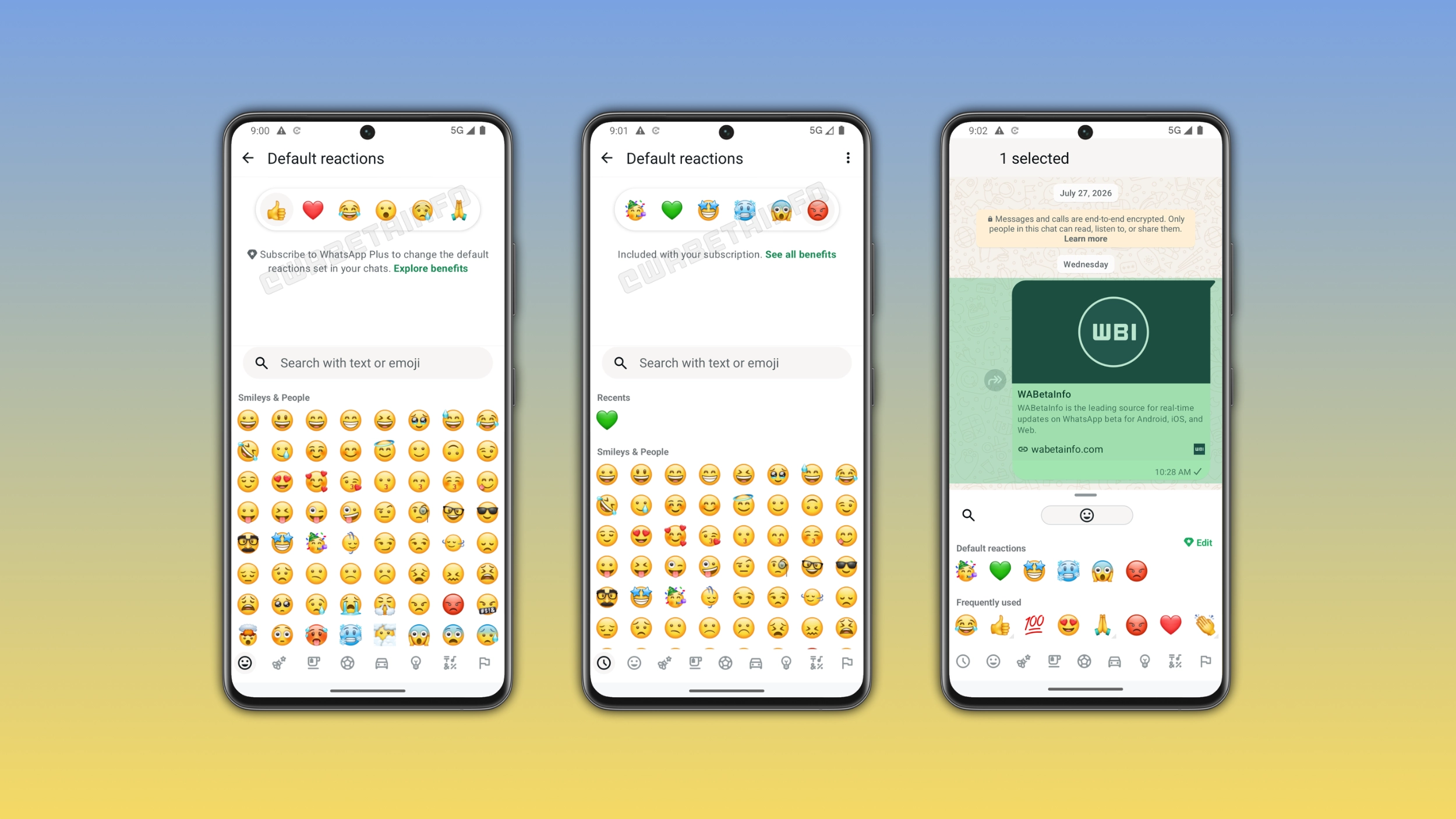
How to customize the default reaction emojis
Users can manage their custom reactions from the app settings. Here, they can select "Chats" and find the Default reactions section. In this section, users can see the six current default emojis at the top of the screen. Users who want to replace one can choose a different emoji from the full keyboard. Any of the six slots can hold any emoji, and users can change as many as they want. After saving the changes, WhatsApp updates the reaction tray immediately with the new emoji.
How to edit reactions directly from the emoji keyboard
It is also possible to manage the custom reactions without opening the settings page. When users open the emoji keyboard to react to a message, they can see the default reactions section at the top of the keyboard. When users tap "Edit", they can customize the reaction tray right from the keyboard without leaving the conversation. This makes it faster to change a reaction emoji without opening the settings screen.
What non-subscribers see when they open the feature
Users who do not have a subscription can see the section in the settings page. However, it is not possible to customize the reaction tray without a subscription. Users will have to subscribe to customize the reaction tray. This makes the feature visible to everyone, but it is exclusive to subscribers.
Why custom reactions fit naturally into WhatsApp Plus
Personalization is the core idea behind WhatsApp Plus. Subscribers can already change the app's accent color, choose a custom app icon, and access exclusive sticker packs. With a custom reaction tray, WhatsApp gives subscribers even more control over their reaction experience. WhatsApp picked six default emojis that work for most situations, but they may not reflect how every user communicates. Subscribers can finally tailor their experience by setting up a reaction tray that reflects their preferences.
WhatsApp is rolling out custom emoji reactions to some Android beta testers
This feature is available to some users who install the latest update from the Google Play Store. WhatsApp is rolling them out gradually, so not every subscriber will see the feature immediately. If the section appears but it is not possible to replace the emoji, users will have to subscribe to WhatsApp Plus. WhatsApp has not announced when this feature will be available to everyone.
Connect with WABetaInfo
Follow WABetaInfo on X and visit our About page to learn more about what we do. We always appreciate your feedback on posts like this one.