WhatsApp is testing new phone number privacy for usernames
WhatsApp is working on new privacy settings to let users choose who can see their phone number when they have a username on Android. Usernames hide the phone number from people who do not have it saved by default. With this feature, users will be able to change this by deciding who can see their number.
| Key Points | Details |
|---|---|
| Feature: | Phone number privacy controls |
| Status: | Under development |
| Availability info: | This feature is currently in development and not yet available for beta testing. |
| Previous news: | WhatsApp is testing original quality media sharing on Android! |
WhatsApp launched a username field for new contacts
In the post about the WhatsApp beta for Android 2.26.31.2 update, we announced a new username field in the contact creation screen. This feature allows users to save a contact's username when they enter their name and phone number. When users set up a username, WhatsApp hides their phone number by default from people who do not have it saved in their contacts. Specifically, users who contact someone new through a username cannot see their phone number.
WhatsApp is working on more controls for phone number visibility
Today, WhatsApp is working on a new section where users can manage who can see their phone number. WhatsApp will add this new section to the privacy settings screen, where users already manage other privacy settings like last seen and profile photo. We discovered this with the WhatsApp beta for Android 2.26.45.1 update, which is available on the Google Play Store. With this update, WhatsApp is developing a privacy setting to manage phone number visibility. This feature will give users with a username more control over who can see their phone number in calls and chats.
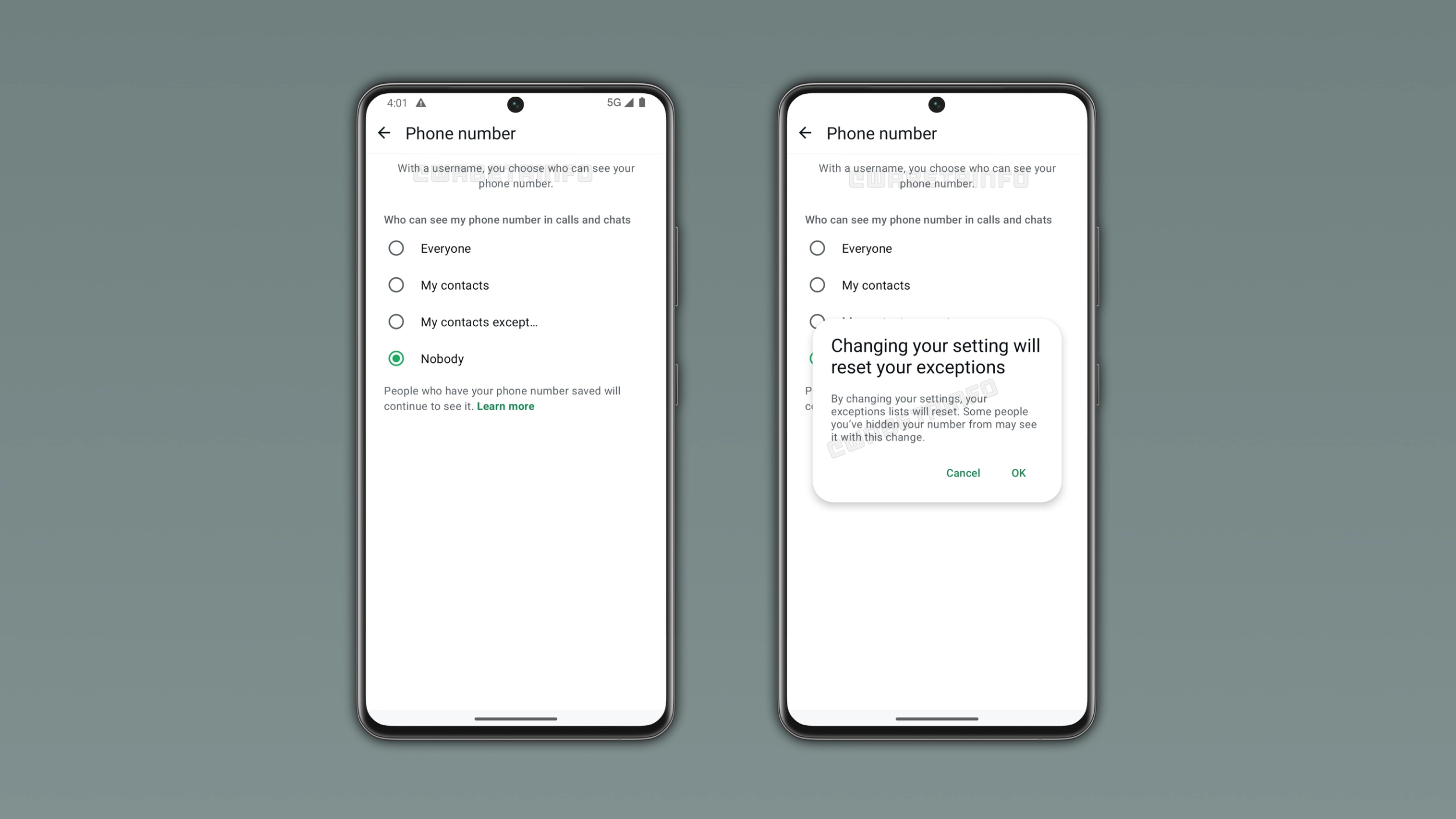
What the new phone number privacy setting includes
WhatsApp is making the new privacy screen about phone number visibility similar to how users already control other privacy settings. In particular, WhatsApp plans to offer 4 privacy options: Everyone, My contacts, My contacts except, and Nobody. By default, WhatsApp sets this option to "Nobody" when users have a username. However, people who already know the user's phone number will continue to see it.
Why users might want to show their phone number even with a username
Some users set up a username to make it easier for others to find them on WhatsApp without sharing their phone number. However, some users may want to keep their phone number visible or add some exceptions. For example, some users may want to be reachable by username while still making their phone number visible to their contacts. Other users may want to exclude some people from their contacts list from seeing their phone number. The new setting will make this possible by offering different levels of visibility.
What happens when users change this privacy setting
When users switch to a different option, the app presents a dialog to let them know that WhatsApp will reset their exceptions list. This means that some people the user previously excluded may now see their phone number. To switch to a different privacy setting, users will have to confirm that the phone number visibility will change. This warning ensures that users understand the consequences before switching to a different privacy setting.
How this differs from the current default behavior
At the moment, WhatsApp hides the phone number from people who do not have it saved when users set up a username. In a future update, users will be able to change this by choosing a different privacy visibility. Users will be able to keep the default behavior by keeping the setting on Nobody. As a result, the new setting will let users control their phone number visibility without changing anything for those who prefer the current behavior. This may be the final step before the full username feature becomes available to everyone.
WhatsApp is developing phone number controls for a future Android update
The new phone number privacy setting is currently under development on Android. Since it's in development, this feature is not available yet. WhatsApp will make it available to the public in a future update. At the moment, WhatsApp has not announced when this feature will be available.
Connect with WABetaInfo
Follow WABetaInfo on X and visit our About page to learn more about what we do. We always appreciate your feedback on posts like this one.