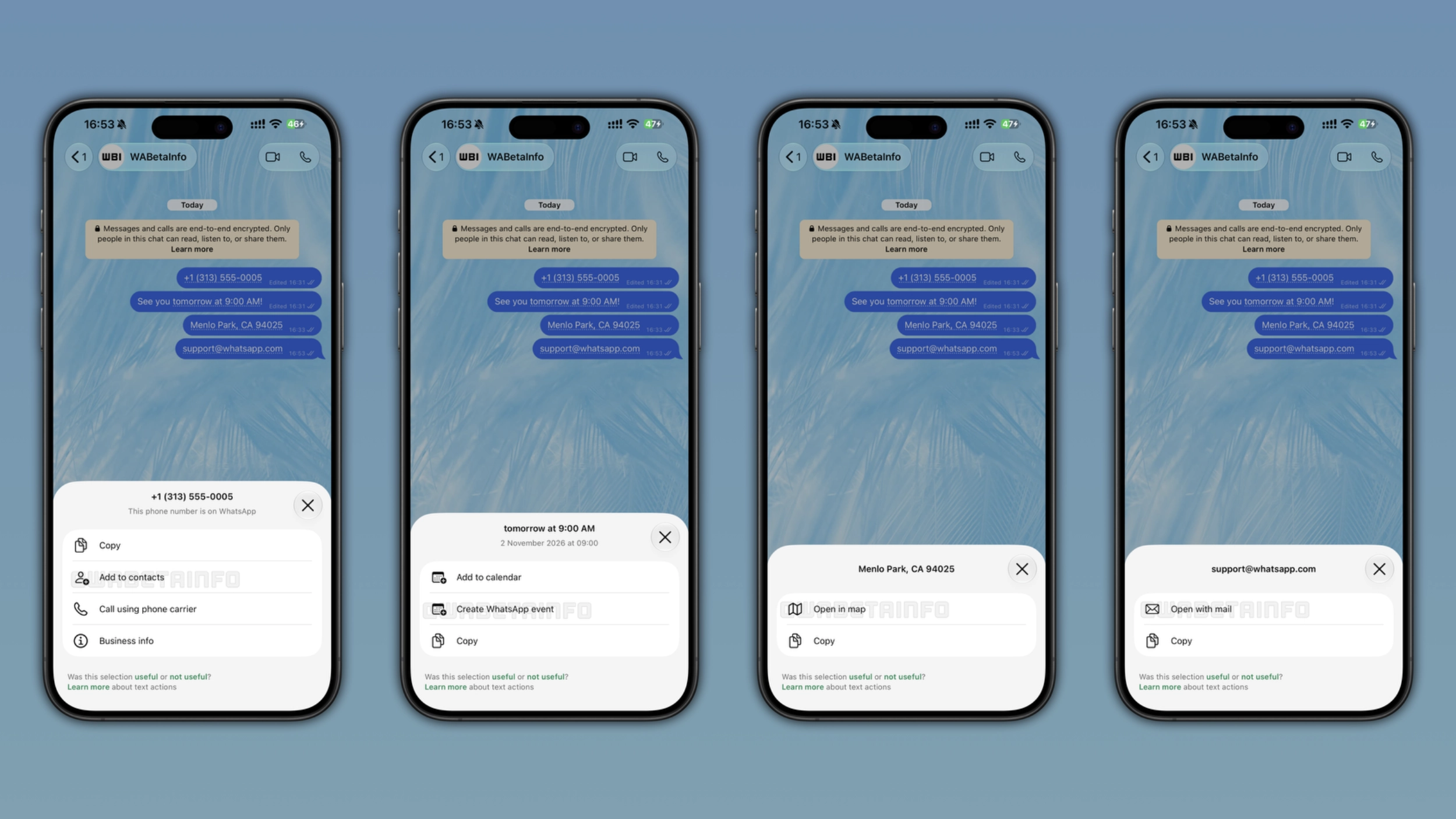
WhatsApp now detects phone numbers, dates, addresses, and email addresses in messages to suggest quick shortcuts automatically. When the app recognizes one of these formats, it marks the text with a dotted underline so users know that an action is available. Users can tap it to see what they can do or leave it to continue the conversation.
| Key points | Details |
|---|---|
| Feature: | Message text actions |
| Feature availability: | Some features may be under development, so they are not available to beta testers. Others may become available to users over time. If you're unable to access a certain feature, you will need to wait for a future update. |
| News shared last week: | WhatsApp is working on a refreshed settings interface on Android! |
| Previous article: | WhatsApp is testing new phone number privacy for usernames! |
Weekly WhatsApp beta updates: new features and improvements
This new weekly roundup brings together all the latest updates about WhatsApp beta shared this week. As a result, you can finally catch up on everything you might have missed from our past announcements. You can consider this summary as a way to keep up new features, improvements, and fixes. This week's highlight focuses on message actions, a new feature that offers some shortcuts when the app detects specific message formats. See what else we announced this week.
WhatsApp is testing a contextual chat preview for Android
WhatsApp is working on a contextual chat preview that appears when users long press on a conversation. The preview shows the most recent messages in the chat, so users can read them without opening the conversation. The new chat preview feature will let users read new messages without marking them as read. This means that WhatsApp will update read receipts only when users open the chat normally. In the future, WhatsApp will also introduce a scrollable preview to let users scroll through the conversation interface without opening it.
WhatsApp is rolling out message text actions on Android and iOS
WhatsApp is rolling out smart message text actions on the latest versions of WhatsApp for Android and iOS. When WhatsApp recognizes a phone number, a date, an address, or an email address, the app marks the text with a dotted underline to let users know that an action is available. For phone numbers, WhatsApp lets users copy them, add them to contacts, and place a call using their phone carrier. For dates and times, users can add them to the calendar, copy them, or create a new event within WhatsApp, while for addresses, users can copy them or open the address in the map. WhatsApp generates text actions on the device without sharing messages with the server. As a result, the feature does not affect end-to-end encryption.
WhatsApp is testing original quality media sharing on Android
WhatsApp is working on a third quality option that goes beyond HD quality: original quality. With the original quality option, WhatsApp will let users send photos and videos without any compression. This means that the recipient will get the photo or video exactly as the sender saved it on their device. Some users may assume that HD quality and original quality are the same thing, but they are not. HD quality is the best option currently available to all users, but it still compresses the file before sending it. WhatsApp plans to make this option available only to WhatsApp Plus subscribers.
WhatsApp is testing new phone number privacy for usernames
With the WhatsApp beta for Android 2.26.45.1 update, WhatsApp is working on a new section where users can manage who can see their phone number. In a future update, WhatsApp plans to offer 4 privacy options: Everyone, My contacts, My contacts except, and Nobody. By default, WhatsApp sets this option to "Nobody" when users have a username. When users switch to a different option, the app presents a dialog to let them know that WhatsApp will reset their exceptions list, so users will have to confirm that the phone number visibility will change.
WhatsApp is rolling out media suggestions on Android and iOS
WhatsApp is rolling out recent media suggestions to some iOS and Android users. This functionality helps users share their photos and videos faster without opening the gallery. WhatsApp is currently testing this feature with two different entry points. With the first configuration, WhatsApp immediately shows a toast above the chat bar when users open a conversation. With the second configuration, WhatsApp temporarily replaces the camera icon in the chat bar with the media thumbnail. When users tap the toast or the thumbnail in the chat bar, WhatsApp does not send the media automatically. Instead, it opens the drawing editor, where users can review the photo or video. Users who prefer not to see suggestions can disable the feature at any time from the app settings.
WhatsApp is rolling out chats powered by Meta AI on Android
With the WhatsApp beta for Android 2.26.44.6 update, WhatsApp is rolling out the ability to create chats powered by Meta AI. Users can create a new AI-powered chat right within the conversation with Meta AI. Here, they can type a name for the new chat and set a custom profile picture to distinguish it from other conversations. Once users create a new chat with Meta AI, WhatsApp automatically adds it to the chat list. In the Chats tab, users can easily find it by tapping the AI filter. Users can distinguish chats with Meta AI from other conversations by the chatbot logo over the profile icon, making it clearer that the conversation is AI-powered.
WhatsApp is rolling out AI photo expansion on Android
WhatsApp is introducing a new AI-powered tool to expand photos. Users can expand their photos by opening the drawing editor. After they select the option to expand the photo, Meta AI will start processing it to generate the expanded version in a few seconds. Meta AI does not stretch the original image to fit the 9:16 format. Instead, it analyzes the content of the photo to generate new content around its edges. The feature is compatible with both chats and status updates.
WhatsApp is rolling out a feature to expand images on iOS
WhatsApp is also bringing the AI photo expansion feature to the iOS app. Similar to how Android users can expand their photos, users on iOS can open the drawing editor to find the new AI-powered tool. Once users select this option, Meta AI takes a few seconds to analyze the photo and generate the expanded version. If the expanded photo does not look as users expected, they can tap the undo button to restore the original photo at any time, or tap the button to expand the photo again to generate a different result.
Connect with WABetaInfo
Follow WABetaInfo on X and visit our About page to learn more about what we do. We always appreciate your feedback on posts like this one.