WhatsApp is rolling out a new Contacts tab on iOS beta
WhatsApp is rolling out a new tab where users can quickly see their contacts and if they are online. This section makes it easier for users to discover who is available without opening the chat interface. At the moment, WhatsApp is replacing the Communities tab with the new Contacts hub.
| Key Points | Details |
|---|---|
| Feature: | Contacts tab |
| Status: | Rolling out |
| Compatibility: | WhatsApp beta for iOS 26.44.10.70 is a compatible update. |
| Availability info: | This feature is available to some beta testers, and it's rolling out to more accounts over the coming weeks. |
| Thanks: | Sc and AbyssalVoid, for testing and reporting. |
| Previous news: | WhatsApp is rolling out a new Contacts tab on Android! |
WhatsApp rolled out a new Contacts tab on Android
In the post about the WhatsApp beta for Android 2.26.45.2 update, we announced a new Contacts tab. The update introduced a new hub where users can see their contacts and sort them by activity, alphabetical order, or birthdays. At the moment, WhatsApp is replacing the communities tab in the bottom navigation bar to let users find and contact people faster from the main screen. With the new Contacts tab, WhatsApp is making it simpler for users to check who is online without opening the conversation.
WhatsApp is introducing a new Contacts tab on iOS
WhatsApp is finally bringing the same experience with the Contacts tab to the iOS app. Even on iOS, WhatsApp is replacing the Communities tab with a new hub where users can see their contact list. We discovered this with the WhatsApp beta for iOS 26.44.10.70 update, which is available on TestFlight. With this update, WhatsApp is rolling out a new Contacts tab to some beta testers. The tab allows users to see who is online, add new contacts, and invite their friends from the same screen.
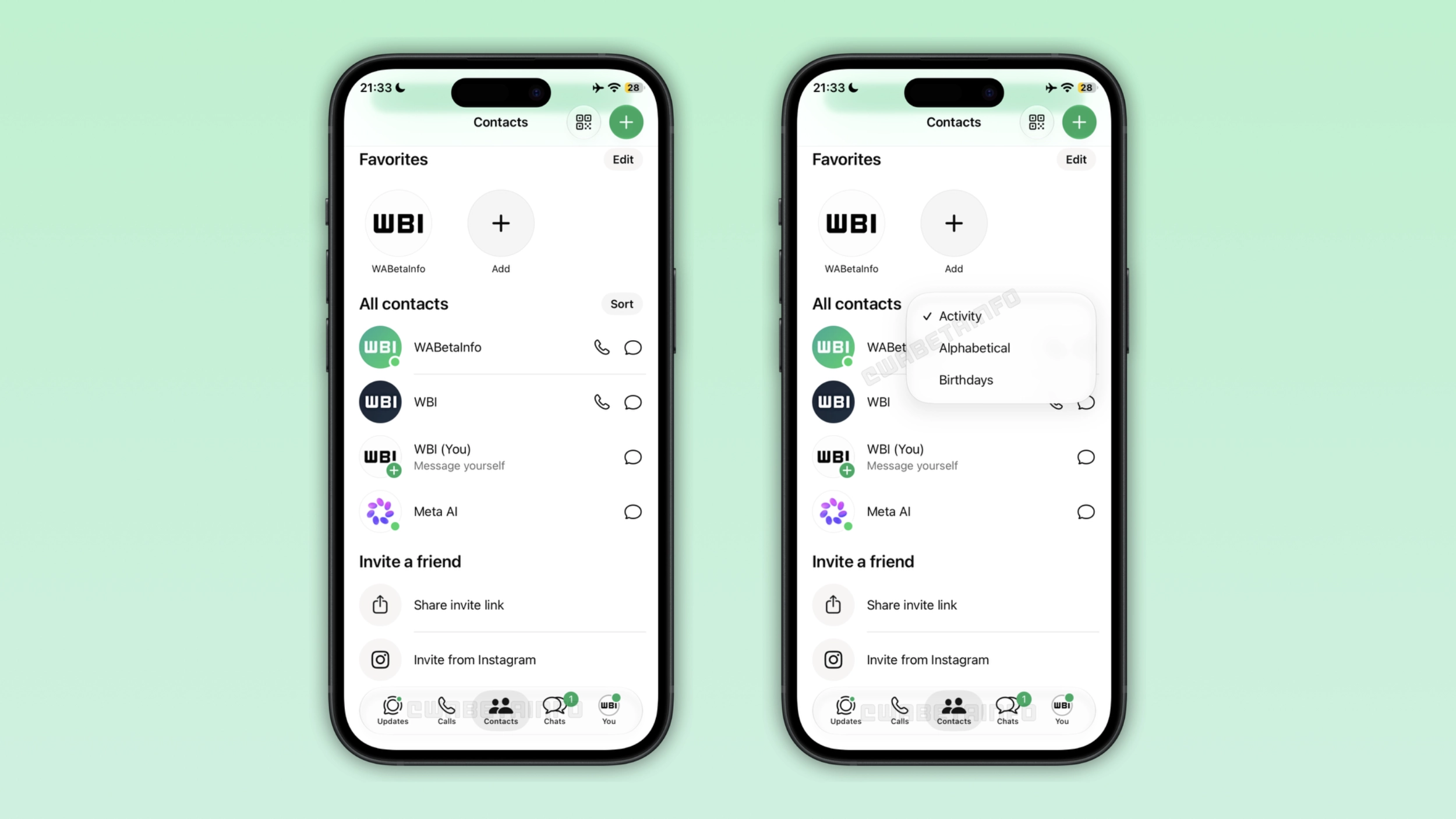
What the Contacts tab shows on iOS
The new tab includes a section with favorite contacts and a full contact list. Users can see their favorite contacts at the top of the screen, making it easier to start a conversation with them. They can also sort the full contact list by activity, alphabetical, and birthdays. With alphabetical, the app organizes contacts by name. With activity, WhatsApp shows who is currently online at the top of the list. WhatsApp marks these contacts with a green dot, so users can easily distinguish them from offline contacts. WhatsApp also sorts recently active contacts by last seen, so users can quickly identify who was active most recently. With birthdays, WhatsApp sorts contacts by their upcoming birthday, so users can see who has a birthday coming up soon.
How to add a new contact from the Contacts tab
Users can add a new contact by tapping the green button at the top of the Contacts tab. Here, users can enter the contact's details. The contact creation screen asks users to enter the first name, last name, phone number, and their username. As always, users can also choose whether to sync the new contact to their address book.
How privacy settings affect what the Contacts tab shows
WhatsApp shows the last seen and online status in the Contacts tab only when contacts allow it in their privacy settings. If a contact hides their last seen or online status, WhatsApp will not show any information about their activity in the Contacts tab. For the same reason, WhatsApp does not show information about last seen and online status if the user doesn't share it. Users can update their information about last seen and online from the privacy screen at any time.
Why WhatsApp replaced the Communities tab
WhatsApp introduced a filter in the Chats tab that lets users manage their communities without the Communities tab. As a result, users no longer need a tab to see their communities. This is why WhatsApp is replacing it with the Contacts tab. However, WhatsApp is testing different experiments for the Contacts tab. One of these is about the Updates tab. In a future update, WhatsApp may replace it with the Contacts tab. Since WhatsApp moved status updates to the top of the Chats tab, and channels may be moved to the chat list as well, the Updates tab may no longer be necessary. However, WhatsApp is currently limiting this update to the Communities tab.
WhatsApp is rolling out the Contacts tab to iOS beta testers
The Contacts tab is available to some users who install the latest update from TestFlight. Since WhatsApp is rolling it out gradually, the feature is not available to everyone. If the Contacts tab does not appear yet, it should become available to more users over the coming weeks. Users should keep their app up to date to get this feature as it becomes available to their accounts.
Connect with WABetaInfo
Follow WABetaInfo on X and visit our About page to learn more about what we do. We always appreciate your feedback on posts like this one.