WhatsApp is rolling out a new chat theme experience on Android with five categories and a redesigned Wallpaper section. Users can now choose from Featured, Nature, Live, Minimal, and Doodle for their chat themes. The Wallpaper section also gets its own categories, making it easier to find the right background without setting a full theme.
| Key points | Details |
|---|---|
| Feature: | Chat themes |
| Feature availability: | Some features may be under development, so they are not available to beta testers. Others may become available to users over time. If you're unable to access a certain feature, you will need to wait for a future update. |
| News shared last week: | WhatsApp launches a Mac-style navigation sidebar for iPad! |
| Previous article: | WhatsApp is testing a new voice-to-text feature for messages! |
Weekly WhatsApp beta updates: new features and improvements
This new weekly roundup brings together all the latest updates about WhatsApp beta shared this week. As a result, you can finally catch up on everything you might have missed from our past announcements. You can consider this summary as a way to keep up new features, improvements, and fixes. This week's highlight focuses on a new experience with chat themes on Android. See what else we announced this week.
WhatsApp will make calls available for users without an account
WhatsApp is working on bringing guest calls to the iOS app. With this feature, users will be able to invite people without a WhatsApp account. They will have to open the Calls tab, where they can create a call link and choose between a voice call and a video call. Once they share the link, anyone who receives it can join the call from their browser, even if they do not have an account. Before joining the call, the guest must wait for the host to approve their request. This step is always mandatory for anyone who joins a guest call without an account.
WhatsApp is rolling out new chat themes on Android beta
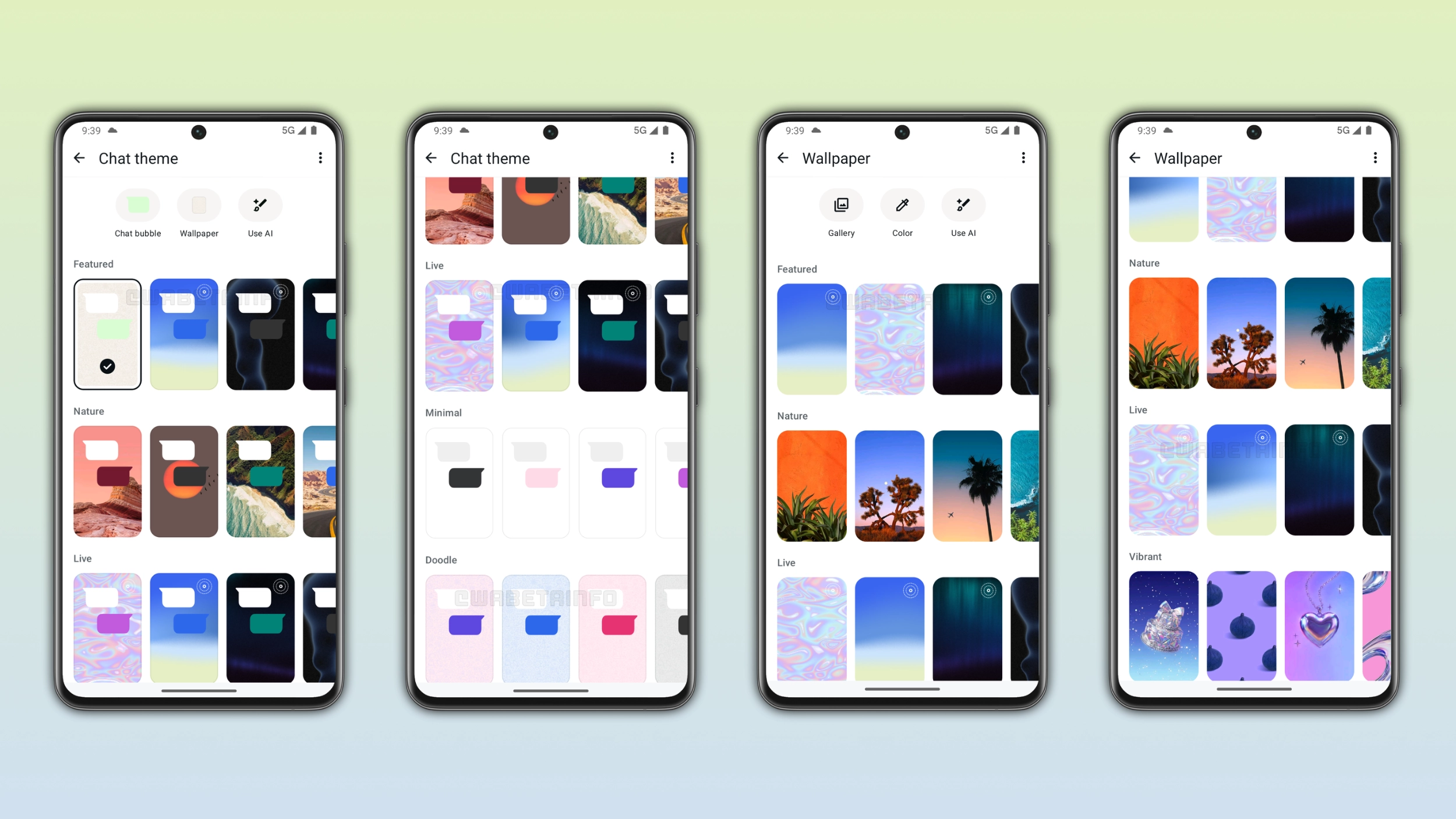
WhatsApp is bringing a new experience with chat themes to the Android app. WhatsApp is introducing five categories, making it easier to choose a theme: Featured, Nature, Live, Minimal, and Doodle. The Live category features animated wallpapers that move slowly in the background. WhatsApp keeps the animations slow to avoid distracting users from the conversation. WhatsApp automatically chooses the bubble color based on the theme and wallpaper, so users do not need to adjust it manually.
The wallpaper section gets its own categories
WhatsApp is also grouping wallpapers in separate categories, making it simpler to find specific wallpapers. In addition, WhatsApp is introducing vibrant and gradient wallpapers: Vibrant offers bold, colorful wallpapers that make the chat screen feel energetic. Gradient provides smooth color transitions that give the chat a modern look. If users do not like these wallpapers, they can still choose one from the gallery or create it using AI. Live wallpapers show a small badge in the corner of its thumbnail, so users can easily notice them.
WhatsApp worked on bring more than three accounts on iOS
Initially, we announced that WhatsApp was working on a feature that lets users add up to 3 accounts to the same app. At the moment, users can add up to two accounts to the same app, but WhatsApp worked on bringing support for more than 2 accounts. Every account on the device has its own chat history, notifications, privacy settings, backup, and media. However, after further investigation, it seems that WhatsApp may not currently be planning to introduce a third account option. The app supports more than two accounts internally, but this is not planned for release.
WhatsApp is testing a chat theme update to sync wallpapers
WhatsApp is developing a feature that will let users sync their chat theme with others. In the future, users will be able to set a theme for a conversation and choose whether to apply it only for themselves or for the other person too. If they choose to sync, the other person will see the same wallpaper, theme, and bubble color on their side of the conversation. WhatsApp is also working on bringing the same feature to group chats, where all members will see the same wallpaper and bubble color in the conversation.
WhatsApp is rolling out new languages for voice transcriptions
With the WhatsApp beta for Android 2.26.37.5 update, WhatsApp is rolling out support for new transcription languages. This update brings support for the following languages: more variants for English, German, French, Italian, and Japanese. These add to the languages that were already available before this update: Arabic, Spanish, Hindi, Portuguese, and Russian. WhatsApp doesn't share the audio with third parties to transcribe the message, as it uses language packs to recognize and convert the voice note into text. This will make it possible for WhatsApp to transcribe the voice on the device.
WhatsApp is developing a new voice-to-text feature for messages
WhatsApp is working on a voice-to-text feature that converts spoken words into a written message. WhatsApp will place a new button right within the chat bar, even though this may change before the official release. Once users complete the setup, WhatsApp enters listening mode and displays "Listening..." in the chat bar. The feature relies on the same language packs used for voice message transcriptions. This means that WhatsApp does not share the recording with third parties before sending the message. The recipient receives it as a text message and will never hear the user's voice. In addition, WhatsApp will not mark the message as converted from voice, so it looks like any other text message in the chat.
WhatsApp launches a search shortcut for chats and channels
With the WhatsApp for iOS 26.36.74 update, WhatsApp is bringing a new search shortcut to the chat interface. The new search button appears at the top of the screen when users scroll up through the conversation, and disappears when users return to the bottom of the chat. Both chats and channels support this shortcut, so users can search for messages in any conversation without leaving it. Before this update, users who wanted to search for a message within a chat had to open the chat info screen and tap the search button. Now, users can activate search mode directly in the conversation.
Connect with WABetaInfo
Follow WABetaInfo on X and visit our About page to learn more about what we do. We always appreciate your feedback on posts like this one.